Kernel error messages: leds fujitsu::radio_led: Setting an LED's brightness failed
A message that is not in the archive (sent off-list or not yet received): [email protected]
Quoted 1 line
Hello,
Hi! Thank you for the report and sorry about the delay, but I have been at a conference for the past week, having way less spare time than I wish I had.
Quoted 4 lines
I found your mail address in https://patchwork.kernel.org/patch/8598801/
and it seems you are somehow involved in the improvement for fujitsu-laptop LED handling. If this does not 'belong' to you, maybe you can point me in the right direction where to report the issue.
No worries, that is fine, though I have CCed Jonathan Woithe, who is the maintainer of fujitsu-laptop, and both the platform-driver-x86 mailing list and LKML (both are open lists).
Quoted 4 lines
So let's start explaining.
I am the proud owner of a Fujitsu Lifebook E 751 (DMI: FUJITSU LIFEBOOK E751/FJNB222, BIOS Version 1.22 04/19/2013) which is equipped with some LEDs in the body (11 to be clear).
A photo would be useful (though please do not attach it to your message, provide a link to it instead) so that we know exactly what we are discussing; image search engines can sometimes come up with confusing results when looking for a specific model. Is this what your laptop looks like?
https://www.notebookcheck.net/fileadmin/_migrated/pics/Fujitsu-LB-E751-Tastatur_1j.jpg
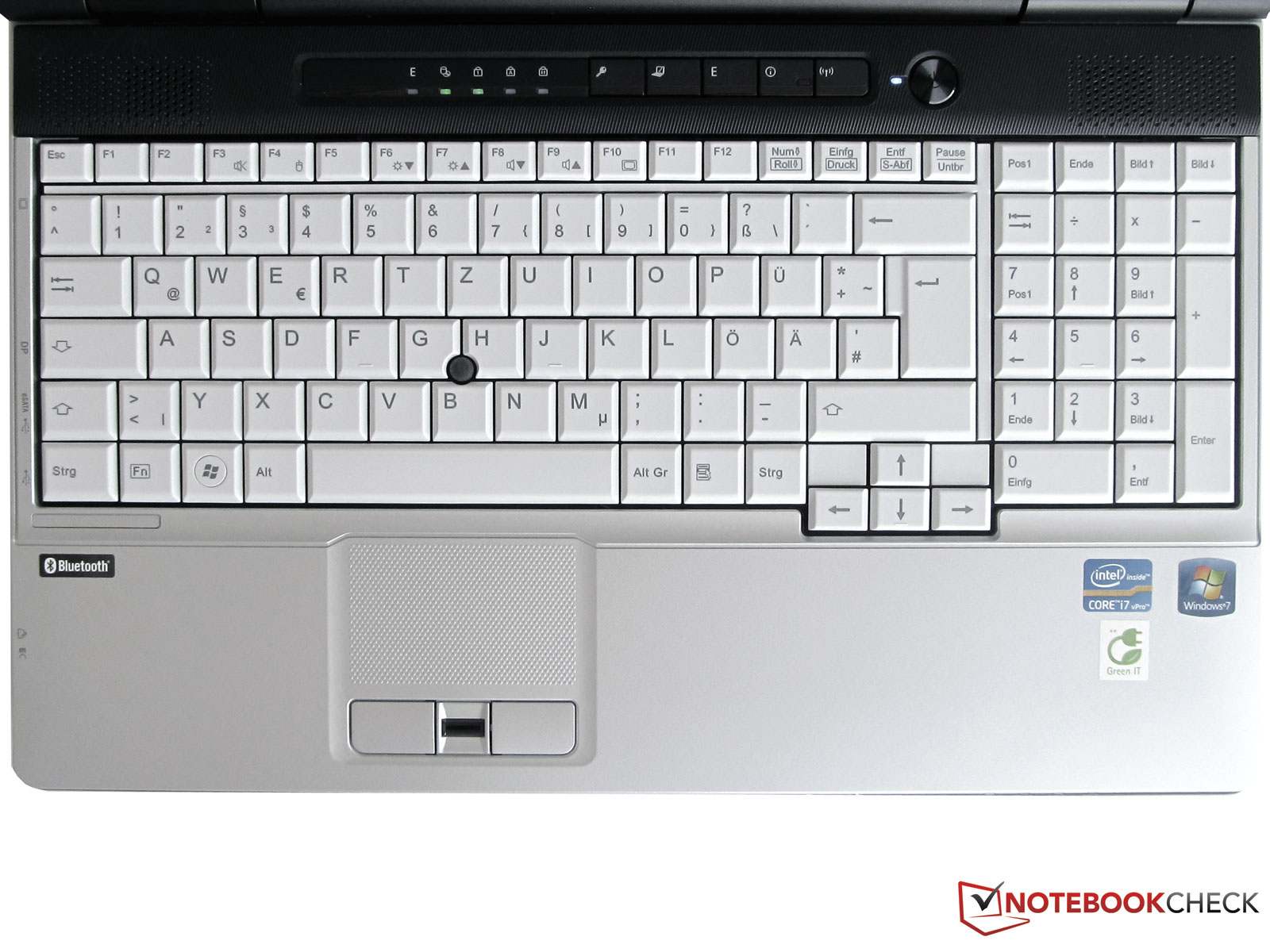
I also found an alleged photo of an E781, which apparently is a very similar model:
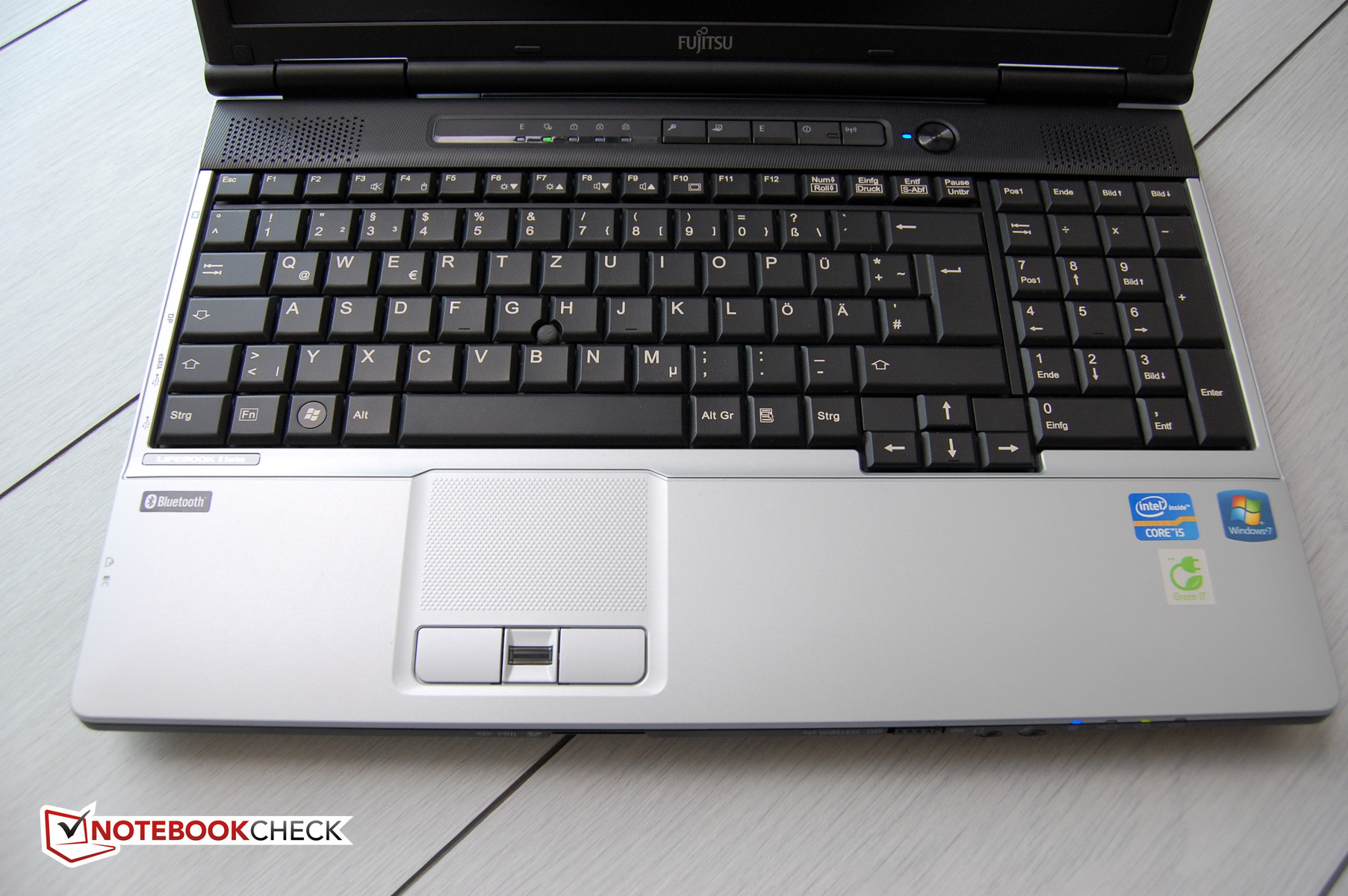
Are these the 11 LEDs you mentioned?
- top, left: E, HDD, Num Lock, Caps Lock, Scroll Lock,
- top, right: I, Power Button,
- front (not pictured in the first photo above): Power Supply, Battery Charging, Battery 1, Battery 2.
Quoted 42 lines
I am using archlinux and as of kernel
4.11 (IIRC) there has appeared an error message in the journalctl log saying:kernel: leds
fujitsu::radio_led: Setting an LED's brightness failed (-2147483648)This appears for several times:
harvey@gruenix ~/Documents/scripts $ sudo journalctl -b | grep
radio_led725:Jul 14 12:29:37 gruenix kernel: ledsfujitsu::radio_led: Setting an LED's brightness failed (-2147483648)
761:Jul 14 12:29:37 gruenix kernel: ledsfujitsu::radio_led: Setting an LED's brightness failed (-2147483648)
762:Jul 14 12:29:37 gruenix kernel: ledsfujitsu::radio_led: Setting an LED's brightness failed (-2147483648)
788:Jul 14 12:29:38 gruenix kernel: ledsfujitsu::radio_led: Setting an LED's brightness failed (-2147483648)
796:Jul 14 12:29:38 gruenix kernel: ledsfujitsu::radio_led: Setting an LED's brightness failed (-2147483648)
799:Jul 14 12:29:38 gruenix kernel: ledsfujitsu::radio_led: Setting an LED's brightness failed (-2147483648)
887:Jul 14 12:29:45 gruenix kernel: ledsfujitsu::radio_led: Setting an LED's brightness failed (-2147483648)
979:Jul 14 12:29:45 gruenix kernel: ledsfujitsu::radio_led: Setting an LED's brightness failed (-2147483648)
981:Jul 14 12:29:45 gruenix kernel: ledsfujitsu::radio_led: Setting an LED's brightness failed (-2147483648)
987:Jul 14 12:29:45 gruenix kernel: ledsfujitsu::radio_led: Setting an LED's brightness failed (-2147483648)
988:Jul 14 12:29:45 gruenix kernel: ledsfujitsu::radio_led: Setting an LED's brightness failed (-2147483648)
1009:Jul 14 12:29:45 gruenix kernel: ledsfujitsu::radio_led: Setting an LED's brightness failed (-2147483648)
1010:Jul 14 12:29:45 gruenix kernel: ledsfujitsu::radio_led: Setting an LED's brightness failed (-2147483648)
1036:Jul 14 12:29:46 gruenix kernel: ledsfujitsu::radio_led: Setting an LED's brightness failed (-2147483648)
1037:Jul 14 12:29:46 gruenix kernel: ledsfujitsu::radio_led: Setting an LED's brightness failed (-2147483648)
1776:Jul 14 12:33:48 gruenix kernel: ledsfujitsu::radio_led: Setting an LED's brightness failed (-2147483648)
Quoted 8 lines
1777:Jul 14 12:33:48 gruenix kernel: leds
fujitsu::radio_led: Setting an LED's brightness failed (-2147483648)
1779:Jul 14 12:33:48 gruenix kernel: ledsfujitsu::radio_led: Setting an LED's brightness failed (-2147483648)
1781:Jul 14 12:33:48 gruenix kernel: ledsfujitsu::radio_led: Setting an LED's brightness failed (-2147483648)
1783:Jul 14 12:33:48 gruenix kernel: ledsfujitsu::radio_led: Setting an LED's brightness failed (-2147483648)
4.11 included a patch which sets the default trigger for the radio LED to rfkill-any, which would explain why you only started seeing these errors after upgrading to that version. See also below.
Quoted 2 lines
Some of the LEDs are not working under linux, especially the bluetooth one
Where is the Bluetooth LED located? I cannot see it. Can you show it on a photo? How does it behave under other operating systems?
Quoted 1 line
and three others E,
According to a manual I found [1], this is an "Energy saving functions indicator", which is lit when "energy function are enabled". My guess would be it can be repurposed under Linux.
Quoted 1 line
I(nformation)
According to the same manual, this LED signals battery level when the laptop is off (S5 state) and the "I" key is pressed. Not sure it can be repurposed, but how does it behave under other operating systems?
Quoted 2 lines
and one that shows the sign of a
lock with up and down arrows in it.
That is Scroll Lock. I do not think fujitsu-laptop has anything to do with it. If it does not work the way you expect it to, you might want to search the web, because there are known inconsistencies in how various distributions handle it.
Quoted 2 lines
The case is equipped with a slider
for Wireless on/off, if that matters.
It does, see also below.
Quoted 2 lines
Although the message seems to be harmless I am somewhat embarrassed what happens here and thought I might report it to someone with more knowledge ;)
Again, thank you for the report, because implementing a feature like this in a platform driver often requires at least some guesswork, which may result in that feature working for some users and misbehaving for others. This is an example of such a situation.
As you may have inferred from the patchwork link you visited, I was not sure whether my method of detecting radio LED presence was correct. Your report clearly proves I was wrong. Could you please send me the BTNI value reported on your laptop? You should be able to look it up by running:
$ dmesg | grep BTNI
In fact, posting your entire dmesg output somewhere would not hurt either.
Anyway, you were curious what causes these log messages to appear. I believe it happens because fujitsu-laptop _thinks_ you have a radio LED present on your machine, which causes it to register this LED with a default trigger set to rfkill-any. This means the kernel tries to enable this LED whenever any radio transmitter is active and disable it when all radio transmissions are disabled. In order to set the state of the LED, the kernel driver calls a function exposed by the firmware. This function returns an error, which is logged. The specific error number you are seeing (-2147483648) means "unsupported command", which means fujitsu-laptop attempted to use a feature which is unsupported by your laptop's firmware. If you want to get rid of these messages, running the following after every reboot should be enough:
# echo "none" > /sys/class/leds/fujitsu::radio_led/trigger
However, I would appreciate it if you could help us with finding out the correct way to detect the radio LED (it may as well turn out it is not possible by just checking firmware contents). For starters, we will need your laptop's DSDT table, which you can extract using:
# cat /sys/firmware/acpi/tables/DSDT > dsdt.bin
The resulting binary file dsdt.bin is what is needed for further analysis.
[1] http://www.lpmanual.com/manuals/fujitsu/Fujitsu_LIFEBOOK_E751.pdf
Signature · 2 lines
Best regards,
Michał Kępień
Hi Michal
Quoted 8 lines · Micha?? K??pie??
Quoted 4 lines
I found your mail address in https://patchwork.kernel.org/patch/8598801/
and it seems you are somehow involved in the improvement for fujitsu-laptop LED handling. If this does not 'belong' to you, maybe you can point me in the right direction where to report the issue.No worries, that is fine, though I have CCed Jonathan Woithe, who is the maintainer of fujitsu-laptop, and both the platform-driver-x86 mailing list and LKML (both are open lists).
This is mainly to acknowledge that I have read this email. Since my Fujitsu does not have any LEDs I do not have any direct experience with their use within the driver. The existing LED code was contributed by others and recently modified by Michal's patches as part of a broader tidy up of the driver. I'm more than happy for Michal to take the lead in investigating this since I think he has a Fujitsu with LEDs.
Quoted 17 lines
Quoted 4 lines
I am using archlinux and as of kernel
4.11 (IIRC) there has appeared an error message in the journalctl log saying:Quoted 8 lines
kernel: leds
fujitsu::radio_led: Setting an LED's brightness failed (-2147483648)This appears for several times:
harvey@gruenix ~/Documents/scripts $ sudo journalctl -b | grep
radio_led725:Jul 14 12:29:37 gruenix kernel: ledsfujitsu::radio_led: Setting an LED's brightness failed (-2147483648):
4.11 included a patch which sets the default trigger for the radio LED to rfkill-any, which would explain why you only started seeing these errors after upgrading to that version. See also below.
Quoted 5 lines
Quoted 2 lines
Some of the LEDs are not working under linux, especially the bluetooth one
Where is the Bluetooth LED located? I cannot see it. Can you show it on a photo? How does it behave under other operating systems?
Also, how did these LEDs behave under earlier Linux kernel versions? In other words, is the non-functionality of these LEDs a regression in 4.11, or have they never worked on your laptop?
Regards
jonathan
Michał, Jonathan,
just a short note: I am currently on vacation in Spain. I have my laptop with me and will report back as soon as I find the time. I will try to help in any way that I can. I want my laptop to be as functional as possible with linux.
Greetings
Harvey
Am 20.07.2017 um 08:42 schrieb Michał Kępień:
Quoted 172 lines
Quoted 1 line
Hello,
Hi! Thank you for the report and sorry about the delay, but I have been at a conference for the past week, having way less spare time than I wish I had.
Quoted 4 lines
I found your mail address in https://patchwork.kernel.org/patch/8598801/
and it seems you are somehow involved in the improvement for fujitsu-laptop LED handling. If this does not 'belong' to you, maybe you can point me in the right direction where to report the issue.No worries, that is fine, though I have CCed Jonathan Woithe, who is the maintainer of fujitsu-laptop, and both the platform-driver-x86 mailing list and LKML (both are open lists).
Quoted 4 lines
So let's start explaining.
I am the proud owner of a Fujitsu Lifebook E 751 (DMI: FUJITSU LIFEBOOK E751/FJNB222, BIOS Version 1.22 04/19/2013) which is equipped with some LEDs in the body (11 to be clear).A photo would be useful (though please do not attach it to your message, provide a link to it instead) so that we know exactly what we are discussing; image search engines can sometimes come up with confusing results when looking for a specific model. Is this what your laptop looks like?
https://www.notebookcheck.net/fileadmin/_migrated/pics/Fujitsu-LB-E751-Tastatur_1j.jpg
I also found an alleged photo of an E781, which apparently is a very similar model:
Are these the 11 LEDs you mentioned?
- top, left: E, HDD, Num Lock, Caps Lock, Scroll Lock,
- top, right: I, Power Button,
- front (not pictured in the first photo above): Power Supply, Battery Charging, Battery 1, Battery 2.Quoted 42 lines
I am using archlinux and as of kernel
4.11 (IIRC) there has appeared an error message in the journalctl log saying:kernel: leds
fujitsu::radio_led: Setting an LED's brightness failed (-2147483648)This appears for several times:
harvey@gruenix ~/Documents/scripts $ sudo journalctl -b | grep
radio_led725:Jul 14 12:29:37 gruenix kernel: ledsfujitsu::radio_led: Setting an LED's brightness failed (-2147483648)
761:Jul 14 12:29:37 gruenix kernel: ledsfujitsu::radio_led: Setting an LED's brightness failed (-2147483648)
762:Jul 14 12:29:37 gruenix kernel: ledsfujitsu::radio_led: Setting an LED's brightness failed (-2147483648)
788:Jul 14 12:29:38 gruenix kernel: ledsfujitsu::radio_led: Setting an LED's brightness failed (-2147483648)
796:Jul 14 12:29:38 gruenix kernel: ledsfujitsu::radio_led: Setting an LED's brightness failed (-2147483648)
799:Jul 14 12:29:38 gruenix kernel: ledsfujitsu::radio_led: Setting an LED's brightness failed (-2147483648)
887:Jul 14 12:29:45 gruenix kernel: ledsfujitsu::radio_led: Setting an LED's brightness failed (-2147483648)
979:Jul 14 12:29:45 gruenix kernel: ledsfujitsu::radio_led: Setting an LED's brightness failed (-2147483648)
981:Jul 14 12:29:45 gruenix kernel: ledsfujitsu::radio_led: Setting an LED's brightness failed (-2147483648)
987:Jul 14 12:29:45 gruenix kernel: ledsfujitsu::radio_led: Setting an LED's brightness failed (-2147483648)
988:Jul 14 12:29:45 gruenix kernel: ledsfujitsu::radio_led: Setting an LED's brightness failed (-2147483648)
1009:Jul 14 12:29:45 gruenix kernel: ledsfujitsu::radio_led: Setting an LED's brightness failed (-2147483648)
1010:Jul 14 12:29:45 gruenix kernel: ledsfujitsu::radio_led: Setting an LED's brightness failed (-2147483648)
1036:Jul 14 12:29:46 gruenix kernel: ledsfujitsu::radio_led: Setting an LED's brightness failed (-2147483648)
1037:Jul 14 12:29:46 gruenix kernel: ledsfujitsu::radio_led: Setting an LED's brightness failed (-2147483648)
1776:Jul 14 12:33:48 gruenix kernel: ledsfujitsu::radio_led: Setting an LED's brightness failed (-2147483648)Quoted 8 lines
1777:Jul 14 12:33:48 gruenix kernel: leds
fujitsu::radio_led: Setting an LED's brightness failed (-2147483648)
1779:Jul 14 12:33:48 gruenix kernel: ledsfujitsu::radio_led: Setting an LED's brightness failed (-2147483648)
1781:Jul 14 12:33:48 gruenix kernel: ledsfujitsu::radio_led: Setting an LED's brightness failed (-2147483648)
1783:Jul 14 12:33:48 gruenix kernel: ledsfujitsu::radio_led: Setting an LED's brightness failed (-2147483648)4.11 included a patch which sets the default trigger for the radio LED to rfkill-any, which would explain why you only started seeing these errors after upgrading to that version. See also below.
Quoted 2 lines
Some of the LEDs are not working under linux, especially the bluetooth one
Where is the Bluetooth LED located? I cannot see it. Can you show it on a photo? How does it behave under other operating systems?
Quoted 1 line
and three others E,
According to a manual I found [1], this is an "Energy saving functions indicator", which is lit when "energy function are enabled". My guess would be it can be repurposed under Linux.
Quoted 1 line
I(nformation)
According to the same manual, this LED signals battery level when the laptop is off (S5 state) and the "I" key is pressed. Not sure it can be repurposed, but how does it behave under other operating systems?
Quoted 2 lines
and one that shows the sign of a
lock with up and down arrows in it.That is Scroll Lock. I do not think fujitsu-laptop has anything to do with it. If it does not work the way you expect it to, you might want to search the web, because there are known inconsistencies in how various distributions handle it.
Quoted 2 lines
The case is equipped with a slider
for Wireless on/off, if that matters.It does, see also below.
Quoted 2 lines
Although the message seems to be harmless I am somewhat embarrassed what happens here and thought I might report it to someone with more knowledge ;)
Again, thank you for the report, because implementing a feature like this in a platform driver often requires at least some guesswork, which may result in that feature working for some users and misbehaving for others. This is an example of such a situation.
As you may have inferred from the patchwork link you visited, I was not sure whether my method of detecting radio LED presence was correct. Your report clearly proves I was wrong. Could you please send me the BTNI value reported on your laptop? You should be able to look it up by running:
$ dmesg | grep BTNIIn fact, posting your entire dmesg output somewhere would not hurt either.
Anyway, you were curious what causes these log messages to appear. I believe it happens because fujitsu-laptop _thinks_ you have a radio LED present on your machine, which causes it to register this LED with a default trigger set to rfkill-any. This means the kernel tries to enable this LED whenever any radio transmitter is active and disable it when all radio transmissions are disabled. In order to set the state of the LED, the kernel driver calls a function exposed by the firmware. This function returns an error, which is logged. The specific error number you are seeing (-2147483648) means "unsupported command", which means fujitsu-laptop attempted to use a feature which is unsupported by your laptop's firmware. If you want to get rid of these messages, running the following after every reboot should be enough:
# echo "none" > /sys/class/leds/fujitsu::radio_led/triggerHowever, I would appreciate it if you could help us with finding out the correct way to detect the radio LED (it may as well turn out it is not possible by just checking firmware contents). For starters, we will need your laptop's DSDT table, which you can extract using:
# cat /sys/firmware/acpi/tables/DSDT > dsdt.binThe resulting binary file dsdt.bin is what is needed for further analysis.
[1] http://www.lpmanual.com/manuals/fujitsu/Fujitsu_LIFEBOOK_E751.pdf
Signature · 1 line
I am root. If you see me laughing, you'd better have a backup!
Hi Michał,
Quoted 3 lines
A photo would be useful (though please do not attach it to your message,
https://www.notebookcheck.net/fileadmin/_migrated/pics/Fujitsu-LB-E751-Tastatur_1j.jpg
That is exactly my laptop (well, except for those ugly windows badges ;))
To be completely sure I have taken two photos and posted them here:
http://picpaste.com/IMG_20170720_125716-RazF0yQa.jpg
http://picpaste.com/IMG_20170720_125736-zdpEGoHR.jpg
Beware, the photos will only stay online for seven days.


Quoted 6 lines
Are these the 11 LEDs you mentioned?
- top, left: E, HDD, Num Lock, Caps Lock, Scroll Lock,
- top, right: I, Power Button,
- front (not pictured in the first photo above): Power Supply, Battery Charging, Battery 1, Battery 2.
Yes, these are the LEDs in question
Quoted 7 lines
Quoted 2 lines
1783:Jul 14 12:33:48 gruenix kernel: leds
fujitsu::radio_led: Setting an LED's brightness failed (-2147483648)4.11 included a patch which sets the default trigger for the radio LED to rfkill-any, which would explain why you only started seeing these errors after upgrading to that version. See also below.
Quoted 5 lines
Quoted 2 lines
Some of the LEDs are not working under linux, especially the bluetooth one
Where is the Bluetooth LED located? I cannot see it. Can you show it on a photo? How does it behave under other operating systems?
Well, IIRC the one in the I(nformation) key was acting as a bluetooth LED. I have another Harddisk with a working Win7 Installation which I will mount and report back later when I have the time.
Quoted 5 lines
Quoted 1 line
and three others E,
According to a manual I found [1], this is an "Energy saving functions indicator", which is lit when "energy function are enabled". My guess would be it can be repurposed under Linux.
Correct. Would be nice to reuse it in one way or another under linux
Quoted 5 lines
Quoted 1 line
I(nformation)
According to the same manual, this LED signals battery level when the laptop is off (S5 state) and the "I" key is pressed. Not sure it can be repurposed, but how does it behave under other operating systems?
See above. Will report this later when I changed harddisks. Under linux it does nothing. When suspended the three LEDs (1)Power (beneath the power button) (2)Power beneath the wireless slider (both blue) and (3)Battery2 are blinking.
Quoted 7 lines
Quoted 2 lines
and one that shows the sign of a
lock with up and down arrows in it.That is Scroll Lock. I do not think fujitsu-laptop has anything to do with it. If it does not work the way you expect it to, you might want to search the web, because there are known inconsistencies in how various distributions handle it.
Scroll lock works as expected. KDE had taken scroll lock due to a configuration I had forgotten. <Blush>
Quoted 13 lines
Quoted 2 lines
The case is equipped with a slider
for Wireless on/off, if that matters.It does, see also below.
Quoted 2 lines
Although the message seems to be harmless I am somewhat embarrassed what happens here and thought I might report it to someone with more knowledge ;)
Again, thank you for the report, because implementing a feature like this in a platform driver often requires at least some guesswork, which may result in that feature working for some users and misbehaving for others. This is an example of such a situation.
Quoted 7 lines
As you may have inferred from the patchwork link you visited, I was not sure whether my method of detecting radio LED presence was correct. Your report clearly proves I was wrong. Could you please send me the BTNI value reported on your laptop? You should be able to look it up by running:
$ dmesg | grep BTNI
682:[ 12.189363] fujitsu_laptop: BTNI: [0x10f0101]
Quoted 2 lines
In fact, posting your entire dmesg output somewhere would not hurt either.
Quoted 20 lines
Anyway, you were curious what causes these log messages to appear. I believe it happens because fujitsu-laptop _thinks_ you have a radio LED present on your machine, which causes it to register this LED with a default trigger set to rfkill-any. This means the kernel tries to enable this LED whenever any radio transmitter is active and disable it when all radio transmissions are disabled. In order to set the state of the LED, the kernel driver calls a function exposed by the firmware. This function returns an error, which is logged. The specific error number you are seeing (-2147483648) means "unsupported command", which means fujitsu-laptop attempted to use a feature which is unsupported by your laptop's firmware. If you want to get rid of these messages, running the following after every reboot should be enough:
# echo "none" > /sys/class/leds/fujitsu::radio_led/triggerHowever, I would appreciate it if you could help us with finding out the correct way to detect the radio LED (it may as well turn out it is not possible by just checking firmware contents). For starters, we will need your laptop's DSDT table, which you can extract using:
Quoted 4 lines
# cat /sys/firmware/acpi/tables/DSDT > dsdt.binThe resulting binary file dsdt.bin is what is needed for further analysis.
See attachded file
Quoted 2 lines
[1] http://www.lpmanual.com/manuals/fujitsu/Fujitsu_LIFEBOOK_E751.pdf
Conclusion: Only the LED I(nformation) and E(mpowering) LEDs are not working at all.
Glad to help further on. Don't hesitate to contact me. As said before I am in Spain right now but will frequently check my mail though.
Greetings
Harvey
Signature · 1 line
I am root. If you see me laughing, you'd better have a backup!
Hi Michał,
Now I had the time to change the harddisk in my laptop to the Win7 one (It's 35 degrees out there - nice excuse to stay inside ;))
What I found out:
Neither the E nor the I LED work under Windows in my configuration. There is no Bluetooth LED (maybe because there is a combined WLAN/Bluetooth adapter used in the laptop?). There is only a Bluetooth Icon in the taskbar to indicate Bluetooth status.
Pressing the E button brings up some kind of Energy saving applet and pressing the I button brings up an applet telling me about the hardware in my laptop and its current state.
Please tell me if I can provide more Information.
Greetings
Harvey
Signature · 1 line
I am root. If you see me laughing, you'd better have a backup!
Quoted 1 line
Hi Michał,
Hi Harvey,
Thank you for providing us with further information.
Quoted 8 lines
Now I had the time to change the harddisk in my laptop to the Win7 one (It's 35 degrees out there - nice excuse to stay inside ;))
What I found out:
Neither the E nor the I LED work under Windows in my configuration. There is no Bluetooth LED (maybe because there is a combined WLAN/Bluetooth adapter used in the laptop?). There is only a Bluetooth Icon in the taskbar to indicate Bluetooth status.
Okay, this seems to be consistent with the manual I linked to in my previous message.
Quoted 3 lines
Pressing the E button brings up some kind of Energy saving applet and pressing the I button brings up an applet telling me about the hardware in my laptop and its current state.
These hotkeys should already work fine under Linux, i.e. pressing them should generate input events which you can assign to any action you please. If they do not work for you, please let me know so that we can debug further.
Quoted 1 line
Please tell me if I can provide more Information.
If I did not miss anything in your reports, there are two issues that require some work:
- Fixing radio LED detection. I have an idea how to do this, but please mind that I am quite busy lately and cannot guarantee any specific time frame for submitting a patch.
- Investigating the E LED. This requires taking a look at the DSDT dump from your laptop and searching for clues as to how this LED is handled. I will be happy to do that, but again, no promises about how much time it will take. (And given the nature of this task, I cannot promise I will find anything reasonable at all. I also might ask you to do some further experiments as I do not have an E751 myself.)
Signature · 2 lines
Best regards,
Michał Kępień
Hi Michał,
Quoted 1 line
Thank you for providing us with further information.
Again, glad to help where I can.
Quoted 5 lines
Quoted 3 lines
Pressing the E button brings up some kind of Energy saving applet and pressing the I button brings up an applet telling me about the hardware in my laptop and its current state.
These hotkeys should already work fine under Linux
Yes, they do. I already redefined them as shortcuts to start some useful programs.
Quoted 7 lines
If I did not miss anything in your reports, there are two issues that require some work:
- Fixing radio LED detection. I have an idea how to do this, but please mind that I am quite busy lately and cannot guarantee any specific time frame for submitting a patch.
Quoted 7 lines
- Investigating the E LED. This requires taking a look at the DSDT dump from your laptop and searching for clues as to how this LED is handled. I will be happy to do that, but again, no promises about how much time it will take. (And given the nature of this task, I cannot promise I will find anything reasonable at all. I also might ask you to do some further experiments as I do not have an E751 myself.)
Don't forget to take a look at the I LED... And concerning time. it is ready when it's ready ;)
I will be happy to help and test anything that is required. Just send me a note what needs to be done.
Greetings
Harvey
Signature · 1 line
I am root. If you see me laughing, you'd better have a backup!
Quoted 7 lines
Quoted 7 lines
- Investigating the E LED. This requires taking a look at the DSDT dump from your laptop and searching for clues as to how this LED is handled. I will be happy to do that, but again, no promises about how much time it will take. (And given the nature of this task, I cannot promise I will find anything reasonable at all. I also might ask you to do some further experiments as I do not have an E751 myself.)
I feel stupid for only suggesting this now, but can this simply be the eco LED? The DSDT dump from your laptop suggests so, as well as the description of the E LED in the manual. Have you tried playing around with /sys/class/leds/fujitsu::eco_led?
Quoted 1 line
Don't forget to take a look at the I LED...
I could not find anything in the DSDT dump from your laptop that would suggest this LED can be controlled using ACPI.
Signature · 2 lines
Best regards,
Michał Kępień
Am 25.10.2017 um 06:39 schrieb Michał Kępień:
Quoted 8 lines
Quoted 7 lines
Quoted 7 lines
- Investigating the E LED. This requires taking a look at the DSDT dump from your laptop and searching for clues as to how this LED is handled. I will be happy to do that, but again, no promises about how much time it will take. (And given the nature of this task, I cannot promise I will find anything reasonable at all. I also might ask you to do some further experiments as I do not have an E751 myself.)
Quoted 4 lines
I feel stupid for only suggesting this now, but can this simply be the eco LED? The DSDT dump from your laptop suggests so, as well as the description of the E LED in the manual. Have you tried playing around with /sys/class/leds/fujitsu::eco_led?
No, I haven't.
I tried to set brightness to 255 and back to 0:
[root@gruenix ~]# echo 255 >/sys/class/leds/fujitsu::eco_led/brightness
=> eco LED lights up!
[root@gruenix ~]# cat /sys/class/leds/fujitsu::eco_led/brightness
=> eco LED off!
Tadaaa!
So yes, this is the eco LED of my E751.
Quoted 5 lines
Quoted 1 line
Don't forget to take a look at the I LED...
I could not find anything in the DSDT dump from your laptop that would suggest this LED can be controlled using ACPI.
Greetings
Harvey
Signature · 1 line
I am root. If you see me laughing, you'd better have a backup!