When do you replace old hard drives in a raid6?
I am curious if people actually replace hard drives periodically because they are old or out of warranty. My 5 device raid6 has several older drives (3/5 are 3+ years old and out of warranty) They seem fine with SMART and raid scrubs. However, it makes me wonder when they will die. What is the best policy in such situations? More importantly, do people wait for disks to die and then replace or have some ad hoc schedule of replacing (like every 6mo replace oldest) to keep things safe?
Regards
Ramesh
Quoted 7 lines · Ram Ramesh
I am curious if people actually replace hard drives periodically because they are old or out of warranty. My 5 device raid6 has several older drives (3/5 are 3+ years old and out of warranty) They seem fine with SMART and raid scrubs. However, it makes me wonder when they will die. What is the best policy in such situations? More importantly, do people wait for disks to die and then replace or have some ad hoc schedule of replacing (like every 6mo replace oldest) to keep things safe?
I replace drives when their relocation count hits double digits. In my limited sample, that's typically after 40,000 hours.
Phil
Quoted 8 lines · Phil Turmel
Quoted 7 lines · Ram Ramesh
I am curious if people actually replace hard drives periodically because they are old or out of warranty. My 5 device raid6 has several older drives (3/5 are 3+ years old and out of warranty) They seem fine with SMART and raid scrubs. However, it makes me wonder when they will die. What is the best policy in such situations? More importantly, do people wait for disks to die and then replace or have some ad hoc schedule of replacing (like every 6mo replace oldest) to keep things safe?
Quoted 4 lines
I replace drives when their relocation count hits double digits. In my limited sample, that's typically after 40,000 hours.
Phil
Thanks for the data point. 40K hours means roughly 4.5 years with 24/7. That is very good. You use enterprise drives? Mine are desktop (and may be one HGST NAS)
My SMART is perfect except for power on hours. I am going to take it easy for now as I have a spare (not part of a RAID) just in case something bad happens.
Ramesh
Quoted 12 lines · Ram Ramesh
Quoted 11 lines · Phil Turmel
Quoted 8 lines · Ram Ramesh
I am curious if people actually replace hard drives periodically because they are old or out of warranty. My 5 device raid6 has several older drives (3/5 are 3+ years old and out of warranty) They seem fine with SMART and raid scrubs. However, it makes me wonder when they will die. What is the best policy in such situations? More importantly, do people wait for disks to die and then replace or have some ad hoc schedule of replacing (like every 6mo replace oldest) to keep things safe?
Quoted 8 lines
Quoted 4 lines
I replace drives when their relocation count hits double digits. In my limited sample, that's typically after 40,000 hours.
Phil
Thanks for the data point. 40K hours means roughly 4.5 years with 24/7. That is very good. You use enterprise drives?
They don't have to be, cheap crap can last. My case slots the drives in vertically with large silicone dampers, I feel like this helps.
Model Family:     Seagate Barracuda 7200.10
Device Model:     ST3320620AS
5 Reallocated_Sector_Ct 0x0033 100 100 036 Pre-fail
Always - 0
9 Power_On_Hours 0x0032 040 040 000 Old_age
Always - 52576
Model Family:     Seagate Barracuda 7200.10
Device Model:     ST3320620AS
5 Reallocated_Sector_Ct 0x0033 100 100 036 Pre-fail
Always - 0
9 Power_On_Hours 0x0032 048 048 000 Old_age
Always - 46196
Model Family:     Western Digital Caviar Black
Device Model:     WDC WD1001FALS-00E8B0
5 Reallocated_Sector_Ct 0x0033 200 200 140 Pre-fail
Always - 0
9 Power_On_Hours 0x0032 039 039 000 Old_age
Always - 44551
Model Family:     SAMSUNG SpinPoint F1 DT
Device Model:     SAMSUNG HD103UJ
5 Reallocated_Sector_Ct 0x0033 100 100 010 Pre-fail
Always - 10
9 Power_On_Hours 0x0032 087 087 000 Old_age
Always - 67735
Model Family:     Western Digital Caviar Black
Device Model:     WDC WD1001FALS-00E8B0
5 Reallocated_Sector_Ct 0x0033 200 200 140 Pre-fail
Always - 0
9 Power_On_Hours 0x0032 040 040 000 Old_age
Always - 44427
Model Family:     SAMSUNG SpinPoint F1 DT
Device Model:     SAMSUNG HD103UJ
5 Reallocated_Sector_Ct 0x0033 100 100 010 Pre-fail
Always - 6
9 Power_On_Hours 0x0032 093 093 000 Old_age
Always - 36570
I would say the biggest thing is how often you get a reallocated sector. The Samsungs seem to get 1-3 a year, they will probably keep doing that until they die. Past experience with seagate tells me I'm going to get 10 in one day and the drive will die in a week. The WD will probably throw a few at a time and I'll dump them when they get to 10-15 sectors.
Quoted 65 lines · Weedy
Quoted 9 lines · Ram Ramesh
Quoted 8 lines · Phil Turmel
Quoted 7 lines · Ram Ramesh
I am curious if people actually replace hard drives periodically because they are old or out of warranty. My 5 device raid6 has several older drives (3/5 are 3+ years old and out of warranty) They seem fine with SMART and raid scrubs. However, it makes me wonder when they will die. What is the best policy in such situations? More importantly, do people wait for disks to die and then replace or have some ad hoc schedule of replacing (like every 6mo replace oldest) to keep things safe?
Quoted 7 lines
Quoted 4 lines
I replace drives when their relocation count hits double digits. In my limited sample, that's typically after 40,000 hours.
Phil
Thanks for the data point. 40K hours means roughly 4.5 years with 24/7. That is very good. You use enterprise drives?
They don't have to be, cheap crap can last. My case slots the drives in vertically with large silicone dampers, I feel like this helps.
Model Family:     Seagate Barracuda 7200.10
Device Model:     ST3320620AS
5
Reallocated_Sector_Ct0x0033100 100 036 Pre-fail
Always - 0
9Power_On_Hours0x0032040 040 000Old_age
Always - 52576Model Family: Seagate Barracuda 7200.10 Device Model: ST3320620AS5
Reallocated_Sector_Ct0x0033100 100 036 Pre-fail
Always - 0
9Power_On_Hours0x0032048 048 000Old_age
Always - 46196Model Family: Western Digital Caviar Black Device Model: WDC WD1001FALS-00E8B05
Reallocated_Sector_Ct0x0033200 200 140 Pre-fail
Always - 0
9Power_On_Hours0x0032039 039 000Old_age
Always - 44551Model Family: SAMSUNG SpinPoint F1 DT Device Model: SAMSUNG HD103UJ5
Reallocated_Sector_Ct0x0033100 100 010 Pre-fail
Always - 10
9Power_On_Hours0x0032087 087 000Old_age
Always - 67735Model Family: Western Digital Caviar Black Device Model: WDC WD1001FALS-00E8B05
Reallocated_Sector_Ct0x0033200 200 140 Pre-fail
Always - 0
9Power_On_Hours0x0032040 040 000Old_age
Always - 44427Model Family: SAMSUNG SpinPoint F1 DT Device Model: SAMSUNG HD103UJ5
Reallocated_Sector_Ct0x0033100 100 010 Pre-fail
Always - 6
9Power_On_Hours0x0032093 093 000Old_age
Always - 36570
Quoted 6 lines
I would say the biggest thing is how often you get a reallocated sector. The Samsungs seem to get 1-3 a year, they will probably keep doing that until they die. Past experience with seagate tells me I'm going to get 10 in one day and the drive will die in a week. The WD will probably throw a few at a time and I'll dump them when they get to 10-15 sectors.
I hear you. I have not had any fails myself in my 20+ years. I have gotten rid of them because they became too small relative what market offered. Until recently, I had a working 8G (yes, 8G!) IBM IDE drive from my first computer (20+ years ago) It was a keepsake. They do not make them this tough these days. I am almost sure that a new seagate desktop 6TB is not going to last this long.
All said and done, I think I feel I have less to worry. Thanks for helping me to see that.
I run long selftest once a month and will watch the RAID scrubs and SMART values. I should be ok until I see my first reallocated sector hit. After that I will buy my replacements.
Ramesh
Quoted 9 lines · Ram Ramesh
Quoted 8 lines · Phil Turmel
Quoted 7 lines · Ram Ramesh
I am curious if people actually replace hard drives periodically because they are old or out of warranty. My 5 device raid6 has several older drives (3/5 are 3+ years old and out of warranty) They seem fine with SMART and raid scrubs. However, it makes me wonder when they will die. What is the best policy in such situations? More importantly, do people wait for disks to die and then replace or have some ad hoc schedule of replacing (like every 6mo replace oldest) to keep things safe?
Quoted 8 lines
Quoted 4 lines
I replace drives when their relocation count hits double digits. In my limited sample, that's typically after 40,000 hours.
Phil
Thanks for the data point. 40K hours means roughly 4.5 years with 24/7. That is very good. You use enterprise drives? Mine are desktop (and may be one HGST NAS)
I moved from desktop drives to NAS drives about 4 years ago. So the 40k+ hours were on desktop drives. (A couple started dying in the mid 30,000's, but I suspect I overheated those two.) The oldest NAS drives I have now are approaching 40k, and are all still @ zero relocations. WD Reds, fwiw.
Quoted 3 lines
My SMART is perfect except for power on hours. I am going to take it easy for now as I have a spare (not part of a RAID) just in case something bad happens.
Yes, sounds reasonable.
Phil
Quoted 23 lines · Phil Turmel
Quoted 9 lines · Ram Ramesh
Quoted 8 lines · Phil Turmel
Quoted 7 lines · Ram Ramesh
I am curious if people actually replace hard drives periodically because they are old or out of warranty. My 5 device raid6 has several older drives (3/5 are 3+ years old and out of warranty) They seem fine with SMART and raid scrubs. However, it makes me wonder when they will die. What is the best policy in such situations? More importantly, do people wait for disks to die and then replace or have some ad hoc schedule of replacing (like every 6mo replace oldest) to keep things safe?
Quoted 7 lines
Quoted 4 lines
I replace drives when their relocation count hits double digits. In my limited sample, that's typically after 40,000 hours.
Phil
Thanks for the data point. 40K hours means roughly 4.5 years with 24/7. That is very good. You use enterprise drives? Mine are desktop (and may be one HGST NAS)
I moved from desktop drives to NAS drives about 4 years ago. So the 40k+ hours were on desktop drives. (A couple started dying in the mid 30,000's, but I suspect I overheated those two.) The oldest NAS drives I have now are approaching 40k, and are all still @ zero relocations. WD Reds, fwiw.
Quoted 7 lines
Quoted 3 lines
My SMART is perfect except for power on hours. I am going to take it easy for now as I have a spare (not part of a RAID) just in case something bad happens.
Yes, sounds reasonable.
Phil
My disks have about 10K hours (my server only runs from 4pm-2am). I think I have quite a bit of life left assuming an on/off cycle is not as bad as extra 14 hours of run time.
Ramesh
Quoted 1 line
Quoted 1 line
Quoted 1 line
Quoted 1 line
Quoted 1 line
"Ram" == Ram Ramesh <[email protected]> writes:
Quoted 23 lines · Phil Turmel
Quoted 23 lines · Ram Ramesh
Quoted 9 lines · Phil Turmel
Quoted 8 lines · Ram Ramesh
Quoted 7 lines
I am curious if people actually replace hard drives periodically because they are old or out of warranty. My 5 device raid6 has several older drives (3/5 are 3+ years old and out of warranty) They seem fine with SMART and raid scrubs. However, it makes me wonder when they will die. What is the best policy in such situations? More importantly, do people wait for disks to die and then replace or have some ad hoc schedule of replacing (like every 6mo replace oldest) to keep things safe?
Quoted 7 lines
Quoted 4 lines
I replace drives when their relocation count hits double digits. In my limited sample, that's typically after 40,000 hours.
Phil
Thanks for the data point. 40K hours means roughly 4.5 years with 24/7. That is very good. You use enterprise drives? Mine are desktop (and may be one HGST NAS)
I moved from desktop drives to NAS drives about 4 years ago. So the 40k+ hours were on desktop drives. (A couple started dying in the mid 30,000's, but I suspect I overheated those two.) The oldest NAS drives I have now are approaching 40k, and are all still @ zero relocations. WD Reds, fwiw.
Quoted 7 lines
Quoted 7 lines
Quoted 3 lines
My SMART is perfect except for power on hours. I am going to take it easy for now as I have a spare (not part of a RAID) just in case something bad happens.
Yes, sounds reasonable.
Phil
Ram> My disks have about 10K hours (my server only runs from Ram> 4pm-2am). I think I have quite a bit of life left assuming an Ram> on/off cycle is not as bad as extra 14 hours of run time.
The on/off is much worse than just sitting and spinning. That's what tends to kill drives in my experience. Drives die no matter what, but laptops and other systems which power off/on tend to die much more quickly.
John
Quoted 1 line · Ram Ramesh
My disks have about 10K hours (my server only runs from 4pm-2am). I think I have quite a bit of life left assuming an on/off cycle is not as bad as extra 14 hours of run time.
I had very high failure rates of the early 2TB WD Greens, but I still have some WD20EARS and WD20EADS that are alive after 58k hours.
One of the slightly lower power on time ones has a scary load cycle count though:
Device Model: WDC WD20EARS-00S8B1
  9 Power_On_Hours          0x0032   033   033   000    Old_age   Always       -       49255
193 Load_Cycle_Count        0x0032   001   001   000    Old_age   Always       -       1317839
I'm running this as RAID6+spare and I'm just going to let these run until they fail and replace them with WD REDs one by one. I clearly had bathtub effect where I had several drives I replaced under warranty in the first 1-2 years of their lifetime, but the ones that replaced them, and the ones that didn't fail, still seems to be doing fine.
I have two drives with reallocated sectors, but it's 3 and 5 sectors respectively, so this is not worrying yet.
I wish we had raid6e (or whatever to call it) with 3 parity drives, I'd really like to run that instead of raid6+spare.
Signature · 1 line
Mikael Abrahamsson email: [email protected]
Quoted 2 lines · On Wed, 9 Mar 2016 07:43:16 +0100 (CET) Mikael Abrahamsson <[email protected]>…
I had very high failure rates of the early 2TB WD Greens, but I still have some WD20EARS and WD20EADS that are alive after 58k hours.
In my experience a major cause for the WD failures is that they develop rust on the PCB contacts which connect to the drive insides, see e.g.:
http://ods.com.ua/win/rus/other/hdd/2/wd_cont2.jpg
http://www.chipmaker.ru/uploads/monthly_12_2013/post/image/post-7336-020632100%201388236036.jpg
and: https://www.youtube.com/watch?v=tDTt_yjYYQ8
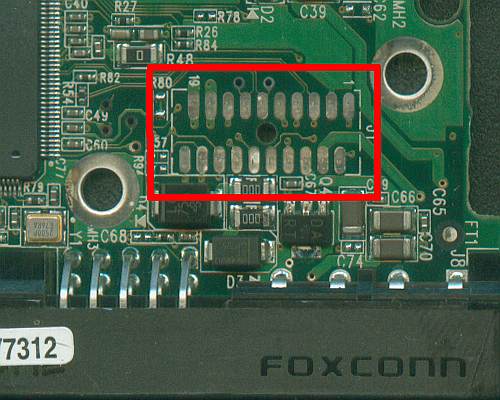

If such WD drive has just developed several unreadable sectors, this often can be solved by checking and cleaning those contacts, then overwriting the whole drive with zeroes (or well, with whatever you want, the point is to rewrite all the "badly written" areas), then it will likely work fine for years after that.
Quoted 6 lines
One of the slightly lower power on time ones has a scary load cycle count though:
Device Model: WDC WD20EARS-00S8B1
9Power_On_Hours0x0032033 033 000Old_ageAlways - 49255
193Load_Cycle_Count0x0032001 001 000Old_ageAlways - 1317839
This can be disabled:
http://www.storagereview.com/how_to_stop_excessive_load_cycles_on_the_western_digital_2tb_caviar_green_wd20ears_with_wdidle3
http://idle3-tools.sourceforge.net/
Signature · 2 lines
With respect,
Roman
Hi
Quoted 2 lines · Phil Turmel
I replace drives when their relocation count hits double digits. In my limited sample, that's typically after 40,000 hours.
It really depends a lot on the drive type and manufacturer (for example see the various reports by Backblaze).
We run quite a number of "desktop" style drives and many have seen 60k and more power on hours, but then our data collection is a bit biased as we replace disks once they do not complete a "long" smartcheck (smartctl -t long).
I've attached a sorted list of current data, columns are mostly:
manufacturer
model number
reallocated sectors (ID 5 of smartctl -a)
power on hours (also according to smartctl -a)
So, not sure one could infer much from these lines due to the inherent bias.
Personally, I would monitor the number of reallocated and pending blocks, run short tests often and long tests about once a week. This should give you at least some hint, if a drive may go down. And if it does unexpectedly, you should be covered by RAID6.
Cheers
Carsten
Quoted 2 lines · Carsten Aulbert
It really depends a lot on the drive type and manufacturer (for example see the various reports by Backblaze).
I've seen it reported that Seagate Barracudas (I remembered it because that's what I've got) have a bit of a design fault. I think the air filter has a tendency to leak, and that could be why they fail so quick once they go - they get dust into them.
Cheers,
Wol