Kernel 3.10.0 with nvme-compatibility driver
Hi All,
I just started playing with Intel NVME PCIe cards and trying to optimize system performance. I am using RHEL7, kernel 3.10 and the nvme-compatibility drivers due to the fact that Mellanox software distribution don't support kernel 3.15 at the moment. Server has dual E5-2690 v2 processors and 64GB RAM. The aim is to design a server which can match WAN transfer at 100Gbps by writing on the nvme drives.
The maximum performance I have seen is about 1.4GB/sec per drive running in parallel over 6 drives. I plan to add a total of 10 drives. In these tests, dd is used "dd if=/dev/zero of=/nvme$i/$file.dump count=700000 bs=4096k". Graphs in below URLS are created from output by dstat:
http://www.ultralight.org/~azher/nvme/dd-bs4k.png
http://www.ultralight.org/~azher/nvme/cpu-graph.PNG


Disk Formatting scripts:
http://www.ultralight.org/~azher/nvme/nvme-format.txt
http://www.ultralight.org/~azher/nvme/nvme.txt
Since the idle CPU is already at 40%, so I wonder what will happen when adding 4 more drives. So my questions are:
1. How to force drivers and kernel to keep nvme driver on just one socket and let the kernel use the other processor for WAN transfer using Mellanox and TCP overheads ?
2. Kernel optimizations to reduce the nvme CPU usage ? With current driver, I cannot change scheduler and nr_requests.
3. Data write per drive is not steady, what could be the reason ?
Any suggestions / help would be appreciated.
Thanks
-Azher
Hi Azher,
Quoted 4 lines · Azher Mughal
I just started playing with Intel NVME PCIe cards and trying to optimize system performance. I am using RHEL7, kernel 3.10 and the nvme-compatibility drivers due to the fact that Mellanox software distribution don't support kernel 3.15 at the moment.
RHEL 7.0 has an included nvme driver that is a bit ahead of the nvme-compatibility version. I'd recommend using that one.
Quoted 3 lines
Server has dual E5-2690 v2 processors and 64GB RAM. The aim is to design a server which can match WAN transfer at 100Gbps by writing on the nvme drives.
Looks like you're pushing 80% of the way there already!
Depending on what capacity drive and series you're using, you may be able to get up to 1900MB/s according to the product brief on intel.com for sustainted write performance, so I think there is some room to improve your numbers.
Quoted 4 lines
The maximum performance I have seen is about 1.4GB/sec per drive running in parallel over 6 drives. I plan to add a total of 10 drives. In these tests, dd is used "dd if=/dev/zero of=/nvme$i/$file.dump count=700000 bs=4096k". Graphs in below URLS are created from output by dstat:
You're running single depth sequential writes through the page cache and a filesystem. You should get more stable performance if you add "oflag=direct". You may get even better if you use higher depths. Maybe try fio instead.
Also, can you verify what PCI-e link speed you're devices are running?
Quoted 2 lines
Since the idle CPU is already at 40%, so I wonder what will happen when adding 4 more drives. So my questions are:
Adding more drives should scale performance fairly linearly until you have multiple devices behind the same PCI-e switch.
Quoted 3 lines
1. How to force drivers and kernel to keep nvme driver on just one socket and let the kernel use the other processor for WAN transfer using Mellanox and TCP overheads ?
You can pin processes to cores using 'taskset' and pin interrupts using 'irqbalance' (or you can do that manually).
Quoted 2 lines
2. Kernel optimizations to reduce the nvme CPU usage ? With current driver, I cannot change scheduler and
nr_requests.
This block driver hooks into a layer where those options are not available.
Quoted 1 line
3. Data write per drive is not steady, what could be the reason ?
At least part of this is that you're not using O_DIRECT.
Quoted 1 line
Any suggestions / help would be appreciated.
Feel free to contact me directly if you need more details on any thing above or otherwise.
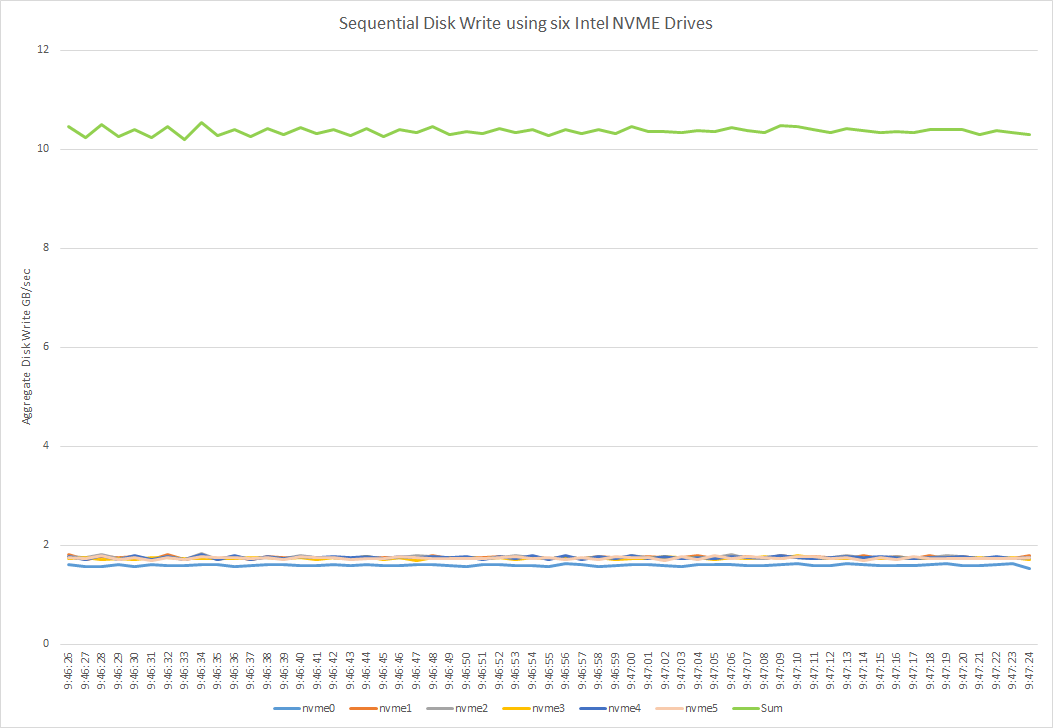
Thanks for the tips. Yes all drives are in the Gen3 slots.
Much better and steady throughput per drive. Less CPU usage this time.
http://www.ultralight.org/~azher/nvme/2ddperdrive-withoflag.png

-Azher
Quoted 53 lines · Keith Busch
Hi Azher,
Quoted 4 lines · Azher Mughal
I just started playing with Intel NVME PCIe cards and trying to optimize system performance. I am using RHEL7, kernel 3.10 and the nvme-compatibility drivers due to the fact that Mellanox software distribution don't support kernel 3.15 at the moment.
RHEL 7.0 has an included nvme driver that is a bit ahead of the nvme-compatibility version. I'd recommend using that one.
Quoted 3 lines
Server has dual E5-2690 v2 processors and 64GB RAM. The aim is to design a server which can match WAN transfer at 100Gbps by writing on the nvme drives.
Looks like you're pushing 80% of the way there already!
Depending on what capacity drive and series you're using, you may be able to get up to 1900MB/s according to the product brief on intel.com for sustainted write performance, so I think there is some room to improve your numbers.
Quoted 4 lines
The maximum performance I have seen is about 1.4GB/sec per drive running in parallel over 6 drives. I plan to add a total of 10 drives. In these tests, dd is used "dd if=/dev/zero of=/nvme$i/$file.dump count=700000 bs=4096k". Graphs in below URLS are created from output by dstat:
You're running single depth sequential writes through the page cache and a filesystem. You should get more stable performance if you add "oflag=direct". You may get even better if you use higher depths. Maybe try fio instead.
Also, can you verify what PCI-e link speed you're devices are running?
Quoted 2 lines
Since the idle CPU is already at 40%, so I wonder what will happen when adding 4 more drives. So my questions are:
Adding more drives should scale performance fairly linearly until you have multiple devices behind the same PCI-e switch.
Quoted 3 lines
1. How to force drivers and kernel to keep nvme driver on just one socket and let the kernel use the other processor for WAN transfer using Mellanox and TCP overheads ?
You can pin processes to cores using 'taskset' and pin interrupts using 'irqbalance' (or you can do that manually).
Quoted 2 lines
2. Kernel optimizations to reduce the nvme CPU usage ? With current driver, I cannot change scheduler and
nr_requests.This block driver hooks into a layer where those options are not available.
Quoted 9 lines
Quoted 1 line
3. Data write per drive is not steady, what could be the reason ?
At least part of this is that you're not using
O_DIRECT.Quoted 1 line
Any suggestions / help would be appreciated.
Feel free to contact me directly if you need more details on any thing above or otherwise.
-------------- next part --------------
A non-text attachment was scrubbed...
Name: 2ddperdrive-withoflag.png
Type: image/png
Size: 22958 bytes
Desc: not available
URL: <http://lists.infradead.org/pipermail/linux-nvme/attachments/20140625/d464b087/attachment-0001.png>