i.MX6 IPU CSI analog video input on Ventana
Subsystems (7)
Hi,
I'm using analog PAL video in on GW53xx/54xx boards (through ADV7180 chip and 8-bit parallel CSI input, with (presumably) BT.656). I'm trying to upgrade from e.g. Linux 4.2 + Steve's older MX6 camera driver (which works fine) to v.4.16 with the recently merged driver.
media-ctl -r -l '"adv7180 2-0020":0->"ipu2_csi1_mux":1[1],
                 "ipu2_csi1_mux":2->"ipu2_csi1":0[1],
                 "ipu2_csi1":2->"ipu2_csi1 capture":0[1]'
media-ctl -V '"adv7180 2-0020":0[fmt:UYVY2X8 720x576 field:interlaced]' media-ctl -V '"ipu2_csi1_mux":1[fmt:UYVY2X8 720x576 field:interlaced]' media-ctl -V '"ipu2_csi1_mux":2[fmt:UYVY2X8 720x576 field:interlaced]'
It seems there are issues, though:
First, I can't find a way to change to PAL standard. *s_std() doesn't propagate from "ipu2_csi1 capture" through "ipu2_csi1_mux" to adv7180.
For now I have just changed the default:
drivers/media/i2c/adv7180.c +1 -1
@@ -1320,7 +1321,7 @@ static int adv7180_probe(struct i2c_client *client, state->irq = client->irq;mutex_init (&state->mutex); - state->curr_norm =V4L2_STD_NTSC ; + state->curr_norm =V4L2_STD_PAL ;if (state->chip_info->flags &ADV7180_FLAG_RESET_POWERED ) state->powered = true;else
Second, the image format information I'm getting out of "ipu2_csi1 capture" device is:
open("/dev/video6")
ioctl(VIDIOC_S_FMT, {V4L2_BUF_TYPE_VIDEO_CAPTURE,
	fmt.pix={704x576, pixelformat=NV12, V4L2_FIELD_INTERLACED} =>
	fmt.pix={720x576, pixelformat=NV12, V4L2_FIELD_INTERLACED,
        bytesperline=720, sizeimage=622080,
	colorspace=V4L2_COLORSPACE_SMPTE170M}})
Now, the resulting image obtained via QBUF/DQBUF doesn't seem to be a single interlaced frame (like it was with older drivers). Actually, I'm getting the two fields, encoded with NV12 and concatenated together (I think it's V4L2_FIELD_SEQ_TB or V4L2_FIELD_SEQ_BT).
What's wrong?
Is it possible to get a real V4L2_FIELD_INTERLACED frame, so it can be passed straight to the CODA H.264 encoder?
Signature · 4 lines
Krzysztof Halasa

Industrial Research Institute for Automation and Measurements PIAP
Al. Jerozolimskie 202, 02-486 Warsaw, Poland
Steve Longerbeam
maintainerHello Krzysztof,
Quoted 11 lines · Krzysztof Hałasa
Hi,
I'm using analog PAL video in on GW53xx/54xx boards (through ADV7180 chip and 8-bit parallel CSI input, with (presumably) BT.656). I'm trying to upgrade from e.g. Linux 4.2 + Steve's older MX6 camera driver (which works fine) to v.4.16 with the recently merged driver.
media-ctl -r -l '"adv7180 2-0020":0->"ipu2_csi1_mux":1[1],
                  "ipu2_csi1_mux":2->"ipu2_csi1":0[1],
                  "ipu2_csi1":2->"ipu2_csi1 capture":0[1]'
Quoted 8 lines
media-ctl -V '"adv7180 2-0020":0[fmt:UYVY2X8 720x576 field:interlaced]' media-ctl -V '"ipu2_csi1_mux":1[fmt:UYVY2X8 720x576 field:interlaced]' media-ctl -V '"ipu2_csi1_mux":2[fmt:UYVY2X8 720x576 field:interlaced]'
It seems there are issues, though:
First, I can't find a way to change to PAL standard.
*s_std()doesn't propagate from "ipu2_csi1capture" through "ipu2_csi1_mux" to adv7180.
Right. That's a current drawback, other mc drivers have this issue too. One option, besides changing the default below, is to make VIDIOC_QUERYSTD, VIDIOC_G_STD, and VIDIOC_S_STD ioctls available for use via v4l2 subdevice node, as in:
drivers/media/v4l2-core/v4l2-subdev.c +0 -0
@@ -195,6 +195,15 @@ static long subdev_do_ioctl(struct file *file, unsigned int cmd, void *arg)
case VIDIOC_QUERYMENU:
return v4l2_querymenu(vfh->ctrl_handler, arg);
+ case VIDIOC_QUERYSTD:
+ return v4l2_subdev_call(sd, video, querystd, arg); +
+ case VIDIOC_G_STD:
+ return v4l2_subdev_call(sd, video, g_std, arg);
+
+ case VIDIOC_S_STD:
+ return v4l2_subdev_call(sd, video, s_std, *(v4l2_std_id *)arg); +
case VIDIOC_G_CTRL:
return v4l2_g_ctrl(vfh->ctrl_handler, arg);
Quoted 25 lines
For now I have just changed the default:
drivers/media/i2c/adv7180.c +1
-1@@ -1320,7 +1321,7 @@ static int adv7180_probe(struct i2c_client *client, state->irq = client->irq;mutex_init (&state->mutex); - state->curr_norm =V4L2_STD_NTSC ; + state->curr_norm =V4L2_STD_PAL ;if (state->chip_info->flags &ADV7180_FLAG_RESET_POWERED ) state->powered = true;else Second, the image format information I'm getting out of "
ipu2_csi1capture" device is:
open("/dev/video6")
ioctl(VIDIOC_S_FMT, {V4L2_BUF_TYPE_VIDEO_CAPTURE,fmt.pix={704x576, pixelformat=NV12, V4L2_FIELD_INTERLACED} => fmt.pix={720x576, pixelformat=NV12, V4L2_FIELD_INTERLACED, bytesperline=720, sizeimage=622080, colorspace=V4L2_COLORSPACE_SMPTE170M}})
Quoted 6 lines
Now, the resulting image obtained via QBUF/DQBUF doesn't seem to be a single interlaced frame (like it was with older drivers). Actually, I'm getting the two fields, encoded with NV12 and concatenated together (I think it's
V4L2_FIELD_SEQ_TBorV4L2_FIELD_SEQ_BT).What's wrong?
Set field type at /dev/video6 to NONE. That will enable IDMAC interweaving of the top and bottom fields.
Steve
Quoted 2 lines
Is it possible to get a real
V4L2_FIELD_INTERLACEDframe, so it can be passed straight to the CODA H.264 encoder?
Quoted 15 lines · Steve Longerbeam
Quoted 15 lines
Second, the image format information I'm getting out of "
ipu2_csi1capture" device is:
open("/dev/video6")
ioctl(VIDIOC_S_FMT, {V4L2_BUF_TYPE_VIDEO_CAPTURE,fmt.pix={704x576, pixelformat=NV12, V4L2_FIELD_INTERLACED} => fmt.pix={720x576, pixelformat=NV12, V4L2_FIELD_INTERLACED, bytesperline=720, sizeimage=622080, colorspace=V4L2_COLORSPACE_SMPTE170M}})Now, the resulting image obtained via QBUF/DQBUF doesn't seem to be a single interlaced frame (like it was with older drivers). Actually, I'm getting the two fields, encoded with NV12 and concatenated together (I think it's
V4L2_FIELD_SEQ_TBorV4L2_FIELD_SEQ_BT).
Quoted 4 lines
Quoted 1 line
What's wrong?
Set field type at
/dev/video6to NONE. That will enable IDMAC interweaving of the top and bottom fields.
Such as this?
"adv7180 2-0020":0
                [fmt:UYVY2X8/720x576 field:interlaced]
"ipu2_csi1_mux":1
                [fmt:UYVY2X8/720x576 field:interlaced]
"ipu2_csi1_mux":2
                [fmt:UYVY2X8/720x576 field:interlaced]
"ipu2_csi1":0
                [fmt:UYVY2X8/720x576 field:interlaced
                 crop.bounds:(0,0)/720x576
                 crop:(0,0)/720x576
                 compose.bounds:(0,0)/720x576
                 compose:(0,0)/720x576]
"ipu2_csi1":2
                [fmt:AYUV32/720x576 field:none]
There is something wrong - the resulting image is out of (vertical) sync, it seems the time it takes to receive a frame is a bit longer than the normal 40 ms. I can also set field to NONE on "ipu2_csi1_mux":[12] but it doesn't sync, either. Only with everything set to INTERLACED, the frame is synchronized (actually, it starts unsynchronized, but slowly scrolls down the screen and eventually "catches sync").
With the old drivers nothing like this happens: the image is "instantly" synchronized and it's a single interlaced frame, not the two halves concatenated.
Signature · 4 lines
Krzysztof Halasa

Industrial Research Institute for Automation and Measurements PIAP
Al. Jerozolimskie 202, 02-486 Warsaw, Poland
Steve Longerbeam
maintainerQuoted 22 lines · Krzysztof Hałasa
Quoted 10 lines · Steve Longerbeam
Quoted 10 lines
Second, the image format information I'm getting out of "
ipu2_csi1capture" device is:
open("/dev/video6")
ioctl(VIDIOC_S_FMT, {V4L2_BUF_TYPE_VIDEO_CAPTURE,fmt.pix={704x576, pixelformat=NV12, V4L2_FIELD_INTERLACED} => fmt.pix={720x576, pixelformat=NV12, V4L2_FIELD_INTERLACED, bytesperline=720, sizeimage=622080, colorspace=V4L2_COLORSPACE_SMPTE170M}})Quoted 8 lines
Quoted 6 lines
Now, the resulting image obtained via QBUF/DQBUF doesn't seem to be a single interlaced frame (like it was with older drivers). Actually, I'm getting the two fields, encoded with NV12 and concatenated together (I think it's
V4L2_FIELD_SEQ_TBorV4L2_FIELD_SEQ_BT).What's wrong?
Set field type at
/dev/video6to NONE. That will enable IDMAC interweaving of the top and bottom fields.Such as this?
"adv7180 2-0020":0
Quoted 13 lines
                 [fmt:UYVY2X8/720x576 field:interlaced]
"ipu2_csi1_mux":1
                 [fmt:UYVY2X8/720x576 field:interlaced]
"ipu2_csi1_mux":2
                 [fmt:UYVY2X8/720x576 field:interlaced]
"ipu2_csi1":0
                 [fmt:UYVY2X8/720x576 field:interlaced
                  crop.bounds:(0,0)/720x576
                  crop:(0,0)/720x576
                  compose.bounds:(0,0)/720x576
                  compose:(0,0)/720x576]
"ipu2_csi1":2
                 [fmt:AYUV32/720x576 field:none]
Yes, that looks fine.
Quoted 2 lines
There is something wrong - the resulting image is out of (vertical) sync,
Yes, the CSI on i.MX6 does not deal well with unstable bt.656 sync codes, which results in vertical sync issues (scrolling or split images). The ADV7180 will often shift the sync codes around in various situations (initial power on, see below, also when there is an interruption of the input analog CVBS signal).
There is a frame interval monitor in the imx-media driver that can catch these unstable sync code events and send an v4l2 event to userspace, userspace can then issue stream off->on which usually corrects the vertical sync.
See https://linuxtv.org/downloads/v4l-dvb-apis/v4l-drivers/imx.html, section 15.9 for more info on the vertical sync issues in i.MX6 CSI and how to setup the FIM to correct them.
One other thing I've noticed is that the ADV7180 can send unstable bt.656 sync codes after initial power on. Try adding a ~10 frame time delay in adv7180_set_power(), so that the imx CSI won't see these frames and get tripped up at stream on.
Quoted 8 lines
it seems the time it takes to receive a frame is a bit longer than
the normal 40 ms. I can also set field to NONE on "ipu2_csi1_mux":[12] but it doesn't sync, either. Only with everything set to INTERLACED, the frame is synchronized (actually, it starts unsynchronized, but slowly scrolls down the screen and eventually "catches sync").
With the old drivers nothing like this happens: the image is "instantly" synchronized and it's a single interlaced frame, not the two halves concatenated.
The old driver, IIRC, would also catch the unstable sync codes via a FIM, but would internally restart IPU capture hardware without the involvement of userspace, effectively this was an internal stream on/off. In imx-media, this must be done via userspace when it catches the V4L2_EVENT_IMX_FRAME_INTERVAL_ERROR event.
Steve
Quoted 7 lines · Steve Longerbeam
Yes, the CSI on i.MX6 does not deal well with unstable bt.656 sync codes, which results in vertical sync issues (scrolling or split images). The ADV7180
will often shift the sync codes around in various situations (initial power on,
see below, also when there is an interruption of the input analog CVBS signal).
I'm not convinced it's the sync code issue. I've compared the key registers (both 4.2 + your old driver vs 4.16) and this is what I got:
"adv7180 2-0020":0 [fmt:UYVY2X8/720x576 field:interlaced]
"ipu2_csi1_mux":1  [fmt:UYVY2X8/720x576 field:interlaced]
"ipu2_csi1_mux":2  [fmt:UYVY2X8/720x576 field:interlaced]
"ipu2_csi1":0      [fmt:UYVY2X8/720x576 field:interlaced]
"ipu2_csi1":2      [fmt:AYUV32/720x576 field:none]
There is H sync but no V sync. The encoding is wrong (I'm using NV12 but what I get from /dev/video* isn't NV12).
IPU2_CSI1 registers are:
0 4 8 C 10 14 18 1C
2a38000: 04000A20 023F02CF 023F02CF 0 0 00040030 00000000 00FF0000 vs the old driver:
04000A30 027002CF 023F02CF 0 0 01040596 000D07DF 00FF0000
0: CSI1 Sensor Configuration (IPUx_CSI1_SENS_CONF)
The new driver uses progressive mode while the old one - interlaced mode.
4: CSI1 Sense Frame Size Register (IPUx_CSI1_SENS_FRM_SIZE) The new driver uses 575 lines in place of 624 (this probably needs to be checked with the ADV7180 docs, though the old version works fine).
14, 18: CSI1 CCIR Code Register 1 and 2 (IPUx_CSI1_CCIR_CODE_[12]) The new driver doesn't use "Error detection and correction" and it seems the codes are set for progressive mode. I think this can't work.
With:
"adv7180 2-0020":0 [fmt:UYVY2X8/720x576 field:interlaced]
"ipu2_csi1_mux":1  [fmt:UYVY2X8/720x576 field:none]
"ipu2_csi1_mux":2  [fmt:UYVY2X8/720x576 field:none]
"ipu2_csi1":0      [fmt:UYVY2X8/720x576 field:none]
"ipu2_csi1":2      [fmt:AYUV32/720x576 field:none]
Still, V sync but no H sync. The Y/colors are good, except that there are two consecutive images on the screen.
2a38000: 04000A20 023F02CF 023F02CF 0 0 00040030 00000000 00FF0000 CSI set to progressive again. Setting the registers manually (SENS_CONF and SAV/EAV codes) makes the image stabilize, though there are still two images (split in the middle). Apparently something is simply appending the two field images, instead of merging them properly.
With:
"adv7180 2-0020":0 [fmt:UYVY2X8/720x576 field:interlaced]
"ipu2_csi1_mux":1  [fmt:UYVY2X8/720x576 field:interlaced]
"ipu2_csi1_mux":2  [fmt:UYVY2X8/720x576 field:interlaced]
"ipu2_csi1":0      [fmt:UYVY2X8/720x576 field:interlaced]
"ipu2_csi1":2      [fmt:AYUV32/720x576 field:interlaced]
2a38000: 04000A30 027002CF 023F02CF 0 0 01040596 000D07DF 00FF0000 the CSI is set for interlaced mode, and there are two stable images (both fields concatenated).
The first case again (all except ipu2_csi1 set to interlaced). I've manually set the CSI registers and now the image is synchronized and stable (one complete frame this time). The problem is it's not NV12 (nor YUV420), the colors are all green and the Y lines comes in pairs - valid then invalid (probably color) and so on.
Could it be a DTS problem? I'm using imx6q-gw53xx.dtb file, the 8-bit ADV7180 (40 pin version) is connected to the IPU2 CSI1 DATA, EIM_EB3 = HSYNC, EIM_A16 = PIXCLK and EIM_D29 = VSYNC. HSYNC and VSYNC aren't currently used, though.
I Guess I have to compare all IPU registers.
Signature · 4 lines
Krzysztof Halasa

Industrial Research Institute for Automation and Measurements PIAP
Al. Jerozolimskie 202, 02-486 Warsaw, Poland
Quoted 76 lines · Krzysztof Hałasa
Quoted 7 lines · Steve Longerbeam
Yes, the CSI on i.MX6 does not deal well with unstable bt.656 sync codes, which results in vertical sync issues (scrolling or split images). The ADV7180
will often shift the sync codes around in various situations (initial power on,
see below, also when there is an interruption of the input analog CVBS signal).I'm not convinced it's the sync code issue. I've compared the key registers (both 4.2 + your old driver vs 4.16) and this is what I got:
"adv7180 2-0020":0 [fmt:UYVY2X8/720x576 field:interlaced]
"ipu2_csi1_mux":1  [fmt:UYVY2X8/720x576 field:interlaced]
"ipu2_csi1_mux":2  [fmt:UYVY2X8/720x576 field:interlaced]
"ipu2_csi1":0      [fmt:UYVY2X8/720x576 field:interlaced]
"ipu2_csi1":2      [fmt:AYUV32/720x576 field:none]
There is H sync but no V sync. The encoding is wrong (I'm using NV12 but what I get from
/dev/video*isn't NV12).
IPU2_CSI1registers are:
0 4 8 C 10 14 18 1C
2a38000: 04000A20 023F02CF 023F02CF 0 0 00040030 00000000 00FF0000 vs the old driver:04000A30 027002CF 023F02CF 0 0 01040596 000D07DF 00FF00000: CSI1 Sensor Configuration (
IPUx_CSI1_SENS_CONF)
The new driver uses progressive mode while the old one - interlaced mode.4: CSI1 Sense Frame Size Register (
IPUx_CSI1_SENS_FRM_SIZE) The new driver uses 575 lines in place of 624 (this probably needs to be checked with the ADV7180 docs, though the old version works fine).14, 18: CSI1 CCIR Code Register 1 and 2 (IPUx_CSI1_CCIR_CODE_[12]) The new driver doesn't use "Error detection and correction" and it seems the codes are set for progressive mode. I think this can't work.
With:
"adv7180 2-0020":0 [fmt:UYVY2X8/720x576 field:interlaced]"ipu2_csi1_mux":1 [fmt:UYVY2X8/720x576 field:none] "ipu2_csi1_mux":2 [fmt:UYVY2X8/720x576 field:none] "ipu2_csi1":0 [fmt:UYVY2X8/720x576 field:none] "ipu2_csi1":2 [fmt:AYUV32/720x576 field:none]Still, V sync but no H sync. The Y/colors are good, except that there are two consecutive images on the screen.
2a38000: 04000A20 023F02CF 023F02CF 0 0 00040030 00000000 00FF0000 CSI set to progressive again. Setting the registers manually (SENS_CONFand SAV/EAV codes) makes the image stabilize, though there are still two images (split in the middle). Apparently something is simply appending the two field images, instead of merging them properly.With:
"adv7180 2-0020":0 [fmt:UYVY2X8/720x576 field:interlaced]"ipu2_csi1_mux":1 [fmt:UYVY2X8/720x576 field:interlaced] "ipu2_csi1_mux":2 [fmt:UYVY2X8/720x576 field:interlaced] "ipu2_csi1":0 [fmt:UYVY2X8/720x576 field:interlaced] "ipu2_csi1":2 [fmt:AYUV32/720x576 field:interlaced]2a38000: 04000A30 027002CF 023F02CF 0 0 01040596 000D07DF 00FF0000 the CSI is set for interlaced mode, and there are two stable images (both fields concatenated).
The first case again (all except
ipu2_csi1set to interlaced). I've manually set the CSI registers and now the image is synchronized and stable (one complete frame this time). The problem is it's not NV12 (nor YUV420), the colors are all green and the Y lines comes in pairs - valid then invalid (probably color) and so on.
Quoted 6 lines
Could it be a DTS problem? I'm using imx6q-gw53xx.dtb file, the 8-bit ADV7180 (40 pin version) is connected to the IPU2 CSI1 DATA,
EIM_EB3= HSYNC,EIM_A16= PIXCLK andEIM_D29= VSYNC. HSYNC and VSYNC aren't currently used, though.I Guess I have to compare all IPU registers.
Krzysztof,
What version of kernel are you using and what specific board model do you have (full board model and/or serial number so I know if you've got an IMX6DL or an IMX6Q) and have you modified the device-tree? I tested the adv7180 a couple of months ago but I don't know if I hit your specific combination. I was using NTSC but if your not getting VSYNC then yes I would like to make sure the pinmux is correct for your situation.
Thanks,
Tim
Tim,
Quoted 7 lines · Tim Harvey
What version of kernel are you using and what specific board model do you have (full board model and/or serial number so I know if you've got an IMX6DL or an IMX6Q) and have you modified the device-tree? I tested the adv7180 a couple of months ago but I don't know if I hit your specific combination. I was using NTSC but if your not getting VSYNC then yes I would like to make sure the pinmux is correct for your situation.
At the moment I'm using 4.16.0 and this particular board IDs itself as GW5304-D2, the CPU is i.MX6Q. I mostly use GW5300s and GW5400s (and others in smaller numbers) and they work fine with Steve's older driver (the one with a special ADV7180 module).
I'm using the official device tree (v4.16 in this case) with just the LDB (LVDS display) portion removed.
I guess I can test it with a NTSC camera.
Signature · 4 lines
Krzysztof Halasa Industrial Research Institute for Automation and Measurements PIAP Al. Jerozolimskie 202, 02-486 Warsaw, Poland
Tested with NTSC camera, it's the same as with PAL.
The only case when IPU2_CSI1_SENS_CONF register is set to interlaced mode (PRCTL=3, CCIR interlaced mode (BT.656)) is when all parts of the pipeline are set to interlaced:
"adv7180 2-0020":0 [fmt:UYVY2X8/720x576 field:interlaced]
"ipu2_csi1_mux":1  [fmt:UYVY2X8/720x576 field:interlaced]
"ipu2_csi1_mux":2  [fmt:UYVY2X8/720x576 field:interlaced]
"ipu2_csi1":0      [fmt:UYVY2X8/720x576 field:interlaced]
"ipu2_csi1":2      [fmt:AYUV32/720x576 field:interlaced]
The image is stable and in sync, the "only" problem is that I get two concatenated field images (in one V4L2 frame) instead of a normal interlaced frame (all lines in order - 0, 1, 2, 3, 4 etc). IOW I get V4L2_FIELD_ALTERNATE, V4L2_FIELD_SEQ_TB or V4L2_FIELD_SEQ_BT (the data format, I don't mean the pixel format.field) while I need to get V4L2_FIELD_INTERLACED, V4L2_FIELD_INTERLACED_TB or _BT.
If I set "ipu2_csi1":2 to field:none, the IPU2_CSI1_SENS_CONF is set to progressive mode (PRCTL=2). It's the last element of the pipeline I can configure, it's connected straight to "ipu2_csi1 capture" aka /dev/videoX. I think CSI can't work with interlaced camera (and ADV7180) when set to progressive, can it?
I wonder... perhaps to get an interlaced frame I need to route the data through VDIC (ipu2_vdic, the deinterlacer)?
Signature · 4 lines
Krzysztof Halasa

Industrial Research Institute for Automation and Measurements PIAP
Al. Jerozolimskie 202, 02-486 Warsaw, Poland
Quoted 26 lines · Krzysztof Hałasa
Tested with NTSC camera, it's the same as with PAL.
The only case whenIPU2_CSI1_SENS_CONFregister is set to interlaced mode (PRCTL=3, CCIR interlaced mode (BT.656)) is when all parts of the pipeline are set to interlaced:"adv7180 2-0020":0 [fmt:UYVY2X8/720x576 field:interlaced]
"ipu2_csi1_mux":1  [fmt:UYVY2X8/720x576 field:interlaced]
"ipu2_csi1_mux":2  [fmt:UYVY2X8/720x576 field:interlaced]
"ipu2_csi1":0      [fmt:UYVY2X8/720x576 field:interlaced]
"ipu2_csi1":2      [fmt:AYUV32/720x576 field:interlaced]
The image is stable and in sync, the "only" problem is that I get two concatenated field images (in one V4L2 frame) instead of a normal interlaced frame (all lines in order - 0, 1, 2, 3, 4 etc). IOW I get
V4L2_FIELD_ALTERNATE,V4L2_FIELD_SEQ_TBorV4L2_FIELD_SEQ_BT(the data format, I don't mean the pixel format.field) while I need to getV4L2_FIELD_INTERLACED,V4L2_FIELD_INTERLACED_TBor_BT.If I set "ipu2_csi1":2 to field:none, the
IPU2_CSI1_SENS_CONFis set to progressive mode (PRCTL=2). It's the last element of the pipeline I can configure, it's connected straight to "ipu2_csi1capture" aka/dev/videoX. I think CSI can't work with interlaced camera (and ADV7180) when set to progressive, can it?
Quoted 2 lines
I wonder... perhaps to get an interlaced frame I need to route the data through VDIC (
ipu2_vdic, the deinterlacer)?
Krzysztof,
Right, your doing a raw capture where you get both fields in one buffer and I'm not clear what to do with that.
Here's what I've used on a GW54xx with IMX6Q and an adv7180 for NTSC.
using VDIC to deinterlace:
# adv7180 -> vdic -> ic_prpvf -> /dev/video3 # VDIC will de-interlace using motion compensation media-ctl -r # reset all links # Setup links media-ctl -l '"adv7180 2-0020":0 -> "ipu2_csi1_mux":1[1]' media-ctl -l '"ipu2_csi1_mux":2 -> "ipu2_csi1":0[1]' media-ctl -l '"ipu2_csi1":1 -> "ipu2_vdic":0[1]' media-ctl -l '"ipu2_vdic":2 -> "ipu2_ic_prp":0[1]' media-ctl -l '"ipu2_ic_prp":2 -> "ipu2_ic_prpvf":0[1]' media-ctl -l '"ipu2_ic_prpvf":1 -> "ipu2_ic_prpvf capture":0[1]' # Configure pads media-ctl -V "'adv7180 2-0020':0 [fmt:UYVY2X8/720x480]" media-ctl -V "'ipu2_csi1_mux':2 [fmt:UYVY2X8/720x480 field:interlaced]" media-ctl -V "'ipu2_csi1':1 [fmt:UYVY2X8/720x480 field:interlaced]" media-ctl -V "'ipu2_vdic':2 [fmt:UYVY2X8/720x480 field:interlaced]" media-ctl -V "'ipu2_ic_prp':2 [fmt:UYVY2X8/720x480 field:none]" media-ctl -V "'ipu2_ic_prpvf':1 [fmt:UYVY2X8/720x480 field:none]" # streaming can now begin on /dev/video3 v4l2-ctl -d3 --set-fmt-video=width=720,height=480,pixelformat=UYVY v4l2-ctl -d3 --set-ctrl=deinterlacing_mode=3 # set max motion compensation (default) #^^^^ this is the default so could be skipped; also its the only value allowed when capturing direct from CSI v4l2-ctl -d3 --stream-mmap --stream-to=/x.raw --stream-count=1 # capture 1 frame convert -size 720x480 -depth 16 uyvy:/x.raw /var/www/html/frame.png # and convert # or stream jpeg's via gst gst-launch-1.0 v4l2src device=/dev/video3 ! "video/x-raw,format=UYVY" ! jpegenc ! queue ! avimux name=mux ! udpsink host=172.24.20.19 port=5000
or de-interlace via IDMAC:
# PRPVF will do simple IDMAC line interweaving for de-interlacing, since VDIC is not involved in the pipeline, but it will only enable this in the IDMAC if it sees interlaced input at prpvf media-ctl -r # reset all links
# Setup links
media-ctl -l '"adv7180 2-0020":0 -> "ipu2_csi1_mux":1[1]' media-ctl -l '"ipu2_csi1_mux":2 -> "ipu2_csi1":0[1]' media-ctl -l '"ipu2_csi1":1 -> "ipu2_ic_prp":0[1]'
media-ctl -l '"ipu2_ic_prp":2 -> "ipu2_ic_prpvf":0[1]' media-ctl -l '"ipu2_ic_prpvf":1 -> "ipu2_ic_prpvf capture":0[1]' # Configure pads
media-ctl -V "'adv7180 2-0020':0 [fmt:UYVY2X8/720x480]" media-ctl -V "'ipu2_csi1_mux':2 [fmt:UYVY2X8/720x480 field:interlaced]" media-ctl -V "'ipu2_csi1':1 [fmt:UYVY2X8/720x480 field:interlaced]" media-ctl -V "'ipu2_ic_prp':2 [fmt:UYVY2X8/720x480 field:interlaced]" media-ctl -V "'ipu2_ic_prpvf':1 [fmt:UYVY2X8/720x480 field:none]"
# streaming can now begin on /dev/video3 v4l2-ctl -d3 --set-fmt-video=width=720,height=480,pixelformat=UYVY v4l2-ctl -d3 --stream-mmap --stream-to=/x.raw --stream-count=1 # capture gst-launch-1.0 v4l2src device=/dev/video3 ! "video/x-raw,format=UYVY" ! jpegenc ! queue ! avimux name=mux ! udpsink host=172.24.20.19 port=5000
or the following for non deinterlaced:
# adv7180 -> ic_prp -> ic_prpenc -> /dev/video2 media-ctl -r # reset all links # Setup links media-ctl -l '"adv7180 2-0020":0 -> "ipu2_csi1_mux":1[1]' media-ctl -l '"ipu2_csi1_mux":2 -> "ipu2_csi1":0[1]' media-ctl -l '"ipu2_csi1":1 -> "ipu2_ic_prp":0[1]' media-ctl -l '"ipu2_ic_prp":1 -> "ipu2_ic_prpenc":0[1]' media-ctl -l '"ipu2_ic_prpenc":1 -> "ipu2_ic_prpenc capture":0[1]' # Configure pads media-ctl -V "'adv7180 2-0020':0 [fmt:UYVY2X8/720x480]" media-ctl -V "'ipu2_csi1_mux':2 [fmt:UYVY2X8/720x480 field:interlaced]" media-ctl -V "'ipu2_csi1':1 [fmt:UYVY2X8/720x480 field:interlaced]" media-ctl -V "'ipu2_ic_prp':1 [fmt:UYVY2X8/720x480 field:interlaced]" media-ctl -V "'ipu2_ic_prpenc':1 [fmt:UYVY2X8/720x480 field:none]" # streaming can now begin on /dev/video2 v4l2-ctl -d2 --set-fmt-video=width=720,height=480,pixelformat=UYVY v4l2-ctl -d2 --stream-mmap --stream-to=/x.raw --stream-count=1 # capture gst-launch-1.0 v4l2src device=/dev/video2 ! "video/x-raw,format=UYVY" ! jpegenc ! queue ! avimux name=mux ! udpsink host=172.24.20.19 port=5000
One of these days I intend to document all of this on our Gateworks wiki. Its complex as heck with all the board and CPU variants. I wish there was a tool that would auto-connect the entitites as the inputs and outputs change depending on CPU variant but I'm not aware of anything that does that yet. I'm also not very clear on all the possibilities - Steve is the expert on that.
Tim
Steve Longerbeam
maintainerHi Krzysztof, I've been on vacation, just returned today. I will find the time this week to attempt to reproduce your results on a SabreAuto quad with the adv7180.
Btw, if you just need to capture an interlaced frame (lines 0,1,2,...) without motion compensation, there is no need to use the VDIC path. Capturing directly from ipu2_csi1 should work, I've tested this many times on a SabreAuto. But I will try to reproduce your results.
Steve
Quoted 28 lines · Krzysztof Hałasa
Tested with NTSC camera, it's the same as with PAL.
The only case whenIPU2_CSI1_SENS_CONFregister is set to interlaced mode (PRCTL=3, CCIR interlaced mode (BT.656)) is when all parts of the pipeline are set to interlaced:"adv7180 2-0020":0 [fmt:UYVY2X8/720x576 field:interlaced]
"ipu2_csi1_mux":1 [fmt:UYVY2X8/720x576 field:interlaced] "ipu2_csi1_mux":2 [fmt:UYVY2X8/720x576 field:interlaced] "ipu2_csi1":0 [fmt:UYVY2X8/720x576 field:interlaced] "ipu2_csi1":2 [fmt:AYUV32/720x576 field:interlaced]The image is stable and in sync, the "only" problem is that I get two concatenated field images (in one V4L2 frame) instead of a normal interlaced frame (all lines in order - 0, 1, 2, 3, 4 etc). IOW I get
V4L2_FIELD_ALTERNATE,V4L2_FIELD_SEQ_TBorV4L2_FIELD_SEQ_BT(the data format, I don't mean the pixel format.field) while I need to getV4L2_FIELD_INTERLACED,V4L2_FIELD_INTERLACED_TBor_BT.If I set "ipu2_csi1":2 to field:none, the
IPU2_CSI1_SENS_CONFis set to progressive mode (PRCTL=2). It's the last element of the pipeline I can configure, it's connected straight to "ipu2_csi1capture" aka/dev/videoX. I think CSI can't work with interlaced camera (and ADV7180) when set to progressive, can it?I wonder... perhaps to get an interlaced frame I need to route the data through VDIC (
ipu2_vdic, the deinterlacer)?
Hi,
Quoted 3 lines · Steve Longerbeam
Hi Krzysztof, I've been on vacation, just returned today. I will find the time this week to attempt to reproduce your results on a SabreAuto quad with the adv7180.
Great. Please let me know if I can assist you somehow.
Quoted 5 lines
Btw, if you just need to capture an interlaced frame (lines 0,1,2,...) without motion compensation, there is no need to use the VDIC path. Capturing directly from
ipu2_csi1should work, I've tested this many times on a SabreAuto. But I will try to reproduce your results.
That's what I was thinking. Thanks a lot.
Signature · 4 lines
Krzysztof Halasa

Industrial Research Institute for Automation and Measurements PIAP
Al. Jerozolimskie 202, 02-486 Warsaw, Poland
Hi,
I've experimented with the ADV7180 a bit and this is what I found.
First, I'm using (with a NTSC camera but I guess PAL won't be much different):
media-ctl -V '"adv7180 2-0020":0[fmt:UYVY2X8 720x480 field:interlaced]' media-ctl -V '"ipu2_csi1_mux":1[fmt:UYVY2X8 720x480 field:interlaced]' media-ctl -V '"ipu2_csi1_mux":2[fmt:UYVY2X8 720x480 field:interlaced]' media-ctl -V '"ipu2_csi1":0[fmt:UYVY2X8 720x480 field:interlaced]' media-ctl -V '"ipu2_csi1":2[fmt:UYVY2X8 720x480 field:interlaced]'
IOW I set all of the parts to interlaced mode. If i set the last element to "none", the CSI is not set for interlaced input, and nothing works at the low level.
This requires a quick temporary hack:
drivers/staging/media/imx/imx-media-csi.c +2 -2
@@ -474,8 +474,8 @@ static int csi_idmac_setup_channel(struct csi_priv *priv)ipu_smfc_set_burstsize (priv->smfc, burst_size); -if (image.pix.field ==V4L2_FIELD_NONE && -V4L2_FIELD_HAS_BOTH (infmt->field)) +if (1 || (image.pix.field ==V4L2_FIELD_NONE && +V4L2_FIELD_HAS_BOTH (infmt->field)))ipu_cpmem_interlaced_scan (priv->idmac_ch, image.pix.bytesperline);
I.e., I need to set CPMEM to interlaced mode when I operate CSI in interlaced mode. The original code is a bit unclear to me in fact.
The following is required as well. Now the question is why we can't skip writing those odd UV rows. Anyway, with these 2 changes, I get a stable NTSC (and probably PAL) interlaced video stream.
The manual says: Reduce Double Read or Writes (RDRW):
This bit is relevant for YUV4:2:0 formats. For write channels:
U and V components are not written to odd rows.
How could it be so? With YUV420, are they normally written? OTOH it seems that not only UV is broken with this bit set. Y is broken as well.
drivers/staging/media/imx/imx-media-csi.c +0 -2
@@ -413,14 +413,12 @@ static int csi_idmac_setup_channel(struct csi_priv *priv) passthrough_bits =16 ;break ;case V4L2_PIX_FMT_YUV420 :case V4L2_PIX_FMT_NV12 : burst_size = (image.pix.width &0x3f ) ? ((image.pix.width &0x1f ) ? ((image.pix.width &0xf ) ?8 :16 ) :32 ) :64 ; passthrough =is_parallel_16bit_bus (&priv->upstream_ep); passthrough_bits =16 ; -/* Skip writing U and V components to odd rows */ -ipu_cpmem_skip_odd_chroma_rows (priv->idmac_ch);break ;case V4L2_PIX_FMT_YUYV :case V4L2_PIX_FMT_UYVY :
Signature · 4 lines
Krzysztof Halasa

Industrial Research Institute for Automation and Measurements PIAP
Al. Jerozolimskie 202, 02-486 Warsaw, Poland
Steve Longerbeam
maintainerHi Krzysztof,
Quoted 12 lines · Krzysztof Hałasa
Hi,
I've experimented with the ADV7180 a bit and this is what I found.
First, I'm using (with a NTSC camera but I guess PAL won't be much different):
media-ctl -V '"adv7180 2-0020":0[fmt:UYVY2X8 720x480 field:interlaced]' media-ctl -V '"ipu2_csi1_mux":1[fmt:UYVY2X8 720x480 field:interlaced]' media-ctl -V '"ipu2_csi1_mux":2[fmt:UYVY2X8 720x480 field:interlaced]' media-ctl -V '"ipu2_csi1":0[fmt:UYVY2X8 720x480 field:interlaced]' media-ctl -V '"ipu2_csi1":2[fmt:UYVY2X8 720x480 field:interlaced]'
Quoted 3 lines
IOW I set all of the parts to interlaced mode. If i set the last element to "none", the CSI is not set for interlaced input, and nothing works at the low level.
This is what I don't understand. By setting pad ipu2_csi1:2 to "none", the if statement below should be true (sink pad field is "interlaced" and the capture field is propagated from ipu2_csi1:2 field so it is "none", thus ipu_cpmem_interlaced_scan() will be called.
And yes you are correct, ipu_cpmem_interlaced_scan() must be called to enable IDMAC interweave, which is what you want.
Quoted 16 lines
This requires a quick temporary hack:
drivers/staging/media/imx/imx-media-csi.c +2
-2@@ -474,8 +474,8 @@ static int csi_idmac_setup_channel(struct csi_priv *priv)ipu_smfc_set_burstsize (priv->smfc, burst_size); -if (image.pix.field ==V4L2_FIELD_NONE && -V4L2_FIELD_HAS_BOTH (infmt->field)) +if (1 || (image.pix.field ==V4L2_FIELD_NONE && +V4L2_FIELD_HAS_BOTH (infmt->field)))ipu_cpmem_interlaced_scan (priv->idmac_ch, image.pix.bytesperline);
Quoted 2 lines
I.e., I need to set CPMEM to interlaced mode when I operate CSI in interlaced mode. The original code is a bit unclear to me in fact.
No the code above is not unclear at all. The if statement is saying that if the user wants progressive output (V4L2_FIELD_NONE), and the input contains fields, then turn on interweave in the IDMAC channel.
This might be a good time to bring up the fact that the ADV7180 driver is wrong to set output to "interlaced". The ADV7180 does not transmit top lines interlaced with bottom lines. It transmits all top lines followed by all bottom lines (or vice-versa), i.e. it should be either V4L2_FIELD_SEQ_TB or V4L2_FIELD_SEQ_BT. It can also be set to V4L2_FIELD_ALTERNATE, and then it is left up to downstream elements to determine field order (TB or BT).
I've previously sent a patch to fix this at https://patchwork.linuxtv.org/patch/36193/
but it got lost. Niklas has said he will pick this up again.
Quoted 10 lines
The following is required as well. Now the question is why we can't skip writing those odd UV rows. Anyway, with these 2 changes, I get a stable NTSC (and probably PAL) interlaced video stream.
The manual says: Reduce Double Read or Writes (RDRW):
This bit is relevant for YUV4:2:0 formats. For write channels:
U and V components are not written to odd rows.How could it be so? With YUV420, are they normally written?
Well, given that this bit exists, and assuming I understand it correctly (1), I guess the U and V components for odd rows normally are placed on the AXI bus. Which is a total waste of bus bandwidth because in 4:2:0, the U and V components are the same for odd and even rows.
In other words for writing 4:2:0 to memory, this bit should _always_ be set.
(1) OTOH I don't really understand what this bit is trying to say. Whether this bit is set or not, the data in memory is correct for planar 4:2:0: y plane buffer followed by U plane of 1/4 size (decimated by 2 in width and height), followed by Y plane of 1/4 size.
So I assume it is saying that the IPU normally places U/V components on the AXI bus for odd rows, that are identical to the even row values. IOW somehow those identical odd rows are dropped before writing to the U/V planes in memory.
Philipp please chime in if you have something to add here.
Steve
Quoted 20 lines
OTOH it seems that not only UV is broken with this bit set. Y is broken as well.
drivers/staging/media/imx/imx-media-csi.c +0
-2@@ -413,14 +413,12 @@ static int csi_idmac_setup_channel(struct csi_priv *priv) passthrough_bits =16 ;break ;case V4L2_PIX_FMT_YUV420 :case V4L2_PIX_FMT_NV12 : burst_size = (image.pix.width &0x3f ) ? ((image.pix.width &0x1f ) ? ((image.pix.width &0xf ) ?8 :16 ) :32 ) :64 ; passthrough =is_parallel_16bit_bus (&priv->upstream_ep); passthrough_bits =16 ; -/* Skip writing U and V components to odd rows */ -ipu_cpmem_skip_odd_chroma_rows (priv->idmac_ch);break ;case V4L2_PIX_FMT_YUYV :case V4L2_PIX_FMT_UYVY :
Steve Longerbeam
maintainerHi Krzysztof,
Sorry I did find a bug. Please try this patch:
drivers/staging/media/imx/imx-media-csi.c +0 -0
@@ -631,7 +631,6 @@ static int csi_setup(struct csi_priv *priv)
{
struct v4l2_mbus_framefmt *infmt, *outfmt; struct v4l2_mbus_config mbus_cfg; - struct v4l2_mbus_framefmt if_fmt;
infmt = &priv->format_mbus[CSI_SINK_PAD]; outfmt = &priv->format_mbus[priv->active_output_pad]; @@ -642,20 +641,13 @@ static int csi_setup(struct csi_priv *priv) priv->upstream_ep.bus.mipi_csi2.flags :
priv->upstream_ep.bus.parallel.flags;
- /*
- * we need to pass input frame to CSI interface, but - * with translated field type from output format - */
- if_fmt = *infmt;
- if_fmt.field = outfmt->field;
-
ipu_csi_set_window(priv->csi, &priv->crop);
ipu_csi_set_downsize(priv->csi,
priv->crop.width == 2 * priv->compose.width, priv->crop.height == 2 * priv->compose.height);
- ipu_csi_init_interface(priv->csi, &mbus_cfg, &if_fmt); + ipu_csi_init_interface(priv->csi, &mbus_cfg, infmt);
ipu_csi_set_dest(priv->csi, priv->dest);
(the removed code was meant to deal with field type at sink pad being "alternate", which ipu_csi_init_interface() doesn't currently recognize, but that should be dealt with in IPUv3 driver).
With that you should be able to set pad ipu2_csi1:2 to field type "none", e.g. set pipeline to:
media-ctl -V '"adv7180 2-0020":0[fmt:UYVY2X8 720x480 field:interlaced]' media-ctl -V '"ipu2_csi1_mux":1[fmt:UYVY2X8 720x480 field:interlaced]' media-ctl -V '"ipu2_csi1_mux":2[fmt:UYVY2X8 720x480 field:interlaced]' media-ctl -V '"ipu2_csi1":0[fmt:UYVY2X8 720x480 field:interlaced]' media-ctl -V '"ipu2_csi1":2[fmt:UYVY2X8 720x480 field:none]'
With the above patch, capture from ipu1_csi0:2 is fixed for me on SabreAuto.
You may also want to try adding a ~500 msec delay after adv7180 power on as I explained earlier:
drivers/media/i2c/adv7180.c +0 -0
@@ -503,6 +503,9 @@ static int adv7180_set_power(struct adv7180_state *state, bool on)
}
}
+ if (on)
+ msleep(500);
+
return 0;
}
Steve
Quoted 115 lines · Steve Longerbeam
Hi Krzysztof,
Quoted 12 lines · Krzysztof Hałasa
Hi,
I've experimented with the ADV7180 a bit and this is what I found.
First, I'm using (with a NTSC camera but I guess PAL won't be much different):
media-ctl -V '"adv7180 2-0020":0[fmt:UYVY2X8 720x480 field:interlaced]' media-ctl -V '"ipu2_csi1_mux":1[fmt:UYVY2X8 720x480 field:interlaced]' media-ctl -V '"ipu2_csi1_mux":2[fmt:UYVY2X8 720x480 field:interlaced]' media-ctl -V '"ipu2_csi1":0[fmt:UYVY2X8 720x480 field:interlaced]' media-ctl -V '"ipu2_csi1":2[fmt:UYVY2X8 720x480 field:interlaced]'Quoted 3 lines
IOW I set all of the parts to interlaced mode. If i set the last element to "none", the CSI is not set for interlaced input, and nothing works at the low level.
This is what I don't understand. By setting pad ipu2_csi1:2 to "none", the if statement below should be true (sink pad field is "interlaced" and the capture field is propagated from ipu2_csi1:2 field so it is "none", thus
ipu_cpmem_interlaced_scan()will be called.And yes you are correct,
ipu_cpmem_interlaced_scan()must be called to enable IDMAC interweave, which is what you want.Quoted 14 lines
This requires a quick temporary hack:
drivers/staging/media/imx/imx-media-csi.c +0
-0@@ -474,8 +474,8 @@ static int csi_idmac_setup_channel(struct csi_priv *priv) ipu_smfc_set_burstsize(priv->smfc, burst_size);- if (image.pix.field ==
V4L2_FIELD_NONE&& -V4L2_FIELD_HAS_BOTH(infmt->field)) + if (1 || (image.pix.field ==V4L2_FIELD_NONE&& +V4L2_FIELD_HAS_BOTH(infmt->field)))ipu_cpmem_interlaced_scan(priv->idmac_ch, image.pix.bytesperline);Quoted 2 lines
I.e., I need to set CPMEM to interlaced mode when I operate CSI in interlaced mode. The original code is a bit unclear to me in fact.
No the code above is not unclear at all. The if statement is saying that if the user wants progressive output (
V4L2_FIELD_NONE), and the input contains fields, then turn on interweave in the IDMAC channel.This might be a good time to bring up the fact that the ADV7180 driver is wrong to set output to "interlaced". The ADV7180 does not transmit top lines interlaced with bottom lines. It transmits all top lines followed by all bottom lines (or vice-versa), i.e. it should be either
V4L2_FIELD_SEQ_TBorV4L2_FIELD_SEQ_BT. It can also be set toV4L2_FIELD_ALTERNATE, and then it is left up to downstream elements to determine field order (TB or BT).I've previously sent a patch to fix this at https://patchwork.linuxtv.org/patch/36193/
but it got lost. Niklas has said he will pick this up again.Quoted 10 lines
The following is required as well. Now the question is why we can't skip writing those odd UV rows. Anyway, with these 2 changes, I get a stable NTSC (and probably PAL) interlaced video stream.
The manual says: Reduce Double Read or Writes (RDRW):
This bit is relevant for YUV4:2:0 formats. For write channels:
U and V components are not written to odd rows.How could it be so? With YUV420, are they normally written?
Well, given that this bit exists, and assuming I understand it correctly (1), I guess the U and V components for odd rows normally are placed on the AXI bus. Which is a total waste of bus bandwidth because in 4:2:0, the U and V components are the same for odd and even rows.
In other words for writing 4:2:0 to memory, this bit should _always_ be set.
(1) OTOH I don't really understand what this bit is trying to say. Whether this bit is set or not, the data in memory is correct for planar 4:2:0: y plane buffer followed by U plane of 1/4 size (decimated by 2 in width and height), followed by Y plane of 1/4 size.
So I assume it is saying that the IPU normally places U/V components on the AXI bus for odd rows, that are identical to the even row values. IOW somehow those identical odd rows are dropped before writing to the U/V planes in memory.
Philipp please chime in if you have something to add here.
Steve
Quoted 21 lines
OTOH it seems that not only UV is broken with this bit set. Y is broken as well.
drivers/staging/media/imx/imx-media-csi.c +0
-0@@ -413,14 +413,12 @@ static int csi_idmac_setup_channel(struct csi_priv *priv) passthrough_bits = 16; break;case
V4L2_PIX_FMT_YUV420:
caseV4L2_PIX_FMT_NV12:
burst_size= (image.pix.width &0x3f) ? ((image.pix.width &0x1f) ? ((image.pix.width &0xf) ? 8 : 16) : 32) : 64; passthrough =is_parallel_16bit_bus(&priv->upstream_ep);passthrough_bits= 16;
- /* Skip writing U and V components to odd rows */ -ipu_cpmem_skip_odd_chroma_rows(priv->idmac_ch); break;
caseV4L2_PIX_FMT_YUYV:
caseV4L2_PIX_FMT_UYVY:
Steve Longerbeam
maintainerHi Krzysztof, Philipp,
And I can confirm that capturing planar 4:2:0 (YU12, YV12, or NV12), is broken because of the call to ipu_cpmem_skip_odd_chroma_rows(). YU12 or NV12 images look correct again when commenting out that call. Commits
14330d7f08 ("media: imx: csi: enable double write reduction") b54a5c2dc8 ("media: imx: prpencvf: enable double write reduction")
should be reverted for now, until the behavior of this bit is better understood.
Steve
Quoted 189 lines · Steve Longerbeam
Hi Krzysztof,
Sorry I did find a bug. Please try this patch:
drivers/staging/media/imx/imx-media-csi.c +0
-1@@ -631,7 +631,6 @@ static int csi_setup(struct csi_priv *priv) { struct v4l2_mbus_framefmt *infmt, *outfmt; struct v4l2_mbus_config mbus_cfg; - struct v4l2_mbus_framefmt if_fmt; infmt = &priv->format_mbus[CSI_SINK_PAD]; outfmt = &priv->format_mbus[priv->active_output_pad];@@ -642,20 +641,13 @@ static int csi_setup(struct csi_priv *priv)
priv->upstream_ep.bus.mipi_csi2.flags:
priv->upstream_ep.bus.parallel.flags;- /*
- * we need to pass input frame to CSI interface, but - * with translated field type from output format - */
-if_fmt= *infmt;
- if_fmt.field =outfmt->field;
-
ipu_csi_set_window(priv->csi, &priv->crop);ipu_csi_set_downsize(priv->csi,
priv->crop.width== 2 *priv->compose.width,priv->crop.height== 2 *priv->compose.height);-
ipu_csi_init_interface(priv->csi, &mbus_cfg, &if_fmt); +ipu_csi_init_interface(priv->csi, &mbus_cfg, infmt);
ipu_csi_set_dest(priv->csi, priv->dest);(the removed code was meant to deal with field type at sink pad being "alternate", which
ipu_csi_init_interface()doesn't currently recognize, but that should be dealt with in IPUv3 driver).With that you should be able to set pad ipu2_csi1:2 to field type "none", e.g. set pipeline to:
media-ctl -V '"adv7180 2-0020":0[fmt:UYVY2X8 720x480 field:interlaced]' media-ctl -V '"ipu2_csi1_mux":1[fmt:UYVY2X8 720x480 field:interlaced]' media-ctl -V '"ipu2_csi1_mux":2[fmt:UYVY2X8 720x480 field:interlaced]' media-ctl -V '"ipu2_csi1":0[fmt:UYVY2X8 720x480 field:interlaced]' media-ctl -V '"ipu2_csi1":2[fmt:UYVY2X8 720x480 field:none]'
With the above patch, capture from ipu1_csi0:2 is fixed for me on SabreAuto.
You may also want to try adding a ~500 msec delay after adv7180 power on as I explained earlier:
drivers/media/i2c/adv7180.c +3
-0@@ -503,6 +503,9 @@ static int adv7180_set_power(struct adv7180_state *state, bool on) } } + if (on) + msleep(500); + return 0; }Steve
Quoted 115 lines · Steve Longerbeam
Hi Krzysztof,
Quoted 12 lines · Krzysztof Hałasa
Hi,
I've experimented with the ADV7180 a bit and this is what I found.
First, I'm using (with a NTSC camera but I guess PAL won't be much different):
media-ctl -V '"adv7180 2-0020":0[fmt:UYVY2X8 720x480 field:interlaced]' media-ctl -V '"ipu2_csi1_mux":1[fmt:UYVY2X8 720x480 field:interlaced]' media-ctl -V '"ipu2_csi1_mux":2[fmt:UYVY2X8 720x480 field:interlaced]' media-ctl -V '"ipu2_csi1":0[fmt:UYVY2X8 720x480 field:interlaced]' media-ctl -V '"ipu2_csi1":2[fmt:UYVY2X8 720x480 field:interlaced]'Quoted 3 lines
IOW I set all of the parts to interlaced mode. If i set the last element to "none", the CSI is not set for interlaced input, and nothing works at the low level.
This is what I don't understand. By setting pad ipu2_csi1:2 to "none", the if statement below should be true (sink pad field is "interlaced" and the capture field is propagated from ipu2_csi1:2 field so it is "none", thus
ipu_cpmem_interlaced_scan()will be called.And yes you are correct,
ipu_cpmem_interlaced_scan()must be called to enable IDMAC interweave, which is what you want.Quoted 14 lines
This requires a quick temporary hack:
drivers/staging/media/imx/imx-media-csi.c +0
-0@@ -474,8 +474,8 @@ static int csi_idmac_setup_channel(struct csi_priv *priv) ipu_smfc_set_burstsize(priv->smfc, burst_size);- if (image.pix.field ==
V4L2_FIELD_NONE&& -V4L2_FIELD_HAS_BOTH(infmt->field)) + if (1 || (image.pix.field ==V4L2_FIELD_NONE&& +V4L2_FIELD_HAS_BOTH(infmt->field)))ipu_cpmem_interlaced_scan(priv->idmac_ch, image.pix.bytesperline);Quoted 2 lines
I.e., I need to set CPMEM to interlaced mode when I operate CSI in interlaced mode. The original code is a bit unclear to me in fact.
No the code above is not unclear at all. The if statement is saying that if the user wants progressive output (
V4L2_FIELD_NONE), and the input contains fields, then turn on interweave in the IDMAC channel.This might be a good time to bring up the fact that the ADV7180 driver is wrong to set output to "interlaced". The ADV7180 does not transmit top lines interlaced with bottom lines. It transmits all top lines followed by all bottom lines (or vice-versa), i.e. it should be either
V4L2_FIELD_SEQ_TBorV4L2_FIELD_SEQ_BT. It can also be set toV4L2_FIELD_ALTERNATE, and then it is left up to downstream elements to determine field order (TB or BT).I've previously sent a patch to fix this at https://patchwork.linuxtv.org/patch/36193/
but it got lost. Niklas has said he will pick this up again.Quoted 10 lines
The following is required as well. Now the question is why we can't skip writing those odd UV rows. Anyway, with these 2 changes, I get a stable NTSC (and probably PAL) interlaced video stream.
The manual says: Reduce Double Read or Writes (RDRW):
This bit is relevant for YUV4:2:0 formats. For write channels:
U and V components are not written to odd rows.How could it be so? With YUV420, are they normally written?
Well, given that this bit exists, and assuming I understand it correctly (1), I guess the U and V components for odd rows normally are placed on the AXI bus. Which is a total waste of bus bandwidth because in 4:2:0, the U and V components are the same for odd and even rows.
In other words for writing 4:2:0 to memory, this bit should _always_ be set.
(1) OTOH I don't really understand what this bit is trying to say. Whether this bit is set or not, the data in memory is correct for planar 4:2:0: y plane buffer followed by U plane of 1/4 size (decimated by 2 in width and height), followed by Y plane of 1/4 size.
So I assume it is saying that the IPU normally places U/V components on the AXI bus for odd rows, that are identical to the even row values. IOW somehow those identical odd rows are dropped before writing to the U/V planes in memory.
Philipp please chime in if you have something to add here.
Steve
Quoted 21 lines
OTOH it seems that not only UV is broken with this bit set. Y is broken as well.
drivers/staging/media/imx/imx-media-csi.c +0
-0@@ -413,14 +413,12 @@ static int csi_idmac_setup_channel(struct csi_priv *priv) passthrough_bits = 16; break;case
V4L2_PIX_FMT_YUV420:
caseV4L2_PIX_FMT_NV12:
burst_size= (image.pix.width &0x3f) ? ((image.pix.width &0x1f) ? ((image.pix.width &0xf) ? 8 : 16) : 32) : 64; passthrough =is_parallel_16bit_bus(&priv->upstream_ep);passthrough_bits= 16;
- /* Skip writing U and V components to odd rows */ -ipu_cpmem_skip_odd_chroma_rows(priv->idmac_ch); break;
caseV4L2_PIX_FMT_YUYV:
caseV4L2_PIX_FMT_UYVY:
Philipp Zabel
maintainerHi Steve,
Quoted 7 lines · Steve Longerbeam
Hi Krzysztof, Philipp,
And I can confirm that capturing planar 4:2:0 (YU12, YV12, or NV12), is broken because of the call to
ipu_cpmem_skip_odd_chroma_rows(). YU12 or NV12 images look correct again when commenting out that call. Commits
Quoted 5 lines
14330d7f08("media: imx: csi: enable double write reduction")b54a5c2dc8("media: imx: prpencvf: enable double write reduction")should be reverted for now, until the behavior of this bit is better understood.
I think that is a bit radical. I am not aware of any problems with non- interlaced formats. Could we just disable them when the interlaced_scan bit is set?
regards
Philipp
Quoted 1 line · Steve Longerbeam
Sorry I did find a bug. Please try this patch:
Ok, your patch fixes the first problem (sets the CSI interlaced mode on input when field = NOE is requested on output). Posting in full since your mail came somehow mangled with UTF-8.
drivers/staging/media/imx/imx-media-csi.c +1 -9
@@ -629,7 +629,6 @@ static int csi_setup(struct csi_priv *priv) {struct v4l2_mbus_framefmt *infmt, *outfmt;struct v4l2_mbus_config mbus_cfg; -struct v4l2_mbus_framefmt if_fmt; infmt = &priv->format_mbus[CSI_SINK_PAD ]; outfmt = &priv->format_mbus[priv->active_output_pad];
@@ -640,20 +639,13 @@ static int csi_setup(struct csi_priv *priv) priv->upstream_ep.bus.mipi_csi2.flags : priv->upstream_ep.bus.parallel.flags; -/* -* we need to pass input frame to CSI interface, but -* with translated field type from output format -*/ - if_fmt = *infmt; - if_fmt.field = outfmt->field; -ipu_csi_set_window (priv->csi, &priv->crop);ipu_csi_set_downsize (priv->csi, priv->crop.width ==2 * priv->compose.width, priv->crop.height ==2 * priv->compose.height); -ipu_csi_init_interface (priv->csi, &mbus_cfg, &if_fmt); +ipu_csi_init_interface (priv->csi, &mbus_cfg, infmt);ipu_csi_set_dest (priv->csi, priv->dest);
Quoted 3 lines
(the removed code was meant to deal with field type at sink pad being "alternate", which
ipu_csi_init_interface()doesn't currently recognize, but that should be dealt with in IPUv3 driver).
I see.
Quoted 4 lines
With that you should be able to set pad ipu2_csi1:2 to field type "none", e.g.
set pipeline to:
Quoted 8 lines
media-ctl -V '"adv7180 2-0020":0[fmt:UYVY2X8 720x480 field:interlaced]' media-ctl -V '"ipu2_csi1_mux":1[fmt:UYVY2X8 720x480 field:interlaced]' media-ctl -V '"ipu2_csi1_mux":2[fmt:UYVY2X8 720x480 field:interlaced]' media-ctl -V '"ipu2_csi1":0[fmt:UYVY2X8 720x480 field:interlaced]' media-ctl -V '"ipu2_csi1":2[fmt:UYVY2X8 720x480 field:none]'
With the above patch, capture from ipu1_csi0:2 is fixed for me on SabreAuto.
Right, it also works fine for me on Ventana GW5300 (with ipu_cpmem_skip_odd_chroma_rows() removed as well, of course).
Quoted 2 lines
You may also want to try adding a ~500 msec delay after adv7180 power on as I explained earlier:
Ok. In fact I don't have a sync problem even without it, the rolling image always eventually syncs. Maybe I'll investigate the data stream (from ADV7180 to CSI) and see what's on. I't a bit complicated since what I have is just an oscilloscope.
Signature · 4 lines
Krzysztof Halasa

Industrial Research Institute for Automation and Measurements PIAP
Al. Jerozolimskie 202, 02-486 Warsaw, Poland
Philipp Zabel
maintainerOn Thu, 2018-05-24 at 11:12 -0700, Steve Longerbeam wrote:
[...]
Quoted 18 lines
Quoted 9 lines
The following is required as well. Now the question is why we can't skip writing those odd UV rows. Anyway, with these 2 changes, I get a stable NTSC (and probably PAL) interlaced video stream.
The manual says: Reduce Double Read or Writes (RDRW):
This bit is relevant for YUV4:2:0 formats. For write channels:
U and V components are not written to odd rows.How could it be so? With YUV420, are they normally written?
Well, given that this bit exists, and assuming I understand it correctly (1),
I guess the U and V components for odd rows normally are placed on the AXI bus. Which is a total waste of bus bandwidth because in 4:2:0, the U and V components are the same for odd and even rows.In other words for writing 4:2:0 to memory, this bit should _always_ be set.
Quoted 8 lines
(1) OTOH I don't really understand what this bit is trying to say. Whether this bit is set or not, the data in memory is correct for planar 4:2:0: y plane buffer followed by U plane of 1/4 size (decimated by 2 in width and height), followed by Y plane of 1/4 size.
So I assume it is saying that the IPU normally places U/V components on the AXI bus for odd rows, that are identical to the even row values.
Whether they are identical depends on the input format.
The IDMAC always gets fed AYUV32 from the CSI or IC.
If the CSI captures YUV 4:2:x, odd and even lines will have the same chroma values. But if the CSI captures YUV 4:4:4 (or RGB, fed through the IC), we can have AYUV32 input with different chroma values on even and odd lines.
In that case the IPU just writes the even chroma line and then overwrites it with the odd line, unless the double write reduction bit is set.
Quoted 2 lines
IOW somehow those identical odd rows are dropped before writing to the U/V planes in memory.
potentially identical.
Quoted 1 line
Philipp please chime in if you have something to add here.
I suppose the bit could be used to choose to write the chroma values of odd instead of even lines for 4:4:4 inputs, at the cost of increased memory bandwidth usage.
Quoted 4 lines
Steve
Quoted 2 lines
OTOH it seems that not only UV is broken with this bit set. Y is broken as well.
Maybe scanline interlave and double write reduction can't be used at the same time?
regards
Philipp
Quoted 2 lines · Philipp Zabel
Maybe scanline interlave and double write reduction can't be used at the same time?
Well, if it works in non-interlaced modes - it may be the case.
Perhaps the data reduction is done before the field merge step. This would make it incompatible: in interlaced mode we need all color data from a field (we could potentially remove all color info from the other field, or use some average).
Signature · 4 lines
Krzysztof Halasa

Industrial Research Institute for Automation and Measurements PIAP
Al. Jerozolimskie 202, 02-486 Warsaw, Poland
Steve Longerbeam
maintainerHi Krzysztof, Philipp,
Quoted 7 lines · Krzysztof Hałasa
Quoted 2 lines · Philipp Zabel
Maybe scanline interlave and double write reduction can't be used at the same time?
Well, if it works in non-interlaced modes - it may be the case.
Perhaps the data reduction is done before the field merge step.
Yeah, that might explain the incompatibility. The IDMAC top/bottom line merging needs all the lines present. It won't have them if the IDMAC has previously skipped the odd chroma lines. Or maybe I'm over-simplifying.
In any case as I said they are proved to be incompatible. I am preparing a patch-set with these fixes.
Krzysztof, in the meantime the patches are available in my media-tree fork, for testing on the Ventana GW5300:
[email protected]:slongerbeam/mediatree.git, branch 'fix-csi-interlaced'
Steve
Hi Steve,
Quoted 4 lines · Steve Longerbeam
Krzysztof, in the meantime the patches are available in my media-tree fork, for testing on the Ventana GW5300:
[email protected]:slongerbeam/mediatree.git, branch 'fix-csi-interlaced'
I assume fix-csi-interlaced.2 is a newer version, isn't it?
I merged it and I think I can't set the correct config:
media-ctl -r -l '"adv7180 2-0020":0->"ipu2_csi1_mux":1[1],
"ipu2_csi1_mux":2->"ipu2_csi1":0[1],
"ipu2_csi1":2->"ipu2_csi1 capture":0[1]'media-ctl -V "'adv7180 2-0020':0 [fmt:UYVY2X8/720x480 field:seq-bt]" media-ctl -V "'ipu2_csi1_mux':2 [fmt:UYVY2X8/720x480]" media-ctl -V "'ipu2_csi1':2 [fmt:AYUV32/720x480 field:interlaced]"
produces:
"adv7180 2-0020":0 [fmt:UYVY2X8/720x480 field:interlaced]
"ipu2_csi1_mux":1 [fmt:UYVY2X8/720x480 field:interlaced] "ipu2_csi1_mux":2 [fmt:UYVY2X8/720x480 field:interlaced] "ipu2_csi1":0 [fmt:UYVY2X8/720x480 field:interlaced] "ipu2_csi1":2 [fmt:AYUV32/720x480 field:interlaced]
Do I need to patch ADV7180 for field type "sequential"?
It seems setting seq-bt on ADV7180 sets "interlaced" on ADV -> MUX input -> MUX output. Setting "'ipu2_csi1_mux':2 [fmt:UYVY2X8/720x480]" sets interlaced on all elements of the pipeline. The effect is a pair of fields, not an interlaced frame.
Signature · 4 lines
Krzysztof Halasa

Industrial Research Institute for Automation and Measurements PIAP
Al. Jerozolimskie 202, 02-486 Warsaw, Poland
Steve Longerbeam
maintainerHi Krzysztof,
Quoted 19 lines · Krzysztof Hałasa
Hi Steve,
Quoted 4 lines · Steve Longerbeam
Krzysztof, in the meantime the patches are available in my media-tree fork, for testing on the Ventana GW5300:
[email protected]:slongerbeam/mediatree.git, branch 'fix-csi-interlaced'
I assume fix-csi-interlaced.2 is a newer version, isn't it?
I merged it and I think I can't set the correct config:
media-ctl -r -l '"adv7180 2-0020":0->"ipu2_csi1_mux":1[1],"ipu2_csi1_mux":2->"ipu2_csi1":0[1], "ipu2_csi1":2->"ipu2_csi1 capture":0[1]'media-ctl -V "'adv7180 2-0020':0 [fmt:UYVY2X8/720x480 field:seq-bt]" media-ctl -V "'ipu2_csi1_mux':2 [fmt:UYVY2X8/720x480]" media-ctl -V "'ipu2_csi1':2 [fmt:AYUV32/720x480 field:interlaced]"
Quoted 8 lines
produces:
"adv7180 2-0020":0 [fmt:UYVY2X8/720x480 field:interlaced]"ipu2_csi1_mux":1 [fmt:UYVY2X8/720x480 field:interlaced] "ipu2_csi1_mux":2 [fmt:UYVY2X8/720x480 field:interlaced] "ipu2_csi1":0 [fmt:UYVY2X8/720x480 field:interlaced] "ipu2_csi1":2 [fmt:AYUV32/720x480 field:interlaced]Do I need to patch ADV7180 for field type "sequential"?
Yes, you'll need to patch adv7180.c to select either 'seq-bt/tb' or 'alternate'. The current version will override any attempt to set field to anything other than 'interlaced'. This is in anticipation of getting a patch merged for adv7180 that fixes this.
Steve
Quoted 5 lines · Steve Longerbeam
Yes, you'll need to patch
adv7180.cto select either 'seq-bt/tb' or 'alternate'. The current version will override any attempt to set field to anything other than 'interlaced'. This is in anticipation of getting a patch merged for adv7180 that fixes this.
Right. I've applied the patch from your adv718x-v6 branch (just the "media: adv7180: fix field type" patch) and now it works.
Also, I have changed "seq-bt" to "alternate" (in the examples in Documentation/media/v4l-drivers/imx.rst) - the data stream from ADV7180 to CSI consists of separate fields which can then be merged into frames in any order requested by the user (e.g. in accordance with "digital PAL / NTSC" requirements).
The following:
media-ctl -V "'adv7180 2-0020':0 [fmt:UYVY2X8/720x480 field:alternate]" media-ctl -V "'ipu2_csi1_mux':2 [fmt:UYVY2X8/720x480]" media-ctl -V "'ipu2_csi1':2 [fmt:AYUV32/720x480 field:interlaced]" now produces:
"adv7180 2-0020":0 [fmt:UYVY2X8/720x480 field:alternate]
"ipu2_csi1_mux":1 [fmt:UYVY2X8/720x480 field:alternate] "ipu2_csi1_mux":2 [fmt:UYVY2X8/720x480 field:alternate] "ipu2_csi1":0 [fmt:UYVY2X8/720x480 field:alternate] "ipu2_csi1":2 [fmt:AYUV32/720x480 field:interlaced-bt]
and it works correctly.
The only issue is that I can't:
media-ctl -V "'ipu2_csi1':2 [fmt:AYUV32/720x480 field:interlaced-tb]" (it remains fixed in -bt mode since NTSC is the default). I think we may set TB/BT by default (depending on CSI input geometry or TV standard), but it should be possible for the user to explicitly request the field order on CSI output (I can make a patch I guess).
Signature · 4 lines
Krzysztof Halasa Industrial Research Institute for Automation and Measurements PIAP Al. Jerozolimskie 202, 02-486 Warsaw, Poland
Steve Longerbeam
maintainerHi Krzysztof,
Quoted 28 lines · Krzysztof Hałasa
Quoted 5 lines · Steve Longerbeam
Yes, you'll need to patch
adv7180.cto select either 'seq-bt/tb' or 'alternate'. The current version will override any attempt to set field to anything other than 'interlaced'. This is in anticipation of getting a patch merged for adv7180 that fixes this.Right. I've applied the patch from your adv718x-v6 branch (just the "media: adv7180: fix field type" patch) and now it works.
Also, I have changed "seq-bt" to "alternate" (in the examples in
Documentation/media/v4l-drivers/imx.rst) - the data stream from ADV7180 to CSI consists of separate fields which can then be merged into frames in any order requested by the user (e.g. in accordance with "digital PAL / NTSC" requirements).The following:
media-ctl -V "'adv7180 2-0020':0 [fmt:UYVY2X8/720x480 field:alternate]" media-ctl -V "'ipu2_csi1_mux':2 [fmt:UYVY2X8/720x480]" media-ctl -V "'ipu2_csi1':2 [fmt:AYUV32/720x480 field:interlaced]" now produces:"adv7180 2-0020":0 [fmt:UYVY2X8/720x480 field:alternate]
"ipu2_csi1_mux":1 [fmt:UYVY2X8/720x480 field:alternate] "ipu2_csi1_mux":2 [fmt:UYVY2X8/720x480 field:alternate] "ipu2_csi1":0 [fmt:UYVY2X8/720x480 field:alternate] "ipu2_csi1":2 [fmt:AYUV32/720x480 field:interlaced-bt]
Quoted 6 lines
and it works correctly.
The only issue is that I can't:
media-ctl -V "'ipu2_csi1':2 [fmt:AYUV32/720x480 field:interlaced-tb]" (it remains fixed in -bt mode since NTSC is the default). I think we may set TB/BT by default (depending on CSI input geometry or TV standard),
Yes, that's what I've implemented. If the user requests an interlaced field type ('interlaced', 'interlaced-bt', 'interlaced-tb'), but the field order is not correct given the input height (480=NTSC, 576=PAL), then the request field type is overridden with the correct field order.
Quoted 2 lines
but it should be possible for the user to explicitly request the field order on CSI output (I can make a patch I guess).
If you think that is the correct behavior, I will remove the override code. I suppose it makes sense to allow user to select field order even if that order does not make sense given the input standard. I'm fine either way, Philipp what is your opinion? I'll go with the popular vote :)
Steve
Quoted 7 lines · Steve Longerbeam
Quoted 2 lines
but it should be possible for the user to explicitly request the field order on CSI output (I can make a patch I guess).
If you think that is the correct behavior, I will remove the override code. I suppose it makes sense to allow user to select field order even if that order does not make sense given the input standard. I'm fine either way, Philipp what is your opinion? I'll go with the popular vote :)
I think it should be up to the user.
Actually, PAL and NTSC aren't valid names in the digital world. Their meaning ends in the ADV7180 (or equivalent). I don't know if PAL and/or NTSC specify the field order in the analog frame (meaningful when someone hooks a camera with progressive sensor and analog, interlaced output), but the digital YUV422 from ADV to CSI isn't NTSC/PAL anymore. It's just WxH @ framerate + possible interlacing, sequential fields, top-bottom or otherwise, etc. The analog standard names could be used here but just as defaults.
If we were strict (and we don't want to force it), then we should set NTSC/PAL thing on ADV7180 input, [email protected] (or 720x576@50i, or 704x... etc) on the input parts of the CSI/IPU (where there are no video frames yet), and [email protected] B-T or T-B (or default, or separate fields - whatever suits the user) on the output from CSI.
I remember the reversed field order was sometimes needed - for example, PAL DV (the casette camcorder thing) produced B-T frames (same as NTSC), and to avoid (slight) additional quality loss one had to process it (up to e.g. .MP4, DVD, and then to HDMI, SCART etc) as B-T. It wasn't a problem in otherwise-PAL-centric environment.
Signature · 4 lines
Krzysztof Halasa Industrial Research Institute for Automation and Measurements PIAP Al. Jerozolimskie 202, 02-486 Warsaw, Poland
Steve Longerbeam
maintainerQuoted 24 lines · Krzysztof Hałasa
Quoted 6 lines · Steve Longerbeam
Quoted 2 lines
but it should be possible for the user to explicitly request the field order on CSI output (I can make a patch I guess).
If you think that is the correct behavior, I will remove the override code. I suppose it makes sense to allow user to select field order even if that order does not make sense given the input standard. I'm fine either way, Philipp what is your opinion? I'll go with the popular vote :)
I think it should be up to the user.
Actually, PAL and NTSC aren't valid names in the digital world. Their meaning ends in the ADV7180 (or equivalent). I don't know if PAL and/or NTSC specify the field order in the analog frame (meaningful when someone hooks a camera with progressive sensor and analog, interlaced output), but the digital YUV422 from ADV to CSI isn't NTSC/PAL anymore. It's just WxH @ framerate + possible interlacing, sequential fields, top-bottom or otherwise, etc. The analog standard names could be used here but just as defaults.If we were strict (and we don't want to force it), then we should set NTSC/PAL thing on ADV7180 input, [email protected] (or 720x576@50i, or 704x... etc) on the input parts of the CSI/IPU (where there are no video frames yet), and [email protected] B-T or T-B (or default, or separate fields - whatever suits the user) on the output from CSI.
Quoted 5 lines
I remember the reversed field order was sometimes needed - for example, PAL DV (the casette camcorder thing) produced B-T frames (same as NTSC), and to avoid (slight) additional quality loss one had to process it (up to e.g. .MP4, DVD, and then to HDMI, SCART etc) as B-T. It wasn't a problem in otherwise-PAL-centric environment.
I tend to agree, I've found conflicting info out there regarding PAL vs. NTSC field order. And I've never liked having to guess at input analog standard based on input # lines. I will go ahead and remove the field order override code.
Steve
Quoted 33 lines · Steve Longerbeam
Quoted 24 lines · Krzysztof Hałasa
Quoted 6 lines · Steve Longerbeam
Quoted 2 lines
but it should be possible for the user to explicitly request the field order on CSI output (I can make a patch I guess).
If you think that is the correct behavior, I will remove the override code. I suppose it makes sense to allow user to select field order even if that order does not make sense given the input standard. I'm fine either way, Philipp what is your opinion? I'll go with the popular vote :)
I think it should be up to the user.
Actually, PAL and NTSC aren't valid names in the digital world. Their meaning ends in the ADV7180 (or equivalent). I don't know if PAL and/or NTSC specify the field order in the analog frame (meaningful when someone hooks a camera with progressive sensor and analog, interlaced output), but the digital YUV422 from ADV to CSI isn't NTSC/PAL anymore. It's just WxH @ framerate + possible interlacing, sequential fields, top-bottom or otherwise, etc. The analog standard names could be used here but just as defaults.If we were strict (and we don't want to force it), then we should set NTSC/PAL thing on ADV7180 input, [email protected] (or 720x576@50i, or 704x... etc) on the input parts of the CSI/IPU (where there are no video frames yet), and [email protected] B-T or T-B (or default, or separate fields - whatever suits the user) on the output from CSI.
Quoted 5 lines
I remember the reversed field order was sometimes needed - for example, PAL DV (the casette camcorder thing) produced B-T frames (same as NTSC), and to avoid (slight) additional quality loss one had to process it (up to e.g. .MP4, DVD, and then to HDMI, SCART etc) as B-T. It wasn't a problem in otherwise-PAL-centric environment.
Quoted 4 lines
I tend to agree, I've found conflicting info out there regarding PAL vs. NTSC field order. And I've never liked having to guess at input analog standard based on input # lines. I will go ahead and remove the field order override code.
Note that the code in ipu_csi_init_interface currently hard-codes field order depending on frame size. It could be that selecting opposite field order is as easy as switching the relevant parts of writes to registers CCIR_CODE_2 and _3, but we'd have to pass the desired output field order to this function. I'd welcome if somebody would verify that this works.
regards
Philipp
Quoted 5 lines · Philipp Zabel
Note that the code in
ipu_csi_init_interfacecurrently hard-codes field order depending on frame size. It could be that selecting opposite field order is as easy as switching the relevant parts of writes to registersCCIR_CODE_2and _3, but we'd have to pass the desired output field order to this function. I'd welcome if somebody would verify that this works.
I can test anything I guess.
Though, in this case, I would be surprised if there is something else needed. We already do the opposite field order by switching the CCIR_CODE_[23] values :-)
Signature · 4 lines
Krzysztof Halasa Industrial Research Institute for Automation and Measurements PIAP Al. Jerozolimskie 202, 02-486 Warsaw, Poland
Steve Longerbeam
maintainerQuoted 36 lines · Philipp Zabel
Quoted 31 lines · Steve Longerbeam
Quoted 24 lines · Krzysztof Hałasa
Quoted 6 lines · Steve Longerbeam
Quoted 2 lines
but it should be possible for the user to explicitly request the field order on CSI output (I can make a patch I guess).
If you think that is the correct behavior, I will remove the override code. I suppose it makes sense to allow user to select field order even if that order does not make sense given the input standard. I'm fine either way, Philipp what is your opinion? I'll go with the popular vote :)
I think it should be up to the user.
Actually, PAL and NTSC aren't valid names in the digital world. Their meaning ends in the ADV7180 (or equivalent). I don't know if PAL and/or NTSC specify the field order in the analog frame (meaningful when someone hooks a camera with progressive sensor and analog, interlaced output), but the digital YUV422 from ADV to CSI isn't NTSC/PAL anymore. It's just WxH @ framerate + possible interlacing, sequential fields, top-bottom or otherwise, etc. The analog standard names could be used here but just as defaults.If we were strict (and we don't want to force it), then we should set NTSC/PAL thing on ADV7180 input, [email protected] (or 720x576@50i, or 704x... etc) on the input parts of the CSI/IPU (where there are no video frames yet), and [email protected] B-T or T-B (or default, or separate fields - whatever suits the user) on the output from CSI.
Quoted 5 lines
I remember the reversed field order was sometimes needed - for example, PAL DV (the casette camcorder thing) produced B-T frames (same as NTSC), and to avoid (slight) additional quality loss one had to process it (up to e.g. .MP4, DVD, and then to HDMI, SCART etc) as B-T. It wasn't a problem in otherwise-PAL-centric environment.
Quoted 4 lines
I tend to agree, I've found conflicting info out there regarding PAL vs. NTSC field order. And I've never liked having to guess at input analog standard based on input # lines. I will go ahead and remove the field order override code.
Quoted 5 lines
Note that the code in
ipu_csi_init_interfacecurrently hard-codes field order depending on frame size. It could be that selecting opposite field order is as easy as switching the relevant parts of writes to registersCCIR_CODE_2and _3, but we'd have to pass the desired output field order to this function. I'd welcome if somebody would verify that this works.
As I said in the other thread, I think we should put this off to some other time, and remove the code in ipu_csi_init_interface() that inverts field order according to frame size. This way, CSI will not be lying to userspace when we tell it the order is BT but the CSI has actually inverted that to TB.
Also I have concerns about the CSI capturing field 1 _before_ field 0 for NTSC. Doesn't that mean the CSI will drop the B-field in the first captured frame on stream on, and thereafter mix fields from different adjacent frames?
Steve
Philipp Zabel
maintainerOn Sat, 2018-06-02 at 10:33 -0700, Steve Longerbeam wrote:
[...]
Quoted 10 lines
As I said in the other thread, I think we should put this off to some other time, and remove the code in
ipu_csi_init_interface()that inverts field order according to frame size. This way, CSI will not be lying to userspace when we tell it the order is BT but the CSI has actually inverted that to TB.Also I have concerns about the CSI capturing field 1 _before_ field 0 for NTSC. Doesn't that mean the CSI will drop the B-field in the first captured frame on stream on, and thereafter mix fields from different adjacent frames?
Yes, that is only a problem for 29.97 Hz progressive source material. For real 59.94 Hz interlaced source material it does not matter which two consecutive fields are displayed together as long as we get the top/bottom ordering right.
regards
Philipp
Quoted 4 lines · Steve Longerbeam
I tend to agree, I've found conflicting info out there regarding PAL vs. NTSC field order. And I've never liked having to guess at input analog standard based on input # lines. I will go ahead and remove the field order override code.
I've merged your current fix-csi-interlaced.2 branch (2018-06-01 00:06:45 UTC 22ad9f30454b6e46979edf6f8122243591910a3e) along with "media: adv7180: fix field type" commit and NTSC camera:
media-ctl -V "'adv7180 2-0020':0 [fmt:UYVY2X8/720x480 field:alternate]" media-ctl -V "'ipu2_csi1_mux':2 [fmt:UYVY2X8/720x480]" media-ctl -V "'ipu2_csi1':2 [fmt:AYUV32/720x480 field:interlaced/-bt/-tb]"
correctly sets:
"adv7180 2-0020":0 [fmt:UYVY2X8/720x480 field:alternate]
"ipu2_csi1_mux":1 [fmt:UYVY2X8/720x480 field:alternate] "ipu2_csi1_mux":2 [fmt:UYVY2X8/720x480 field:alternate] "ipu2_csi1":0 [fmt:UYVY2X8/720x480 field:alternate] "ipu2_csi1":2 [fmt:AYUV32/720x480 field:interlaced/-bt/-tb]
but all 3 cases seem to produce top-first interlaced frames. The CCIR_CODE_* register dump shows no differences:
2a38014: 010D07DF 00040596 00FF0000
...it's because the code in drivers/gpu/ipu-v3/ipu-csi.c still sets the registers depending on the height of the image. Hovewer, I'm using 480 lines here, so it should be B-T instead. My guess is the CSI is skipping the first incomplete line (half-line - the first visible line has full length) and BT becomes TB.
It seems writing to the CCIR_CODE_[12] registers does the trick, though (the captured frames aren't correct and have the lines swapped in pairs because t/b field pointers aren't correctly set).
Signature · 4 lines
Krzysztof Halasa Industrial Research Institute for Automation and Measurements PIAP Al. Jerozolimskie 202, 02-486 Warsaw, Poland
Philipp Zabel
maintainerHi Krzysztof,
Quoted 23 lines · Krzysztof Hałasa
Quoted 4 lines · Steve Longerbeam
I tend to agree, I've found conflicting info out there regarding PAL vs. NTSC field order. And I've never liked having to guess at input analog standard based on input # lines. I will go ahead and remove the field order override code.
I've merged your current fix-csi-interlaced.2 branch (2018-06-01 00:06:45 UTC
22ad9f30454b6e46979edf6f8122243591910a3e) along with "media: adv7180: fix field type" commit and NTSC camera:media-ctl -V "'adv7180 2-0020':0 [fmt:UYVY2X8/720x480 field:alternate]" media-ctl -V "'ipu2_csi1_mux':2 [fmt:UYVY2X8/720x480]" media-ctl -V "'ipu2_csi1':2 [fmt:AYUV32/720x480 field:interlaced/-bt/-tb]"
correctly sets:
"adv7180 2-0020":0 [fmt:UYVY2X8/720x480 field:alternate]
"ipu2_csi1_mux":1 [fmt:UYVY2X8/720x480 field:alternate] "ipu2_csi1_mux":2 [fmt:UYVY2X8/720x480 field:alternate] "ipu2_csi1":0 [fmt:UYVY2X8/720x480 field:alternate] "ipu2_csi1":2 [fmt:AYUV32/720x480 field:interlaced/-bt/-tb]
Quoted 6 lines
but all 3 cases seem to produce top-first interlaced frames. The CCIR_CODE_* register dump shows no differences:
2a38014: 010D07DF 00040596 00FF0000...it's because the code in
drivers/gpu/ipu-v3/ipu-csi.cstill sets the registers depending on the height of the image.
Exactly.
Quoted 2 lines
Hovewer, I'm using 480
lines here, so it should be B-T instead.
My understanding is that the CCIR codes for height == 480 (NTSC) currently capture the second field (top) first, assuming that for NTSC the EAV/SAV codes are bottom-field-first.
So the CSI captures SEQ_TB for both PAL and NTSC: The three-bit values in CCIR_CODE_2/3 are in H,V,F order, and the NTSC case has F=1 for the field that is captured first, where F=1 is the field that is marked as second field on the wire, so top. Which means that the captured frame has two fields captured across frame boundaries, which might be problematic if the source data was originally progressive.
Quoted 3 lines
My guess is the CSI is skipping
the first incomplete line (half-line - the first visible line has full length) and BT becomes TB.
That wouldn't make BT TB though, if we'd still capture the bottom field (minus its first half line) first?
Quoted 3 lines
It seems writing to the CCIR_CODE_[12] registers does the trick, though (the captured frames aren't correct and have the lines swapped in pairs because t/b field pointers aren't correctly set).
What are you writing exactly? 0x01040596 to CCIR_CODE_1 and 0x000d07df to CCIR_CODE_2? That is what I would expect to capture SEQ_BT for NTSC data, and the IPU could interweave this into INTERLACED_BT, correctly if we fix ipu_cpmem_interlaced_scan to allow negative offsets.
regards
Philipp
Steve Longerbeam
maintainerQuoted 39 lines · Philipp Zabel
Hi Krzysztof,
Quoted 22 lines · Krzysztof Hałasa
Quoted 4 lines · Steve Longerbeam
I tend to agree, I've found conflicting info out there regarding PAL vs. NTSC field order. And I've never liked having to guess at input analog standard based on input # lines. I will go ahead and remove the field order override code.
I've merged your current fix-csi-interlaced.2 branch (2018-06-01 00:06:45 UTC
22ad9f30454b6e46979edf6f8122243591910a3e) along with "media: adv7180: fix field type" commit and NTSC camera:media-ctl -V "'adv7180 2-0020':0 [fmt:UYVY2X8/720x480 field:alternate]" media-ctl -V "'ipu2_csi1_mux':2 [fmt:UYVY2X8/720x480]" media-ctl -V "'ipu2_csi1':2 [fmt:AYUV32/720x480 field:interlaced/-bt/-tb]"
correctly sets:
"adv7180 2-0020":0 [fmt:UYVY2X8/720x480 field:alternate]
"ipu2_csi1_mux":1 [fmt:UYVY2X8/720x480 field:alternate] "ipu2_csi1_mux":2 [fmt:UYVY2X8/720x480 field:alternate] "ipu2_csi1":0 [fmt:UYVY2X8/720x480 field:alternate] "ipu2_csi1":2 [fmt:AYUV32/720x480 field:interlaced/-bt/-tb]Quoted 6 lines
but all 3 cases seem to produce top-first interlaced frames. The CCIR_CODE_* register dump shows no differences:
2a38014: 010D07DF 00040596 00FF0000...it's because the code in
drivers/gpu/ipu-v3/ipu-csi.cstill sets the registers depending on the height of the image.Exactly.
Quoted 2 lines
Hovewer, I'm using 480
lines here, so it should be B-T instead.My understanding is that the CCIR codes for height == 480 (NTSC) currently capture the second field (top) first, assuming that for NTSC the EAV/SAV codes are bottom-field-first.
Quoted 6 lines
So the CSI captures
SEQ_TBfor both PAL and NTSC: The three-bit values in CCIR_CODE_2/3 are in H,V,F order, and the NTSC case has F=1 for the field that is captured first, where F=1 is the field that is marked as second field on the wire, so top. Which means that the captured frame has two fields captured across frame boundaries, which might be problematic if the source data was originally progressive.
I agree, for NTSC the CSI will drop the first B field and start capturing at the T field, and then capture fields across frame boundaries. At least, that is if we understand how these CCIR registers work: the CSI will look for H-S-V codes for the start and end of active and blanking lines, that match the codes written to CCIR_CODE_1/2 for fields 0/1.
I think this must be legacy code from a Freescale BSP requirement that the CSI must always capture in T-B order. We should remove this code, so that the CSI always captures field 0 followed by field 1, irrespective of field affinity, as in:
drivers/gpu/ipu-v3/ipu-csi.c +0 -0
@@ -398,41 +398,20 @@ int ipu_csi_init_interface(struct ipu_csi *csi,
break;
case IPU_CSI_CLK_MODE_CCIR656_INTERLACED:
if (mbus_fmt->width == 720 && mbus_fmt->height == 576) { - /*
- * PAL case
- *
- * Field0BlankEnd = 0x6, Field0BlankStart = 0x2, - * Field0ActiveEnd = 0x4, Field0ActiveStart = 0 - * Field1BlankEnd = 0x7, Field1BlankStart = 0x3, - * Field1ActiveEnd = 0x5, Field1ActiveStart = 0x1 - */
height = 625; /* framelines for PAL */
-
- ipu_csi_write(csi, 0x40596 | CSI_CCIR_ERR_DET_EN, - CSI_CCIR_CODE_1);
- ipu_csi_write(csi, 0xD07DF, CSI_CCIR_CODE_2); - ipu_csi_write(csi, 0xFF0000, CSI_CCIR_CODE_3); } else if (mbus_fmt->width == 720 && mbus_fmt->height == 480) { - /*
- * NTSC case
- *
- * Field0BlankEnd = 0x7, Field0BlankStart = 0x3, - * Field0ActiveEnd = 0x5, Field0ActiveStart = 0x1 - * Field1BlankEnd = 0x6, Field1BlankStart = 0x2, - * Field1ActiveEnd = 0x4, Field1ActiveStart = 0 - */
height = 525; /* framelines for NTSC */
-
- ipu_csi_write(csi, 0xD07DF | CSI_CCIR_ERR_DET_EN, - CSI_CCIR_CODE_1);
- ipu_csi_write(csi, 0x40596, CSI_CCIR_CODE_2); - ipu_csi_write(csi, 0xFF0000, CSI_CCIR_CODE_3); } else {
dev_err(csi->ipu->dev,
"Unsupported CCIR656 interlaced video mode\n"); spin_unlock_irqrestore(&csi->lock, flags); return -EINVAL;
}
+
+ ipu_csi_write(csi, 0x40596 | CSI_CCIR_ERR_DET_EN, + CSI_CCIR_CODE_1);
+ ipu_csi_write(csi, 0xD07DF, CSI_CCIR_CODE_2);
+ ipu_csi_write(csi, 0xFF0000, CSI_CCIR_CODE_3); break;
case IPU_CSI_CLK_MODE_CCIR1120_PROGRESSIVE_DDR:
case IPU_CSI_CLK_MODE_CCIR1120_PROGRESSIVE_SDR:
Quoted 5 lines · Steve Longerbeam
I think this must be legacy code from a Freescale BSP requirement that the CSI must always capture in T-B order. We should remove this code, so that the CSI always captures field 0 followed by field 1, irrespective
of field affinity,
Well it now seems we could do just that.
Signature · 4 lines
Krzysztof Halasa Industrial Research Institute for Automation and Measurements PIAP Al. Jerozolimskie 202, 02-486 Warsaw, Poland
Philipp Zabel
maintainerQuoted 103 lines · Steve Longerbeam
Quoted 42 lines · Philipp Zabel
Hi Krzysztof,
Quoted 23 lines · Krzysztof Hałasa
Quoted 4 lines · Steve Longerbeam
I tend to agree, I've found conflicting info out there regarding PAL vs. NTSC field order. And I've never liked having to guess at input analog standard based on input # lines. I will go ahead and remove the field order override code.
I've merged your current fix-csi-interlaced.2 branch (2018-06-01 00:06:45 UTC
22ad9f30454b6e46979edf6f8122243591910a3e) along with "media: adv7180: fix field type" commit and NTSC camera:media-ctl -V "'adv7180 2-0020':0 [fmt:UYVY2X8/720x480 field:alternate]" media-ctl -V "'ipu2_csi1_mux':2 [fmt:UYVY2X8/720x480]" media-ctl -V "'ipu2_csi1':2 [fmt:AYUV32/720x480 field:interlaced/-bt/-tb]"
correctly sets:
"adv7180 2-0020":0 [fmt:UYVY2X8/720x480 field:alternate]
"ipu2_csi1_mux":1 [fmt:UYVY2X8/720x480 field:alternate] "ipu2_csi1_mux":2 [fmt:UYVY2X8/720x480 field:alternate] "ipu2_csi1":0 [fmt:UYVY2X8/720x480 field:alternate] "ipu2_csi1":2 [fmt:AYUV32/720x480 field:interlaced/-bt/-tb]Quoted 6 lines
but all 3 cases seem to produce top-first interlaced frames. The CCIR_CODE_* register dump shows no differences:
2a38014: 010D07DF 00040596 00FF0000...it's because the code in
drivers/gpu/ipu-v3/ipu-csi.cstill sets the registers depending on the height of the image.Exactly.
Quoted 2 lines
Hovewer, I'm using 480
lines here, so it should be B-T instead.My understanding is that the CCIR codes for height == 480 (NTSC) currently capture the second field (top) first, assuming that for NTSC the EAV/SAV codes are bottom-field-first.
Quoted 6 lines
So the CSI captures
SEQ_TBfor both PAL and NTSC: The three-bit values in CCIR_CODE_2/3 are in H,V,F order, and the NTSC case has F=1 for the field that is captured first, where F=1 is the field that is marked as second field on the wire, so top. Which means that the captured frame has two fields captured across frame boundaries, which might be problematic if the source data was originally progressive.I agree, for NTSC the CSI will drop the first B field and start capturing at the T field, and then capture fields across frame boundaries. At least, that is if we understand how these CCIR registers work: the CSI will look for H-S-V codes for the start and end of active and blanking lines, that match the codes written to CCIR_CODE_1/2 for fields 0/1.
I think this must be legacy code from a Freescale BSP requirement that the CSI must always capture in T-B order. We should remove this code, so that the CSI always captures field 0 followed by field 1, irrespective
of field affinity, as in:drivers/gpu/ipu-v3/ipu-csi.c +0
-26@@ -398,41 +398,20 @@ int ipu_csi_init_interface(struct ipu_csi *csi, break; case IPU_CSI_CLK_MODE_CCIR656_INTERLACED: if (mbus_fmt->width == 720 && mbus_fmt->height == 576) { - /* - * PAL case - * - * Field0BlankEnd = 0x6, Field0BlankStart = 0x2, - * Field0ActiveEnd = 0x4, Field0ActiveStart = 0 - * Field1BlankEnd = 0x7, Field1BlankStart = 0x3, - * Field1ActiveEnd = 0x5, Field1ActiveStart = 0x1 - */ height = 625; /* framelines for PAL */ - - ipu_csi_write(csi, 0x40596 | CSI_CCIR_ERR_DET_EN, - CSI_CCIR_CODE_1); - ipu_csi_write(csi, 0xD07DF, CSI_CCIR_CODE_2); - ipu_csi_write(csi, 0xFF0000, CSI_CCIR_CODE_3); } else if (mbus_fmt->width == 720 && mbus_fmt->height ==480 ) { - /* - * NTSC case - * - * Field0BlankEnd = 0x7, Field0BlankStart = 0x3, - * Field0ActiveEnd = 0x5, Field0ActiveStart = 0x1 - * Field1BlankEnd = 0x6, Field1BlankStart = 0x2, - * Field1ActiveEnd = 0x4, Field1ActiveStart = 0 - */ height = 525; /* framelines for NTSC */ - - ipu_csi_write(csi, 0xD07DF | CSI_CCIR_ERR_DET_EN, - CSI_CCIR_CODE_1); - ipu_csi_write(csi, 0x40596, CSI_CCIR_CODE_2); - ipu_csi_write(csi, 0xFF0000, CSI_CCIR_CODE_3); } else { dev_err(csi->ipu->dev,
drivers/gpu/ipu-v3/ipu-csi.c int ipu_csi_init_interface(struct ipu_csi *csi, · line 416
Quoted 10 lines
drivers/gpu/ipu-v3/ipu-csi.c +5
-0"Unsupported CCIR656 interlaced video mode\n"); spin_unlock_irqrestore(&csi->lock, flags); return -EINVAL; } + + ipu_csi_write(csi, 0x40596 | CSI_CCIR_ERR_DET_EN, + CSI_CCIR_CODE_1); + ipu_csi_write(csi, 0xD07DF, CSI_CCIR_CODE_2); + ipu_csi_write(csi, 0xFF0000, CSI_CCIR_CODE_3);
This will require a negative interlace offset in the IDMAC to produce seq-bt -> interlaced-bt for NTSC.
regards
Philipp
I've just tested the PAL setup: in currect situation (v4.17 + Steve's fix-csi-interlaced.2 + "media: adv7180: fix field type" + a small cheap PAL camera) the following produces bottom-first interlaced frames:
media-ctl -r -l '"adv7180 2-0020":0->"ipu2_csi1_mux":1[1],
                 "ipu2_csi1_mux":2->"ipu2_csi1":0[1],
                 "ipu2_csi1":2->"ipu2_csi1 capture":0[1]'
media-ctl -V "'adv7180 2-0020':0 [fmt:UYVY2X8/720x576 field:alternate]" media-ctl -V "'ipu2_csi1_mux':2 [fmt:UYVY2X8/720x576]" media-ctl -V "'ipu2_csi1':2 [fmt:AYUV32/720x576 field:interlaced]"
"adv7180 2-0020":0 [fmt:UYVY2X8/720x576 field:alternate]
"ipu2_csi1_mux":1 [fmt:UYVY2X8/720x576 field:alternate] "ipu2_csi1_mux":2 [fmt:UYVY2X8/720x576 field:alternate] "ipu2_csi1":0 [fmt:UYVY2X8/720x576 field:alternate] "ipu2_csi1":2 [fmt:AYUV32/720x576 field:interlaced]
I think it would be great if these changes make their way upstream. The details could be refined then.
Signature · 3 lines
Krzysztof Halasa

Industrial Research Institute for Automation and Measurements PIAP
Al. Jerozolimskie 202, 02-486 Warsaw, Poland
Quoted 13 lines · Krzysztof Hałasa
I've just tested the PAL setup: in currect situation (v4.17 + Steve's fix-csi-interlaced.2 + "media: adv7180: fix field type" + a small cheap PAL camera) the following produces bottom-first interlaced frames:
media-ctl -r -l '"adv7180 2-0020":0->"ipu2_csi1_mux":1[1],
                  "ipu2_csi1_mux":2->"ipu2_csi1":0[1],
                  "ipu2_csi1":2->"ipu2_csi1 capture":0[1]'
media-ctl -V "'adv7180 2-0020':0 [fmt:UYVY2X8/720x576 field:alternate]" media-ctl -V "'ipu2_csi1_mux':2 [fmt:UYVY2X8/720x576]" media-ctl -V "'ipu2_csi1':2 [fmt:AYUV32/720x576 field:interlaced]"
Quoted 8 lines
"adv7180 2-0020":0 [fmt:UYVY2X8/720x576 field:alternate]
"ipu2_csi1_mux":1 [fmt:UYVY2X8/720x576 field:alternate] "ipu2_csi1_mux":2 [fmt:UYVY2X8/720x576 field:alternate] "ipu2_csi1":0 [fmt:UYVY2X8/720x576 field:alternate] "ipu2_csi1":2 [fmt:AYUV32/720x576 field:interlaced]I think it would be great if these changes make their way upstream. The details could be refined then.
Krzysztof / Steve / Philipp,
I jumped back onto IMX6 video capture from the adv7180 the other day trying to help out a customer that's using mainline and found things are still not working right. Where is all of this at these days?
If I use v4.19 with Steves 'imx-media: Fixes for interlaced capture' v3 series (https://patchwork.kernel.org/cover/10626499/) I rolling/split (un-synchronized) video using:
# Setup links
media-ctl -r
media-ctl -l '"adv7180 2-0020":0 -> "ipu2_csi1_mux":1[1]' media-ctl -l '"ipu2_csi1_mux":2 -> "ipu2_csi1":0[1]' media-ctl -l '"ipu2_csi1":1 -> "ipu2_ic_prp":0[1]'
media-ctl -l '"ipu2_ic_prp":2 -> "ipu2_ic_prpvf":0[1]' media-ctl -l '"ipu2_ic_prpvf":1 -> "ipu2_ic_prpvf capture":0[1]' # Configure pads
media-ctl -V "'adv7180 2-0020':0 [fmt:UYVY2X8/720x480]" media-ctl -V "'ipu2_csi1_mux':2 [fmt:UYVY2X8/720x480 field:interlaced]" media-ctl -V "'ipu2_csi1':1 [fmt:UYVY2X8/720x480 field:interlaced]" media-ctl -V "'ipu2_ic_prp':2 [fmt:UYVY2X8/720x480 field:interlaced]" media-ctl -V "'ipu2_ic_prpvf':1 [fmt:UYVY2X8/720x480 field:none]"
# stream JPEG/RTP/UDP gst-launch-1.0 v4l2src device=/dev/video3 ! video/x-raw,format=UYVY ! jpegenc ! rtpjpegpay ! udpsink host=$SERVER port=$PORT ERROR: from element /GstPipeline:pipeline0/GstV4l2Src:v4l2src0: Device '/dev/video3' does not support progressive interlacing
I'm doing the above on a Gateworks GW5404 IMXQ which has a tda1997x HDMI receiver sensor and an adv7180 Analog CVBS sensor - media graph is here: http://dev.gateworks.com/docs/linux/media/imx6q-gw54xx-media.png
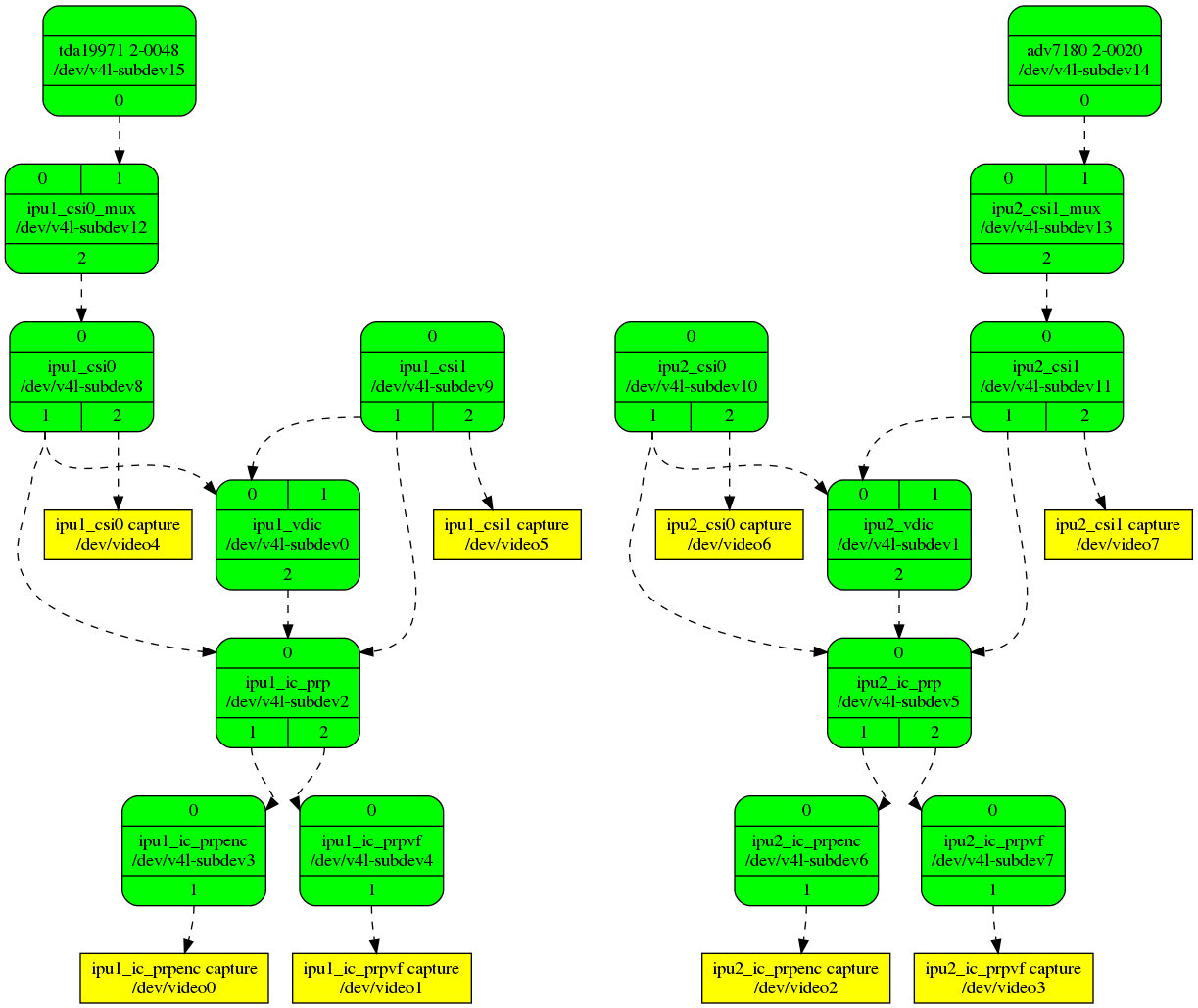
Are there other patches I need or different field formats above with 4.19? Do any of the other kernels work without patchsets that you know of between 4.16 and 4.19?
Steve, I haven't tried your 'media: imx: Switch to subdev notifiers' v7 series yet (https://patchwork.kernel.org/cover/10620967/) but can certainly do so if you need testing. I'm hoping those changes are all internal and won't affect the userspace pipeline configuration between kernel versions?
I'm also interested in looking at Philipps' 'i.MX media mem2mem scaler' series (https://patchwork.kernel.org/cover/10603881/) and am wondering if anyone has some example pipelines showing that in use. I'm hoping that is what is needed to be able to use hardware scaling/CSC and coda based encoding on streams from v4l2 PCI capture devices.
Lastly, is there any hope to use IMX6 hardware compositing to say stitch together multiple streams from a v4l2 PCI capture device into a single stream for coda based hw encoding?
Regards,
Tim
A message that is not in the archive (sent off-list or not yet received): [email protected]
Quoted 73 lines · Steve Longerbeam
Hi Tim,
On 10/17/18 1:38 PM, Tim Harvey wrote:
On Mon, Jun 4, 2018 at 1:58 AM Krzysztof Hałasa <[email protected]> wrote:
I've just tested the PAL setup: in currect situation (v4.17 + Steve's fix-csi-interlaced.2 + "media: adv7180: fix field type" + a small cheap PAL camera) the following produces bottom-first interlaced frames:
media-ctl -r -l '"adv7180 2-0020":0->"ipu2_csi1_mux":1[1],
"ipu2_csi1_mux":2->"ipu2_csi1":0[1], "ipu2_csi1":2->"ipu2_csi1 capture":0[1]'media-ctl -V "'adv7180 2-0020':0 [fmt:UYVY2X8/720x576 field:alternate]" media-ctl -V "'ipu2_csi1_mux':2 [fmt:UYVY2X8/720x576]" media-ctl -V "'ipu2_csi1':2 [fmt:AYUV32/720x576 field:interlaced]"
"adv7180 2-0020":0 [fmt:UYVY2X8/720x576 field:alternate]
"ipu2_csi1_mux":1 [fmt:UYVY2X8/720x576 field:alternate] "ipu2_csi1_mux":2 [fmt:UYVY2X8/720x576 field:alternate] "ipu2_csi1":0 [fmt:UYVY2X8/720x576 field:alternate] "ipu2_csi1":2 [fmt:AYUV32/720x576 field:interlaced]I think it would be great if these changes make their way upstream. The details could be refined then.
Krzysztof / Steve / Philipp,
I jumped back onto IMX6 video capture from the adv7180 the other day trying to help out a customer that's using mainline and found things are still not working right. Where is all of this at these days?
If I use v4.19 with Steves 'imx-media: Fixes for interlaced capture' v3 series (https://patchwork.kernel.org/cover/10626499/) I rolling/split (un-synchronized) video using:
# Setup links
media-ctl -r
media-ctl -l '"adv7180 2-0020":0 -> "ipu2_csi1_mux":1[1]' media-ctl -l '"ipu2_csi1_mux":2 -> "ipu2_csi1":0[1]' media-ctl -l '"ipu2_csi1":1 -> "ipu2_ic_prp":0[1]'
media-ctl -l '"ipu2_ic_prp":2 -> "ipu2_ic_prpvf":0[1]' media-ctl -l '"ipu2_ic_prpvf":1 -> "ipu2_ic_prpvfcapture":0[1]' # Configure pads
media-ctl -V "'adv7180 2-0020':0 [fmt:UYVY2X8/720x480]" media-ctl -V "'ipu2_csi1_mux':2 [fmt:UYVY2X8/720x480 field:interlaced]" media-ctl -V "'ipu2_csi1':1 [fmt:UYVY2X8/720x480 field:interlaced]" media-ctl -V "'ipu2_ic_prp':2 [fmt:UYVY2X8/720x480 field:interlaced]" media-ctl -V "'ipu2_ic_prpvf':1 [fmt:UYVY2X8/720x480 field:none]"# stream JPEG/RTP/UDP gst-launch-1.0 v4l2src device=/dev/video3 ! video/x-raw,format=UYVY ! jpegenc ! rtpjpegpay ! udpsink host=$SERVER port=$PORT ERROR: from element /GstPipeline:pipeline0/GstV4l2Src:v4l2src0: Device '/dev/video3' does not support progressive interlacingI'm doing the above on a Gateworks GW5404 IMXQ which has a tda1997x HDMI receiver sensor and an adv7180 Analog CVBS sensor - media graph is here: http://dev.gateworks.com/docs/linux/media/imx6q-gw54xx-media.png
Are there other patches I need or different field formats above with 4.19? Do any of the other kernels work without patchsets that you know of between 4.16 and 4.19?
First, the v3 series is out of date. Please apply the latest v5 posting of that series. See the
imx.rstdoc regarding field type negotiation, all pads starting at ipu2_csi1:1 should be 'seq-bt' or 'seq-tb' until the capture device, which should be set to 'interlaced' to enable IDMAC interweave. The ADV7180 now correctly sets its field type to alternate, whichimx-media-csi.ctranslates to seq-tb or seq-bt at its output pad.
Quoted 7 lines
See the SabreAuto examples in the doc.
For the rolling/split image problem, try the attached somewhat hackish patch. There used to be code in
imx-media-csi.cthat searched for the backend sensor and queries via .g_skip_frames whether the sensor produces bad frames at first stream-on. But there was push-back on that, so the attached is another approach that doesn't require searching for a backend sensor.
Steve,
Thanks - I hadn't noticed the updated series. I've built it on top of linux-media/master and tested with:
- Testing linux-media/master + your v5 now:
# Use simple interweaving
media-ctl -r
# Setup links
media-ctl -l '"adv7180 2-0020":0 -> "ipu2_csi1_mux":1[1]' media-ctl -l '"ipu2_csi1_mux":2 -> "ipu2_csi1":0[1]' media-ctl -l '"ipu2_csi1":2 -> "ipu2_csi1 capture":0[1]'
# Configure pads
media-ctl -V "'adv7180 2-0020':0 [fmt:UYVY2X8/720x480 field:seq-bt]" media-ctl -V "'ipu2_csi1_mux':2 [fmt:UYVY2X8/720x480]" media-ctl -V "'ipu2_csi1':1 [fmt:AYUV32/720x480]"
# Configure ipu_csi capture interface (/dev/video7) v4l2-ctl -d7 --set-fmt-video=field=interlaced_bt
# Stream JPEG/RTP/UDP
gst-launch-1.0 v4l2src device=/dev/video7 ! video/x-raw,format=UYVY ! jpegenc ! rtpjpegpay ! udpsink host=$SERVER port=5000 ^^^^^^ gives me ERROR: from element /GstPipeline:pipeline0/GstV4l2Src:v4l2src0: Device '/dev/video7' does not support progressive interlacing
I'm assuming this is because the format is still 'interlaced' - not sure how to stream this from GStreamer?
# Use VDIC motion compensated de-interlace
# Setup links
media-ctl -r
media-ctl -l "'adv7180 2-0020':0 -> 'ipu2_csi1_mux':1[1]" media-ctl -l "'ipu2_csi1_mux':2 -> 'ipu2_csi1':0[1]" media-ctl -l "'ipu2_csi1':1 -> 'ipu2_vdic':0[1]"
media-ctl -l "'ipu2_vdic':2 -> 'ipu2_ic_prp':0[1]" media-ctl -l "'ipu2_ic_prp':2 -> 'ipu2_ic_prpvf':0[1]" media-ctl -l "'ipu2_ic_prpvf':1 -> 'ipu2_ic_prpvf capture':0[1]" # Configure pads
media-ctl -V "'adv7180 2-0020':0 [fmt:UYVY2X8/720x480 field:seq-tb]" media-ctl -V "'ipu2_csi1_mux':2 [fmt:UYVY2X8/720x480]" media-ctl -V "'ipu2_csi1':1 [fmt:AYUV32/720x480]" media-ctl -V "'ipu2_vdic':2 [fmt:AYUV32/720x480 field:none]" media-ctl -V "'ipu2_ic_prp':2 [fmt:AYUV32/720x480 field:none]" media-ctl -V "'ipu2_ic_prpvf':1 [fmt:AYUV32/720x480 field:none]" # Stream JPEG/RTP/UDP
gst-launch-1.0 v4l2src device=/dev/video3 ! video/x-raw,format=UYVY ! jpegenc ! rtpjpegpay ! udpsink host=$SERVER port=5000 ^^^^^ streams but still shows sync issues
But once I add your patch it does resolve this (with the 10 frame skip). Strangely I don't recall having to do this way back when your imx-media driver was still going through revisions?
I haven't enabled FIM yet and don't recall how to do so from userspace now that its using V4L2 CID's. Is there a way to set V4L2_CID_IMX_FIM_NUM_SKIP, V4L2_CID_IMX_FIM_ICAP_CHANNEL and V4L2_CID_IMX_FIM_ICAP_EDGE from userspace to test?
Tim
Steve Longerbeam
maintainerQuoted 106 lines · Tim Harvey
Quoted 72 lines · Steve Longerbeam
Hi Tim,
On 10/17/18 1:38 PM, Tim Harvey wrote:
On Mon, Jun 4, 2018 at 1:58 AM Krzysztof Hałasa <[email protected]> wrote:
I've just tested the PAL setup: in currect situation (v4.17 + Steve's fix-csi-interlaced.2 + "media: adv7180: fix field type" + a small cheap PAL camera) the following produces bottom-first interlaced frames:
media-ctl -r -l '"adv7180 2-0020":0->"ipu2_csi1_mux":1[1],
"ipu2_csi1_mux":2->"ipu2_csi1":0[1], "ipu2_csi1":2->"ipu2_csi1 capture":0[1]'media-ctl -V "'adv7180 2-0020':0 [fmt:UYVY2X8/720x576 field:alternate]" media-ctl -V "'ipu2_csi1_mux':2 [fmt:UYVY2X8/720x576]" media-ctl -V "'ipu2_csi1':2 [fmt:AYUV32/720x576 field:interlaced]"
"adv7180 2-0020":0 [fmt:UYVY2X8/720x576 field:alternate]
"ipu2_csi1_mux":1 [fmt:UYVY2X8/720x576 field:alternate] "ipu2_csi1_mux":2 [fmt:UYVY2X8/720x576 field:alternate] "ipu2_csi1":0 [fmt:UYVY2X8/720x576 field:alternate] "ipu2_csi1":2 [fmt:AYUV32/720x576 field:interlaced]I think it would be great if these changes make their way upstream. The details could be refined then.
Krzysztof / Steve / Philipp,
I jumped back onto IMX6 video capture from the adv7180 the other day trying to help out a customer that's using mainline and found things are still not working right. Where is all of this at these days?
If I use v4.19 with Steves 'imx-media: Fixes for interlaced capture' v3 series (https://patchwork.kernel.org/cover/10626499/) I rolling/split (un-synchronized) video using:
# Setup links
media-ctl -r
media-ctl -l '"adv7180 2-0020":0 -> "ipu2_csi1_mux":1[1]' media-ctl -l '"ipu2_csi1_mux":2 -> "ipu2_csi1":0[1]' media-ctl -l '"ipu2_csi1":1 -> "ipu2_ic_prp":0[1]'
media-ctl -l '"ipu2_ic_prp":2 -> "ipu2_ic_prpvf":0[1]' media-ctl -l '"ipu2_ic_prpvf":1 -> "ipu2_ic_prpvfcapture":0[1]' # Configure pads
media-ctl -V "'adv7180 2-0020':0 [fmt:UYVY2X8/720x480]" media-ctl -V "'ipu2_csi1_mux':2 [fmt:UYVY2X8/720x480 field:interlaced]" media-ctl -V "'ipu2_csi1':1 [fmt:UYVY2X8/720x480 field:interlaced]" media-ctl -V "'ipu2_ic_prp':2 [fmt:UYVY2X8/720x480 field:interlaced]" media-ctl -V "'ipu2_ic_prpvf':1 [fmt:UYVY2X8/720x480 field:none]"# stream JPEG/RTP/UDP gst-launch-1.0 v4l2src device=/dev/video3 ! video/x-raw,format=UYVY ! jpegenc ! rtpjpegpay ! udpsink host=$SERVER port=$PORT ERROR: from element /GstPipeline:pipeline0/GstV4l2Src:v4l2src0: Device '/dev/video3' does not support progressive interlacingI'm doing the above on a Gateworks GW5404 IMXQ which has a tda1997x HDMI receiver sensor and an adv7180 Analog CVBS sensor - media graph is here: http://dev.gateworks.com/docs/linux/media/imx6q-gw54xx-media.png
Are there other patches I need or different field formats above with 4.19? Do any of the other kernels work without patchsets that you know of between 4.16 and 4.19?
First, the v3 series is out of date. Please apply the latest v5 posting of that series. See the
imx.rstdoc regarding field type negotiation, all pads starting at ipu2_csi1:1 should be 'seq-bt' or 'seq-tb' until the capture device, which should be set to 'interlaced' to enable IDMAC interweave. The ADV7180 now correctly sets its field type to alternate, whichimx-media-csi.ctranslates to seq-tb or seq-bt at its output pad.Quoted 7 lines
See the SabreAuto examples in the doc.
For the rolling/split image problem, try the attached somewhat hackish patch. There used to be code in
imx-media-csi.cthat searched for the backend sensor and queries via .g_skip_frames whether the sensor produces bad frames at first stream-on. But there was push-back on that, so the attached is another approach that doesn't require searching for a backend sensor.Steve,
Thanks - I hadn't noticed the updated series. I've built it on top of linux-media/master and tested with:
- Testing linux-media/master + your v5 now:
# Use simple interweaving
media-ctl -r
# Setup links
media-ctl -l '"adv7180 2-0020":0 -> "ipu2_csi1_mux":1[1]' media-ctl -l '"ipu2_csi1_mux":2 -> "ipu2_csi1":0[1]' media-ctl -l '"ipu2_csi1":2 -> "ipu2_csi1capture":0[1]'
# Configure pads
media-ctl -V "'adv7180 2-0020':0 [fmt:UYVY2X8/720x480 field:seq-bt]" media-ctl -V "'ipu2_csi1_mux':2 [fmt:UYVY2X8/720x480]" media-ctl -V "'ipu2_csi1':1 [fmt:AYUV32/720x480]"
# Configureipu_csicapture interface (/dev/video7) v4l2-ctl -d7 --set-fmt-video=field=interlaced_bt
# Stream JPEG/RTP/UDP
gst-launch-1.0 v4l2src device=/dev/video7 ! video/x-raw,format=UYVY ! jpegenc ! rtpjpegpay ! udpsink host=$SERVER port=5000 ^^^^^^ gives me ERROR: from element /GstPipeline:pipeline0/GstV4l2Src:v4l2src0: Device '/dev/video7' does not support progressive interlacing
Quoted 2 lines
I'm assuming this is because the format is still 'interlaced' - not sure how to stream this from GStreamer?
I don't know what v4l2src plugin is trying to say by "progressive interlacing" - that's meaningless, the video is either progressive or interlaced, not both.
But what is probably meant is v4l2src is trying to set field type at /dev/video7 to 'none', and complains that it can't. That's a bug in v4l2src, it should accept 'interlaced'.
I'm not getting this error in the version of v42lsrc I have been testing with, it must be something added recently. Haven't looked at the v4l2src git log yet.
Quoted 22 lines
# Use VDIC motion compensated de-interlace
# Setup links
media-ctl -r
media-ctl -l "'adv7180 2-0020':0 -> 'ipu2_csi1_mux':1[1]" media-ctl -l "'ipu2_csi1_mux':2 -> 'ipu2_csi1':0[1]" media-ctl -l "'ipu2_csi1':1 -> 'ipu2_vdic':0[1]"
media-ctl -l "'ipu2_vdic':2 -> 'ipu2_ic_prp':0[1]" media-ctl -l "'ipu2_ic_prp':2 -> 'ipu2_ic_prpvf':0[1]" media-ctl -l "'ipu2_ic_prpvf':1 -> 'ipu2_ic_prpvfcapture':0[1]" # Configure pads
media-ctl -V "'adv7180 2-0020':0 [fmt:UYVY2X8/720x480 field:seq-tb]" media-ctl -V "'ipu2_csi1_mux':2 [fmt:UYVY2X8/720x480]" media-ctl -V "'ipu2_csi1':1 [fmt:AYUV32/720x480]" media-ctl -V "'ipu2_vdic':2 [fmt:AYUV32/720x480 field:none]" media-ctl -V "'ipu2_ic_prp':2 [fmt:AYUV32/720x480 field:none]" media-ctl -V "'ipu2_ic_prpvf':1 [fmt:AYUV32/720x480 field:none]" # Stream JPEG/RTP/UDP
gst-launch-1.0 v4l2src device=/dev/video3 ! video/x-raw,format=UYVY ! jpegenc ! rtpjpegpay ! udpsink host=$SERVER port=5000 ^^^^^ streams but still shows sync issues
Quoted 3 lines
But once I add your patch it does resolve this (with the 10 frame skip). Strangely I don't recall having to do this way back when your imx-media driver was still going through revisions?
That's because the bad frame skipping existed in prior versions, I removed it due to negative feedback at
bf3cfaa712 ("media: staging/imx: get CSI bus type from nearest upstream entity")
Quoted 3 lines
I haven't enabled FIM yet and don't recall how to do so from userspace now that its using V4L2 CID's.
It's easy! From ipu2_csi1_capture device /dev/video7 from above pipeline:
v4l2-ctl -d7 --set-ctrl=fim_enable=1
Quoted 3 lines
Is there a way to set
V4L2_CID_IMX_FIM_NUM_SKIP,V4L2_CID_IMX_FIM_ICAP_CHANNELandV4L2_CID_IMX_FIM_ICAP_EDGEfrom userspace to test?
v4l2-ctl -d7 --set-ctrl=fim_num_skip=N
etc.
But input capture is not operational yet. I posted the patch to imx6 clocksource driver a while ago, no replies. I can forward that patch to you, it will require some machinations elsewhere in imx-media driver to enable icap support though IIRC. Note also that input capture also requires hardware support: the ADV7180 FIELD output pin must be routed to one of the imx6 input capture pads.
Steve
Quoted 124 lines · Steve Longerbeam
Quoted 106 lines · Tim Harvey
Quoted 72 lines · Steve Longerbeam
Hi Tim,
On 10/17/18 1:38 PM, Tim Harvey wrote:
On Mon, Jun 4, 2018 at 1:58 AM Krzysztof Hałasa <[email protected]> wrote:
I've just tested the PAL setup: in currect situation (v4.17 + Steve's fix-csi-interlaced.2 + "media: adv7180: fix field type" + a small cheap PAL camera) the following produces bottom-first interlaced frames:
media-ctl -r -l '"adv7180 2-0020":0->"ipu2_csi1_mux":1[1],
"ipu2_csi1_mux":2->"ipu2_csi1":0[1], "ipu2_csi1":2->"ipu2_csi1 capture":0[1]'media-ctl -V "'adv7180 2-0020':0 [fmt:UYVY2X8/720x576 field:alternate]" media-ctl -V "'ipu2_csi1_mux':2 [fmt:UYVY2X8/720x576]" media-ctl -V "'ipu2_csi1':2 [fmt:AYUV32/720x576 field:interlaced]"
"adv7180 2-0020":0 [fmt:UYVY2X8/720x576 field:alternate]
"ipu2_csi1_mux":1 [fmt:UYVY2X8/720x576 field:alternate] "ipu2_csi1_mux":2 [fmt:UYVY2X8/720x576 field:alternate] "ipu2_csi1":0 [fmt:UYVY2X8/720x576 field:alternate] "ipu2_csi1":2 [fmt:AYUV32/720x576 field:interlaced]I think it would be great if these changes make their way upstream. The details could be refined then.
Krzysztof / Steve / Philipp,
I jumped back onto IMX6 video capture from the adv7180 the other day trying to help out a customer that's using mainline and found things are still not working right. Where is all of this at these days?
If I use v4.19 with Steves 'imx-media: Fixes for interlaced capture' v3 series (https://patchwork.kernel.org/cover/10626499/) I rolling/split (un-synchronized) video using:
# Setup links
media-ctl -r
media-ctl -l '"adv7180 2-0020":0 -> "ipu2_csi1_mux":1[1]' media-ctl -l '"ipu2_csi1_mux":2 -> "ipu2_csi1":0[1]' media-ctl -l '"ipu2_csi1":1 -> "ipu2_ic_prp":0[1]'
media-ctl -l '"ipu2_ic_prp":2 -> "ipu2_ic_prpvf":0[1]' media-ctl -l '"ipu2_ic_prpvf":1 -> "ipu2_ic_prpvfcapture":0[1]' # Configure pads
media-ctl -V "'adv7180 2-0020':0 [fmt:UYVY2X8/720x480]" media-ctl -V "'ipu2_csi1_mux':2 [fmt:UYVY2X8/720x480 field:interlaced]" media-ctl -V "'ipu2_csi1':1 [fmt:UYVY2X8/720x480 field:interlaced]" media-ctl -V "'ipu2_ic_prp':2 [fmt:UYVY2X8/720x480 field:interlaced]" media-ctl -V "'ipu2_ic_prpvf':1 [fmt:UYVY2X8/720x480 field:none]"# stream JPEG/RTP/UDP gst-launch-1.0 v4l2src device=/dev/video3 ! video/x-raw,format=UYVY ! jpegenc ! rtpjpegpay ! udpsink host=$SERVER port=$PORT ERROR: from element /GstPipeline:pipeline0/GstV4l2Src:v4l2src0: Device '/dev/video3' does not support progressive interlacingI'm doing the above on a Gateworks GW5404 IMXQ which has a tda1997x HDMI receiver sensor and an adv7180 Analog CVBS sensor - media graph is here: http://dev.gateworks.com/docs/linux/media/imx6q-gw54xx-media.png
Are there other patches I need or different field formats above with 4.19? Do any of the other kernels work without patchsets that you know of between 4.16 and 4.19?
First, the v3 series is out of date. Please apply the latest v5 posting of that series. See the
imx.rstdoc regarding field type negotiation, all pads starting at ipu2_csi1:1 should be 'seq-bt' or 'seq-tb' until the capture device, which should be set to 'interlaced' to enable IDMAC interweave. The ADV7180 now correctly sets its field type to alternate, whichimx-media-csi.ctranslates to seq-tb or seq-bt at its output pad.Quoted 7 lines
See the SabreAuto examples in the doc.
For the rolling/split image problem, try the attached somewhat hackish patch. There used to be code in
imx-media-csi.cthat searched for the backend sensor and queries via .g_skip_frames whether the sensor produces bad frames at first stream-on. But there was push-back on that, so the attached is another approach that doesn't require searching for a backend sensor.Steve,
Thanks - I hadn't noticed the updated series. I've built it on top of linux-media/master and tested with:
- Testing linux-media/master + your v5 now:
# Use simple interweaving
media-ctl -r
# Setup links
media-ctl -l '"adv7180 2-0020":0 -> "ipu2_csi1_mux":1[1]' media-ctl -l '"ipu2_csi1_mux":2 -> "ipu2_csi1":0[1]' media-ctl -l '"ipu2_csi1":2 -> "ipu2_csi1capture":0[1]'
# Configure pads
media-ctl -V "'adv7180 2-0020':0 [fmt:UYVY2X8/720x480 field:seq-bt]" media-ctl -V "'ipu2_csi1_mux':2 [fmt:UYVY2X8/720x480]" media-ctl -V "'ipu2_csi1':1 [fmt:AYUV32/720x480]"
# Configureipu_csicapture interface (/dev/video7) v4l2-ctl -d7 --set-fmt-video=field=interlaced_bt
# Stream JPEG/RTP/UDP
gst-launch-1.0 v4l2src device=/dev/video7 ! video/x-raw,format=UYVY ! jpegenc ! rtpjpegpay ! udpsink host=$SERVER port=5000 ^^^^^^ gives me ERROR: from element /GstPipeline:pipeline0/GstV4l2Src:v4l2src0: Device '/dev/video7' does not support progressive interlacingQuoted 2 lines
I'm assuming this is because the format is still 'interlaced' - not sure how to stream this from GStreamer?
I don't know what v4l2src plugin is trying to say by "progressive interlacing" -
that's meaningless, the video is either progressive or interlaced, not both.But what is probably meant is v4l2src is trying to set field type at
/dev/video7
to 'none', and complains that it can't. That's a bug in v4l2src, it should accept
'interlaced'.
Quoted 5 lines
I'm not getting this error in the version of v42lsrc I have been testing with, it
must be something added recently. Haven't looked at the v4l2src git log yet.
Steve,
Your right the above was not working using GStreamer 1.14.1 from an Ubuntu Bionic rootfs but works fine Using GStreamer 1.8.3 on an Ubuntu Xenial rootfs. I'll ask about this with the GStreamer folk.
Quoted 28 lines
Quoted 23 lines
# Use VDIC motion compensated de-interlace
# Setup links
media-ctl -r
media-ctl -l "'adv7180 2-0020':0 -> 'ipu2_csi1_mux':1[1]" media-ctl -l "'ipu2_csi1_mux':2 -> 'ipu2_csi1':0[1]" media-ctl -l "'ipu2_csi1':1 -> 'ipu2_vdic':0[1]"
media-ctl -l "'ipu2_vdic':2 -> 'ipu2_ic_prp':0[1]" media-ctl -l "'ipu2_ic_prp':2 -> 'ipu2_ic_prpvf':0[1]" media-ctl -l "'ipu2_ic_prpvf':1 -> 'ipu2_ic_prpvfcapture':0[1]" # Configure pads
media-ctl -V "'adv7180 2-0020':0 [fmt:UYVY2X8/720x480 field:seq-tb]" media-ctl -V "'ipu2_csi1_mux':2 [fmt:UYVY2X8/720x480]" media-ctl -V "'ipu2_csi1':1 [fmt:AYUV32/720x480]" media-ctl -V "'ipu2_vdic':2 [fmt:AYUV32/720x480 field:none]" media-ctl -V "'ipu2_ic_prp':2 [fmt:AYUV32/720x480 field:none]" media-ctl -V "'ipu2_ic_prpvf':1 [fmt:AYUV32/720x480 field:none]" # Stream JPEG/RTP/UDP
gst-launch-1.0 v4l2src device=/dev/video3 ! video/x-raw,format=UYVY ! jpegenc ! rtpjpegpay ! udpsink host=$SERVER port=5000 ^^^^^ streams but still shows sync issuesQuoted 3 lines
But once I add your patch it does resolve this (with the 10 frame skip). Strangely I don't recall having to do this way back when your imx-media driver was still going through revisions?
Quoted 6 lines
That's because the bad frame skipping existed in prior versions, I removed it due to negative feedback at
bf3cfaa712("media: staging/imx: get CSI bus type from nearest upstream entity")
Thanks for that explanation.
I tested v4.15 (before the use of g_skip_frames was removed) and it still shows the same invalid sync with adv7180 issue because adv7180 doesn't implement g_skip_frames. Adding it with a quick patch to skip just 2 frames works fine:
drivers/media/i2c/adv7180.c +10 -0
@@ -187,6 +187,9 @@#define ADV7180_DEFAULT_CSI_I2C_ADDR 0x44#define ADV7180_DEFAULT_VPP_I2C_ADDR 0x42 +/* Initial number of frames to skip to avoid possible garbage */ +#define ADV7180_NUM_OF_SKIP_FRAMES 2 +#define V4L2_CID_ADV_FAST_SWITCH (V4L2_CID_USER_ADV7180_BASE + 0x00)struct adv7180_state ;
@@ -759,6 +762,13 @@ static int adv7180_g_mbus_config(struct v4l2_subdev *sd,return 0 ; } +static int adv7180_get_skip_frames (struct v4l2_subdev *sd,u32 *frames) +{ + *frames =ADV7180_NUM_OF_SKIP_FRAMES ; + +return 0 ; +} + static int adv7180_g_pixelaspect(struct v4l2_subdev *sd, struct
v4l2_fract *aspect)
{
struct adv7180_state *state = to_state(sd);
@@ -838,10 +848,15 @@ static const struct v4l2_subdev_pad_ops
adv7180_pad_ops = {
.get_fmt = adv7180_get_pad_format,};
+static const struct v4l2_subdev_sensor_ops adv7180_sensor_ops = {
+ .g_skip_frames = adv7180_get_skip_frames,
+};
+
static const struct v4l2_subdev_ops adv7180_ops = {
.core = &adv7180_core_ops,
.video = &adv7180_video_ops,
.pad = &adv7180_pad_ops,+ .sensor = &adv7180_sensor_ops,
};
static irqreturn_t adv7180_irq(int irq, void *devid)
So I still don't quite know what I was testing in the past that didn't show this adv7180 sync issue. I'm curious how Krzysztof dealt with it in his recent testing with v4.19. Its very likely that I was getting around the issue by using your FIM solution which perhaps is the right solution here as well. FIM also has the added benefit of resolving the issue (on the capture side not the sensor side) of sync breaking during loss of signal during streaming which I have had to resolve for people switching inputs during streaming.
Where was the negative feedback with the use of g_skip_frames? It looks to me like v4l2-subdev.h describes g_skip_frames specifically for this purpose as its described in the header as "number of frames to skip at stream start. This is needed for buggy sensors that generate faulty frames when they are turned on.".
Perhaps use of g_skip_frames should be added back to media/imx/imx-media-csi.c as well as an implementation of it added to adv7180?
Or perhaps FIM resolves both of these issue?
Quoted 8 lines
Quoted 4 lines
I haven't enabled FIM yet and don't recall how to do so from userspace now that its using V4L2 CID's.
It's easy! From
ipu2_csi1_capturedevice/dev/video7from above pipeline:
Quoted 9 lines
v4l2-ctl -d7 --set-ctrl=fim_enable=1
Quoted 3 lines
Is there a way to set
V4L2_CID_IMX_FIM_NUM_SKIP,V4L2_CID_IMX_FIM_ICAP_CHANNELandV4L2_CID_IMX_FIM_ICAP_EDGEfrom userspace to test?v4l2-ctl -d7 --set-ctrl=fim_num_skip=N
that doesn't work (using v4l2-ctl from git master on Oct 4) - you must be using a patched version of v4l2-ctl perhaps?
I wasn't sure if there was a v4l2-ctl usage that let you define CID's by number instead of by name?
Quoted 9 lines
etc.
But input capture is not operational yet. I posted the patch to imx6 clocksource driver a while ago, no replies. I can forward that patch to you, it will require some machinations elsewhere in imx-media driver to enable icap support though IIRC. Note also that input capture also requires hardware support: the ADV7180 FIELD output pin must be routed to one of the imx6
input capture pads.
Right, you explain clock capture pretty well in Documentation/media/v4l-drivers/imx.rst. I don't have VSYNC going to an input capture channel so I have to rely on FIM working via EOF interrupt.
Tim
Steve Longerbeam
maintainerQuoted 165 lines · Tim Harvey
Quoted 122 lines · Steve Longerbeam
Quoted 106 lines · Tim Harvey
Quoted 72 lines · Steve Longerbeam
Hi Tim,
On 10/17/18 1:38 PM, Tim Harvey wrote:
On Mon, Jun 4, 2018 at 1:58 AM Krzysztof Hałasa <[email protected]> wrote:
I've just tested the PAL setup: in currect situation (v4.17 + Steve's fix-csi-interlaced.2 + "media: adv7180: fix field type" + a small cheap PAL camera) the following produces bottom-first interlaced frames:
media-ctl -r -l '"adv7180 2-0020":0->"ipu2_csi1_mux":1[1],
"ipu2_csi1_mux":2->"ipu2_csi1":0[1], "ipu2_csi1":2->"ipu2_csi1 capture":0[1]'media-ctl -V "'adv7180 2-0020':0 [fmt:UYVY2X8/720x576 field:alternate]" media-ctl -V "'ipu2_csi1_mux':2 [fmt:UYVY2X8/720x576]" media-ctl -V "'ipu2_csi1':2 [fmt:AYUV32/720x576 field:interlaced]"
"adv7180 2-0020":0 [fmt:UYVY2X8/720x576 field:alternate]
"ipu2_csi1_mux":1 [fmt:UYVY2X8/720x576 field:alternate] "ipu2_csi1_mux":2 [fmt:UYVY2X8/720x576 field:alternate] "ipu2_csi1":0 [fmt:UYVY2X8/720x576 field:alternate] "ipu2_csi1":2 [fmt:AYUV32/720x576 field:interlaced]I think it would be great if these changes make their way upstream. The details could be refined then.
Krzysztof / Steve / Philipp,
I jumped back onto IMX6 video capture from the adv7180 the other day trying to help out a customer that's using mainline and found things are still not working right. Where is all of this at these days?
If I use v4.19 with Steves 'imx-media: Fixes for interlaced capture' v3 series (https://patchwork.kernel.org/cover/10626499/) I rolling/split (un-synchronized) video using:
# Setup links
media-ctl -r
media-ctl -l '"adv7180 2-0020":0 -> "ipu2_csi1_mux":1[1]' media-ctl -l '"ipu2_csi1_mux":2 -> "ipu2_csi1":0[1]' media-ctl -l '"ipu2_csi1":1 -> "ipu2_ic_prp":0[1]'
media-ctl -l '"ipu2_ic_prp":2 -> "ipu2_ic_prpvf":0[1]' media-ctl -l '"ipu2_ic_prpvf":1 -> "ipu2_ic_prpvfcapture":0[1]' # Configure pads
media-ctl -V "'adv7180 2-0020':0 [fmt:UYVY2X8/720x480]" media-ctl -V "'ipu2_csi1_mux':2 [fmt:UYVY2X8/720x480 field:interlaced]" media-ctl -V "'ipu2_csi1':1 [fmt:UYVY2X8/720x480 field:interlaced]" media-ctl -V "'ipu2_ic_prp':2 [fmt:UYVY2X8/720x480 field:interlaced]" media-ctl -V "'ipu2_ic_prpvf':1 [fmt:UYVY2X8/720x480 field:none]"# stream JPEG/RTP/UDP gst-launch-1.0 v4l2src device=/dev/video3 ! video/x-raw,format=UYVY ! jpegenc ! rtpjpegpay ! udpsink host=$SERVER port=$PORT ERROR: from element /GstPipeline:pipeline0/GstV4l2Src:v4l2src0: Device '/dev/video3' does not support progressive interlacingI'm doing the above on a Gateworks GW5404 IMXQ which has a tda1997x HDMI receiver sensor and an adv7180 Analog CVBS sensor - media graph is here: http://dev.gateworks.com/docs/linux/media/imx6q-gw54xx-media.png
Are there other patches I need or different field formats above with 4.19? Do any of the other kernels work without patchsets that you know of between 4.16 and 4.19?
First, the v3 series is out of date. Please apply the latest v5 posting of that series. See the
imx.rstdoc regarding field type negotiation, all pads starting at ipu2_csi1:1 should be 'seq-bt' or 'seq-tb' until the capture device, which should be set to 'interlaced' to enable IDMAC interweave. The ADV7180 now correctly sets its field type to alternate, whichimx-media-csi.ctranslates to seq-tb or seq-bt at its output pad.Quoted 7 lines
See the SabreAuto examples in the doc.
For the rolling/split image problem, try the attached somewhat hackish patch. There used to be code in
imx-media-csi.cthat searched for the backend sensor and queries via .g_skip_frames whether the sensor produces bad frames at first stream-on. But there was push-back on that, so the attached is another approach that doesn't require searching for a backend sensor.Steve,
Thanks - I hadn't noticed the updated series. I've built it on top of linux-media/master and tested with:
- Testing linux-media/master + your v5 now:
# Use simple interweaving
media-ctl -r
# Setup links
media-ctl -l '"adv7180 2-0020":0 -> "ipu2_csi1_mux":1[1]' media-ctl -l '"ipu2_csi1_mux":2 -> "ipu2_csi1":0[1]' media-ctl -l '"ipu2_csi1":2 -> "ipu2_csi1capture":0[1]'
# Configure pads
media-ctl -V "'adv7180 2-0020':0 [fmt:UYVY2X8/720x480 field:seq-bt]" media-ctl -V "'ipu2_csi1_mux':2 [fmt:UYVY2X8/720x480]" media-ctl -V "'ipu2_csi1':1 [fmt:AYUV32/720x480]"
# Configureipu_csicapture interface (/dev/video7) v4l2-ctl -d7 --set-fmt-video=field=interlaced_bt
# Stream JPEG/RTP/UDP
gst-launch-1.0 v4l2src device=/dev/video7 ! video/x-raw,format=UYVY ! jpegenc ! rtpjpegpay ! udpsink host=$SERVER port=5000 ^^^^^^ gives me ERROR: from element /GstPipeline:pipeline0/GstV4l2Src:v4l2src0: Device '/dev/video7' does not support progressive interlacingQuoted 2 lines
I'm assuming this is because the format is still 'interlaced' - not sure how to stream this from GStreamer?
I don't know what v4l2src plugin is trying to say by "progressive interlacing" -
that's meaningless, the video is either progressive or interlaced, not both.But what is probably meant is v4l2src is trying to set field type at
/dev/video7
to 'none', and complains that it can't. That's a bug in v4l2src, it should accept
'interlaced'.Quoted 5 lines
I'm not getting this error in the version of v42lsrc I have been testing with, it
must be something added recently. Haven't looked at the v4l2src git log yet.Steve,
Your right the above was not working using GStreamer 1.14.1 from an Ubuntu Bionic rootfs but works fine Using GStreamer 1.8.3 on an Ubuntu Xenial rootfs. I'll ask about this with the GStreamer folk.
Quoted 25 lines
Quoted 21 lines
# Use VDIC motion compensated de-interlace
# Setup links
media-ctl -r
media-ctl -l "'adv7180 2-0020':0 -> 'ipu2_csi1_mux':1[1]" media-ctl -l "'ipu2_csi1_mux':2 -> 'ipu2_csi1':0[1]" media-ctl -l "'ipu2_csi1':1 -> 'ipu2_vdic':0[1]"
media-ctl -l "'ipu2_vdic':2 -> 'ipu2_ic_prp':0[1]" media-ctl -l "'ipu2_ic_prp':2 -> 'ipu2_ic_prpvf':0[1]" media-ctl -l "'ipu2_ic_prpvf':1 -> 'ipu2_ic_prpvfcapture':0[1]" # Configure pads
media-ctl -V "'adv7180 2-0020':0 [fmt:UYVY2X8/720x480 field:seq-tb]" media-ctl -V "'ipu2_csi1_mux':2 [fmt:UYVY2X8/720x480]" media-ctl -V "'ipu2_csi1':1 [fmt:AYUV32/720x480]" media-ctl -V "'ipu2_vdic':2 [fmt:AYUV32/720x480 field:none]" media-ctl -V "'ipu2_ic_prp':2 [fmt:AYUV32/720x480 field:none]" media-ctl -V "'ipu2_ic_prpvf':1 [fmt:AYUV32/720x480 field:none]" # Stream JPEG/RTP/UDP
gst-launch-1.0 v4l2src device=/dev/video3 ! video/x-raw,format=UYVY ! jpegenc ! rtpjpegpay ! udpsink host=$SERVER port=5000 ^^^^^ streams but still shows sync issuesQuoted 3 lines
But once I add your patch it does resolve this (with the 10 frame skip). Strangely I don't recall having to do this way back when your imx-media driver was still going through revisions?
Quoted 6 lines
That's because the bad frame skipping existed in prior versions, I removed it due to negative feedback at
bf3cfaa712("media: staging/imx: get CSI bus type from nearest upstream entity")
Quoted 6 lines
Thanks for that explanation.
I tested v4.15 (before the use of
g_skip_frameswas removed) and it still shows the same invalid sync with adv7180 issue because adv7180 doesn't implementg_skip_frames. Adding it with a quick patch to skip just 2 frames works fine:
Sorry right, forgot to mention adv7180.c needs to implement .g_skip_frames. The below patch is the right idea.
Quoted 47 lines
drivers/media/i2c/adv7180.c +10
-0@@ -187,6 +187,9 @@#define ADV7180_DEFAULT_CSI_I2C_ADDR 0x44#define ADV7180_DEFAULT_VPP_I2C_ADDR 0x42 +/* Initial number of frames to skip to avoid possible garbage */ +#define ADV7180_NUM_OF_SKIP_FRAMES 2 +#define V4L2_CID_ADV_FAST_SWITCH (V4L2_CID_USER_ADV7180_BASE + 0x00)struct adv7180_state ;@@ -759,6 +762,13 @@ static int adv7180_g_mbus_config(struct v4l2_subdev *sd,return 0 ; } +static int adv7180_get_skip_frames (struct v4l2_subdev *sd,u32 *frames) +{ + *frames =ADV7180_NUM_OF_SKIP_FRAMES ; + +return 0 ; +} +static int adv7180_g_pixelaspect (struct v4l2_subdev *sd,struct v4l2_fract *aspect) {struct adv7180_state *state = to_state(sd);drivers/media/i2c/adv7180.c +5
-0@@ -838,10 +848,15 @@ static const struct v4l2_subdev_pad_ops adv7180_pad_ops = { .get_fmt = adv7180_get_pad_format, }; +static const struct v4l2_subdev_sensor_ops adv7180_sensor_ops = { + .g_skip_frames = adv7180_get_skip_frames, +}; +static const struct v4l2_subdev_ops adv7180_ops = { .core = &adv7180_core_ops, .video = &adv7180_video_ops, .pad = &adv7180_pad_ops, + .sensor = &adv7180_sensor_ops, };static
irqreturn_tadv7180_irq(int irq, void *devid)
Quoted 8 lines
So I still don't quite know what I was testing in the past that didn't show this adv7180 sync issue. I'm curious how Krzysztof dealt with it in his recent testing with v4.19. Its very likely that I was getting around the issue by using your FIM solution which perhaps is the right solution here as well. FIM also has the added benefit of resolving the issue (on the capture side not the sensor side) of sync breaking during loss of signal during streaming which I have had to resolve for people switching inputs during streaming.
Yes, FIM is another solution for dealing with the unstable initial bt.656 sync codes. But with the current drawback that the EOF method is subject to irq latency error, so it's possible to trigger false FIM events by, say attaching a USB device creating a flurry of IO. Also FIM requires participation from userland (send a stream restart in response to the FIM event), and a gstreamer pipeline, e.g. v4l2src won't do this.
Quoted 6 lines
Where was the negative feedback with the use of
g_skip_frames? It looks to me likev4l2-subdev.hdescribesg_skip_framesspecifically for this purpose as its described in the header as "number of frames to skip at stream start. This is needed for buggy sensors that generate faulty frames when they are turned on.".
The push-back was not about using g_skip_frames. It was in reaching through the media graph to search for the backend sensor.
Quoted 4 lines
Perhaps use of
g_skip_framesshould be added back tomedia/imx/imx-media-csi.cas well as an implementation of it added to adv7180?
Sure, I will look into trying again. It would have to be a chained approach, similar to how .s_steam is chained.
Quoted 2 lines
Or perhaps FIM resolves both of these issue?
It does but with the above drawbacks mentioned.
Quoted 12 lines
Quoted 12 lines
Quoted 3 lines
I haven't enabled FIM yet and don't recall how to do so from userspace now that its using V4L2 CID's.
It's easy! From
ipu2_csi1_capturedevice/dev/video7from above pipeline:v4l2-ctl -d7 --set-ctrl=fim_enable=1
Quoted 3 lines
Is there a way to set
V4L2_CID_IMX_FIM_NUM_SKIP,V4L2_CID_IMX_FIM_ICAP_CHANNELandV4L2_CID_IMX_FIM_ICAP_EDGEfrom userspace to test?
Quoted 7 lines
Quoted 2 lines
v4l2-ctl -d7 --set-ctrl=fim_num_skip=N
that doesn't work (using v4l2-ctl from git master on Oct 4) - you must be using a patched version of v4l2-ctl perhaps?
I wasn't sure if there was a v4l2-ctl usage that let you define CID's by number instead of by name?
I'm not using a patched version, referencing controls by name has been part of v4l2-ctl for a long time AFAIK. But remember FIM controls are only available from the ipu_csi capture device nodes ATM, not the scaling/CSC/rotation ipu_ic_prp pipelines.
Steve
Quoted 16 lines
Quoted 10 lines
etc.
But input capture is not operational yet. I posted the patch to imx6 clocksource driver a while ago, no replies. I can forward that patch to you, it will require some machinations elsewhere in imx-media driver to enable icap support though IIRC. Note also that input capture also requires hardware support: the ADV7180 FIELD output pin must be routed to one of the imx6
input capture pads.Right, you explain clock capture pretty well in
Documentation/media/v4l-drivers/imx.rst. I don't have VSYNC going to an input capture channel so I have to rely on FIM working via EOF interrupt.Tim
Philipp Zabel
maintainerOn Wed, 2018-10-17 at 14:33 -0700, Steve Longerbeam wrote:
[...]
Quoted 10 lines
Quoted 6 lines
I'm also interested in looking at Philipps' 'i.MX media mem2mem scaler' series (https://patchwork.kernel.org/cover/10603881/) and am wondering if anyone has some example pipelines showing that in use. I'm hoping that is what is needed to be able to use hardware scaling/CSC and coda based encoding on streams from v4l2 PCI capture devices.
Yes exactly, I'll let Philipp answer. I'm also interested in the gstreamer element needed to make use of h/w scaling/CSC from the mem2mem device.
GStreamer should create a GstV4l2Transform element "v4l2videoXconvert" for the /dev/videoX mem2mem scaler device.
Quoted 8 lines
For coda encode, my understanding is that the v4l2h264enc element will make use of coda h/w encode, something like this example which encodes to a h.264 file (I haven't verified this works, still need to build a later version of gst-plugins-good that has the vl2h264enc support):
gst-launch-1.0 v4l2src io-mode=dmabuf device=/dev/video$dev !\ "video/x-raw,format=$fmt,width=$w,height=$h" ! \
v4l2h264enc output-io-mode=dmabuf-import ! queue ! matroskamux ! \
filesink location=$filename
With GStreamer 1.14 the capture side io-mode parameter is not necessary anymore to export dmabufs.
The output-io-mode parameter is currently still needed though, as the V4L2 elements don't support negotiating dmabuf using caps via video/x-raw(memory:DMABuf) yet.
Also there's a h264parse missing to convert the video/x-h264,stream- format=byte-stream from v4l2h264enc to video/x-h264,stream-format=avc as required by matroskamux:
gst-launch-1.0 \ v4l2src ! \ v4l2video10convert output-io-mode=dmabuf-import ! \ v4l2h264enc output-io-mode=dmabuf-import ! \ h264parse ! \ matroskamux ! \ filesink
Quoted 6 lines
Quoted 3 lines
Lastly, is there any hope to use IMX6 hardware compositing to say stitch together multiple streams from a v4l2 PCI capture device into a single stream for coda based hw encoding?
The IPUv3 Image Converter has a combining unit that can combine pixels from two images, but there is no support for that in mainline AFAIK.
I don't think there is any V4L2 API for compositing yet.
regards
Philipp
Hi Philipp,
Quoted 3 lines · Philipp Zabel
My understanding is that the CCIR codes for height == 480 (NTSC) currently capture the second field (top) first, assuming that for NTSC the EAV/SAV codes are bottom-field-first.
2a38014: 010D07DF 00040596
SA EA SB EB SB EB
D07DF: 001 101 (0000) 011 111 011 111 (field 0)
40596: 000 100 (0000) 010 110 010 110 (field 1)
The codes apparently are 1=EAV (0=SAV), field#, 1=blanking. Now BT.656 doesn't say a word about top and bottom fields. There are just fields 1 and 2. So yes, the CCIR_CODE* registers currently seem to swap the fields. It also depends on the ADV7180 sending correct codes based on the even/odd analog fields. Interesting.
Quoted 6 lines
So the CSI captures
SEQ_TBfor both PAL and NTSC: The three-bit values in CCIR_CODE_2/3 are in H,V,F order, and the NTSC case has F=1 for the field that is captured first, where F=1 is the field that is marked as second field on the wire, so top. Which means that the captured frame has two fields captured across frame boundaries, which might be problematic if the source data was originally progressive.
Exactly.
Especially if the complete frame is then passed straight to the display, with the user treating it as progressive (which it isn't anymore).
Quoted 6 lines
Quoted 3 lines
My guess is the CSI is skipping
the first incomplete line (half-line - the first visible line has full length) and BT becomes TB.That wouldn't make BT TB though, if we'd still capture the bottom field (minus its first half line) first?
Well, the entire frame would shift up a line, the bottom "field" would become top and vice versa. This would effectively make BT->TB and TB->BT.
Quoted 6 lines
Quoted 3 lines
It seems writing to the CCIR_CODE_[12] registers does the trick, though (the captured frames aren't correct and have the lines swapped in pairs because t/b field pointers aren't correctly set).
What are you writing exactly?
0x01040596toCCIR_CODE_1and0x000d07dftoCCIR_CODE_2?
Yes.
Quoted 3 lines
That is what I would expect to capture
SEQ_BTfor NTSC
data, and the IPU could interweave this intoINTERLACED_BT, correctly if we fixipu_cpmem_interlaced_scanto allow negative offsets.
Exactly.
Signature · 4 lines
Krzysztof Halasa

Industrial Research Institute for Automation and Measurements PIAP
Al. Jerozolimskie 202, 02-486 Warsaw, Poland
Steve Longerbeam
maintainerHi Philipp,
Quoted 25 lines · Philipp Zabel
On Thu, 2018-05-24 at 11:12 -0700, Steve Longerbeam wrote:
[...]Quoted 23 lines
Quoted 9 lines
The following is required as well. Now the question is why we can't skip writing those odd UV rows. Anyway, with these 2 changes, I get a stable NTSC (and probably PAL) interlaced video stream.
The manual says: Reduce Double Read or Writes (RDRW):
This bit is relevant for YUV4:2:0 formats. For write channels:
U and V components are not written to odd rows.How could it be so? With YUV420, are they normally written?
Well, given that this bit exists, and assuming I understand it correctly (1),
I guess the U and V components for odd rows normally are placed on the AXI bus. Which is a total waste of bus bandwidth because in 4:2:0, the U and V components are the same for odd and even rows.In other words for writing 4:2:0 to memory, this bit should _always_ be set.
(1) OTOH I don't really understand what this bit is trying to say. Whether this bit is set or not, the data in memory is correct for planar 4:2:0: y plane buffer followed by U plane of 1/4 size (decimated by 2 in width and height), followed by Y plane of 1/4 size.
Quoted 3 lines
Quoted 2 lines
So I assume it is saying that the IPU normally places U/V components on the AXI bus for odd rows, that are identical to the even row values.
Whether they are identical depends on the input format.
Right, this is the part I was missing, thanks for clarifying. The even and odd chroma rows coming into the IDMAC from the CSI (or IC) may not be identical if the CSI has captured 4:4:4 (or 4:2:2 yeah? 4:2:2 is only decimated in width not height).
But still, when the IDMAC has finished pixel packing/unpacking and is writing 4:2:0 to memory, it should always skip overwriting the even rows with the odd rows, whether or not it has received identical chroma even/odd lines from the CSI.
Unless interweave is enabled :) See below.
Quoted 10 lines
The IDMAC always gets fed AYUV32 from the CSI or IC.
If the CSI captures YUV 4:2:x, odd and even lines will have the same chroma values. But if the CSI captures YUV 4:4:4 (or RGB, fed through the IC), we can have AYUV32 input with different chroma values on even and odd lines.
In that case the IPU just writes the even chroma line and then overwrites it with the odd line, unless the double write reduction bit is set.
Quoted 3 lines
Quoted 2 lines
IOW somehow those identical odd rows are dropped before writing to the U/V planes in memory.
potentially identical.
Right.
Quoted 6 lines
Quoted 2 lines
Philipp please chime in if you have something to add here.
I suppose the bit could be used to choose to write the chroma values of odd instead of even lines for 4:4:4 inputs, at the cost of increased memory bandwidth usage.
Quoted 6 lines
Quoted 4 lines
Steve
Quoted 2 lines
OTOH it seems that not only UV is broken with this bit set. Y is broken as well.
Maybe scanline interlave and double write reduction can't be used at the same time?
Yes, I just verified that. I went back to the SabreLite with the progressive output OV5640, and double-write-reduction for 4:2:0 capture works fine, the images are correct.
Steve
Philipp Zabel
maintainerQuoted 32 lines · Steve Longerbeam
Hi Philipp,
Quoted 29 lines · Philipp Zabel
On Thu, 2018-05-24 at 11:12 -0700, Steve Longerbeam wrote:
[...]Quoted 26 lines
Quoted 9 lines
The following is required as well. Now the question is why we can't skip writing those odd UV rows. Anyway, with these 2 changes, I get a stable NTSC (and probably PAL) interlaced video stream.
The manual says: Reduce Double Read or Writes (RDRW):
This bit is relevant for YUV4:2:0 formats. For write channels:
U and V components are not written to odd rows.How could it be so? With YUV420, are they normally written?
Well, given that this bit exists, and assuming I understand it correctly (1),
I guess the U and V components for odd rows normally are placed on the AXI bus. Which is a total waste of bus bandwidth because in 4:2:0, the U and V components are the same for odd and even rows.In other words for writing 4:2:0 to memory, this bit should _always_ be set.
(1) OTOH I don't really understand what this bit is trying to say. Whether this bit is set or not, the data in memory is correct for planar 4:2:0: y plane buffer followed by U plane of 1/4 size (decimated by 2 in width and height), followed by Y plane of 1/4 size.
So I assume it is saying that the IPU normally places U/V components on the AXI bus for odd rows, that are identical to the even row values.
Quoted 6 lines
Quoted 1 line
Whether they are identical depends on the input format.
Right, this is the part I was missing, thanks for clarifying. The even and odd chroma rows coming into the IDMAC from the CSI (or IC) may not be identical if the CSI has captured 4:4:4 (or 4:2:2 yeah? 4:2:2 is only decimated in width not height).
Oh right, the MEDIA_BUS_FMT_YUYV variants are pretty common, they have chroma for all the lines. Actually, that is my default test case (1080p YUYV from TC358743), usually written to NV12 so it can be encoded.
Quoted 6 lines
But still, when the IDMAC has finished pixel packing/unpacking and is writing 4:2:0 to memory, it should always skip overwriting the even rows with the odd rows, whether or not it has received identical chroma even/odd lines from the CSI.
Unless interweave is enabled :) See below.
Agreed.
regards
Philipp
Quoted 11 lines · Steve Longerbeam
Quoted 5 lines
The manual says: Reduce Double Read or Writes (RDRW):
This bit is relevant for YUV4:2:0 formats. For write channels:
U and V components are not written to odd rows.How could it be so? With YUV420, are they normally written?
Well, given that this bit exists, and assuming I understand it correctly (1),
I guess the U and V components for odd rows normally are placed on the AXI bus. Which is a total waste of bus bandwidth because in 4:2:0, the U and V components are the same for odd and even rows.
Right. Now, the AXI bus is just a "memory bus", it's a newer version of the AHB. One can't simply "place data" on AXI, it must be a write to a specific address, and the data will end up in RAM (assuming the configuration is sane). How can we have two possible data formats (with and without the RDRW bit) with fixed image format (420-type) is beyond me.
Quoted 7 lines
Commits
14330d7f08("media: imx: csi: enable double write reduction")b54a5c2dc8("media: imx: prpencvf: enable double write reduction")should be reverted for now, until the behavior of this bit is better understood.
I agree.
I have dumped a raw frame (720 x 480 NV12 frame size 518400 from interlaced NTSC camera), with the RDRW bit set.
The Y plane contains, well, valid Y data (720 x 480 bytes).
The color plane (360 pixels x 240 line pairs * 2 colors) has every other line pair zeroed. I.e., there is a 720-byte line pair filled with valid UV data, then there are 720 zeros (360 zeroed UV pairs). Then there is valid UV data and so on.
Not sure what could it be for. Some weird sort of YUV 4:1:0? I guess we don't want it ATM.
WRT ADV7180 field format:
Quoted 11 lines
This might be a good time to bring up the fact that the ADV7180 driver is wrong
to set output to "interlaced". The ADV7180 does not transmit top lines interlaced
with bottom lines. It transmits all top lines followed by all bottom lines (or
vice-versa), i.e. it should be eitherV4L2_FIELD_SEQ_TBorV4L2_FIELD_SEQ_BT.
It can also be set toV4L2_FIELD_ALTERNATE, and then it is left up to downstream
elements to determine field order (TB or BT).
Right. ADV7180, AFAIK, doesn't have the hardware (frame buffer) to get two interlaced fields and merge them to form a complete frame. It simply transforms the incoming analog signal into binary data stream. This issue should be fixed.
Thanks for your work,
Signature · 4 lines
Krzysztof Halasa

Industrial Research Institute for Automation and Measurements PIAP
Al. Jerozolimskie 202, 02-486 Warsaw, Poland
Hey,
* Krzysztof Hałasa, 2018-05-21 10:09:
Quoted 2 lines
I wonder... perhaps to get an interlaced frame I need to route the data through VDIC (
ipu2_vdic, the deinterlacer)?
I have the same problem here, though not investigated nearly as thoroughly as you did, down to the IPU register values. But I also get the images stable (PAL and NTSC) with every other line green when de-interlacing via PRPVF/IDMAC. Unfortunately, de-interlacing via VDIC doesn't work much better:
While the image seems properly de-interlaced and colored then, it keeps jumping up an down a few times per second, because the first line isn't always included in the image. (The pipeline is the same as Tim showed under "using VDIC to deinterlace").
That's with the adv7180 and an iMX6Q with kernel 4.14.35.
m.
Signature · 7 lines
Melchior Franz | Entwicklung Software

GINZINGER ELECTRONIC SYSTEMS GMBH

Tel.: +43 7723 5422 156
Mail: [email protected]
Web: www.ginzinger.com
Hey,
* Krzysztof Hałasa, 2018-05-10 10:19:
Quoted 2 lines
I'm using analog PAL video in on GW53xx/54xx boards (through ADV7180 chip and 8-bit parallel CSI input, with (presumably) BT.656).
[...]
Quoted 7 lines
First, I can't find a way to change to PAL standard.
*s_std()doesn't propagate from "ipu2_csi1capture" through "ipu2_csi1_mux" to adv7180.For now I have just changed the default:
drivers/media/i2c/adv7180.c static int adv7180_probe(struct i2c_client *client, · line 1327
Quoted 8 lines
drivers/media/i2c/adv7180.c +1
-1@@ -1320,7 +1321,7 @@ static int adv7180_probe(struct i2c_client *client, state->irq = client->irq;mutex_init (&state->mutex); - state->curr_norm =V4L2_STD_NTSC ; + state->curr_norm =V4L2_STD_PAL ;if (state->chip_info->flags &ADV7180_FLAG_RESET_POWERED ) state->powered = true;else
JFTR: I had a similar problem on a board, where there can either be an NTSC *or* a PAL camera, so I had to make it dynamic.
drivers/media/i2c/adv7180.c +20 -0
@@ -1320,7 +1320,27 @@ static int adv7180_probe(struct i2c_client *client, state->irq = client->irq;mutex_init (&state->mutex); + +/* check if video standard (PAL, NTSC) has already been determined */ + ret =adv7180_read (state,ADV7180_REG_STATUS1 ); +if (ret <0 ) { + ret = -EIO ; + goto err_unregister_vpp_client; + } + state->curr_norm =V4L2_STD_NTSC ; +if (ret &ADV7180_STATUS1_IN_LOCK ) { + ret = (ret >>4 ) &0x07 ;/* autodetection result (AD_RESULT) */ +if (ret >=2 && ret <=4 ) { +v4l_info (client,"locked on PAL signal\n" ); + state->curr_norm =V4L2_STD_PAL ; + }else { +v4l_info (client,"locked on NTSC signal\n" ); + } + }else { +v4l_info (client,"no signal, using NTSC\n" ); + } +if (state->chip_info->flags &ADV7180_FLAG_RESET_POWERED ) state->powered = true;else
m.
Melchior Franz | Entwicklung Software
GINZINGER ELECTRONIC SYSTEMS GMBH
Tel.: +43 7723 5422 156
Mail: [email protected]
Web: www.ginzinger.com
________________________________________
Ginzinger electronic systems GmbH
Gewerbegebiet Pirath 16
4952 Weng im Innkreis
www.ginzinger.com
Firmenbuchnummer: FN 364958d
Firmenbuchgericht: Ried im Innkreis
UID-Nr.: ATU66521089