Unstable speed or correct?
Hi folks :-)
I've a raid6 sw (6disks from 1.5Tb) asus p5b-e.
Yestarday I done some checks tests and I see this:
is it correct (read) speed or is there a problem?
The read line oscillate and I don't understand if there a problem.
hdparm, smartctl and other diagnostic tool doesn't report any problem..
raid6 is correctly runs.
Any idea?
thanks!
Pol
Quoted 3 lines
What benchmark program did you use for the test? Also, was there any other programs running at the same time? Was the machine in single-user (init 1) state?
hello :-)
dd if=/dev/zero of=/share/raid6/1Gb bs=1024 count=1000000 1000000+0 records in
1000000+0 records out
1024000000 bytes (1.0 GB) copied, 12.1632 s, 84.2 MB/s
dd if=/dev/zero of=/share/raid6/10Gb bs=1024 count=10000000 10000000+0 records in
10000000+0 records out
10240000000 bytes (10 GB) copied, 142.021 s, 72.1 MB/s
That graphic with palimptest (gnome-disk-utility).
No other applications uses raid (I'm on init 2 but samba, ftp, and other daemons are off)
iostat not show me any activity by raid, so I think there is not programs that runs on array.
thanks :-)
Pol
Hello Pol.
Quoted 12 lines · Pol Hallen
Quoted 4 lines
What benchmark program did you use for the test? Also, was there any other programs running at the same time? Was the machine in single-user (init 1) state?
hello :-)
dd if=/dev/zero of=/share/raid6/1Gb bs=1024 count=1000000 1000000+0 records in
1000000+0 records out
1024000000 bytes (1.0 GB) copied, 12.1632 s, 84.2 MB/s
Quoted 4 lines
dd if=/dev/zero of=/share/raid6/10Gb bs=1024 count=10000000 10000000+0 records in
10000000+0 records out
10240000000 bytes (10 GB) copied, 142.021 s, 72.1 MB/s
The above dd's seem much more consistent than the graph.
Quoted 1 line
That graphic with palimptest (gnome-disk-utility).
I'm not familiar with this program (BTW, you mean "palimpsest", right?), and I've run it for the first time on my system (M4A785-M with Phenon-II X6 1055T, 4GB RAM, with 3 x ST31500541AS 1.5TB 3.5" 5900RPM HDs plugged directly onto the motherboard's SB700 SATA controller, running Ubuntu Lucid Lynx 10.04.1 LTS, kernel 2.6.32-32-generic; the 3 HDs are mounted as a RAID5 md device and dedicated to user data-only storage and mounted as /usr2, the root filesystem runs on a separate SSD disk). Here's my palimpsest graph:
http://durval.com/felwithe_raid5_palimpsest_ro_20110609.jpg
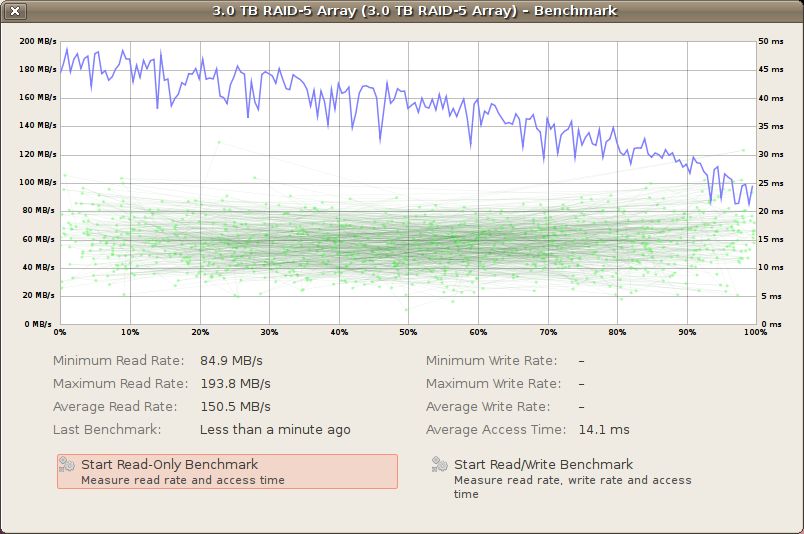
Note that it shows much less "jitter" (local variation) than your graph.
Quoted 5 lines
No other applications uses raid (I'm on init 2 but samba, ftp, and other daemons are off)
iostat not show me any activity by raid, so I think there is not programs that runs on array.
This is very strange... concurrent access by other programs would certainly explain the variation on your graph.
I would try running some other benchmark that can be run on single-user state to see if the variation remains. If it does, then I would conclude that there's something wrong (possibly on your hardware, like a failing disk doing retries/reseeks).
Cheers,
--
Durval Menezes.
Quoted 4 lines
thanks :-)
Pol
--
To unsubscribe from this list: send the line "unsubscribe linux-raid" in the body of a message to [email protected]
More majordomo info at http://vger.kernel.org/majordomo-info.html
Quoted 2 lines
I'm not familiar with this program (BTW, you mean "palimpsest", right?)
yep :-)
Quoted 1 line
I would try running some other benchmark
iozone3 and bonnie?
Do u known other bench programs?
Quoted 2 lines
that can be run on
single-user
next day I'll try do these benchs to init 1
Quoted 3 lines
if it does, then I
would conclude that there's something wrong (possibly on your hardware, like a failing disk doing retries/reseeks).
I already examined all disks by smartclt, hdparm and seem there aren't problems :-/
Is ram a possible problem?
How hardware test I'll do?
thanks :-)
Pol
init 1 raid 6 performance:
http://fuckaround.org/nuvola/?p=17
iostat md0 -x 1:
Device: rrqm/s wrqm/s r/s w/s rsec/s wsec/s avgrq-sz
avgqu-sz await svctm %util
md0 0.00 0.00 0.00 0.00 0.00 0.00 0.00
0.00 0.00 0.00 0.00
:-(((
Pol