Add a blog post about micro:bit emulation
PATCH 1/1 Add a blog post about micro:bit emulation
QEMU 4.0 ships the core micro:bit emulation that was implemented during Outreachy and GSoC 2018. This blog posts explains how to use it and describes the current status.
---
 _posts/2019-05-21-microbit.md | 132 ++++++++++++++++++++++++++++++++++
 screenshots/makecode.png      | Bin 0 -> 55960 bytes
 2 files changed, 132 insertions(+)
 create mode 100644 _posts/2019-05-21-microbit.md
 create mode 100644 screenshots/makecode.png
_posts/2019-05-21-microbit.md new file +132 -0
@@ -0,0 +1,132 @@ +--- +layout: post +title: "QEMU 4.0 adds micro:bit emulation support" +date: 2019-05-21 07:45:00 +0200 +categories: ['qemu 4', microbit, gsoc, outreachy, internships] +--- +[micro:bit](http://microbit.org/) emulation support is available from QEMU 4.0 +onwards and can be used for low-level software testing and development. Unlike +existing micro:bit simulators, QEMU performs full-system emulation and actually +runs the same ARM code as the real hardware. This blog post explains what +full-system emulation means and why QEMU is now a useful tool for developing +micro:bit software. + +The [micro:bit is a tiny ARM board](https://tech.microbit.org/hardware/) +designed for teaching. It is increasingly being used around the world to +expose children to computers, programming, and electronics in a low-cost way +with an active online community that shares project ideas, lesson plans, and +programming tips. + +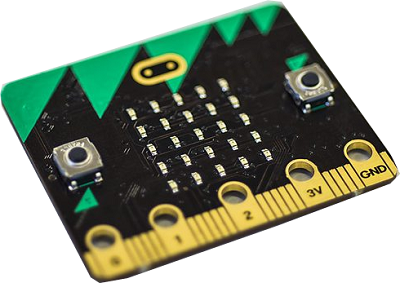 + +## Simulators and emulators +*Simulators* are used for many tasks from mobile app development to +performance analysis of computer hardware. It is possible to develop code +using a simulator without having access to real hardware. Oftentimes using a +simulator is more convenient than flashing and debugging programs on real +hardware. + +*Emulators* allow programs written for one computer system to run on a +different computer system. They use techniques like [machine code +interpreters](https://en.wikipedia.org/wiki/Interpreter_%28computing%29) and +[just-in-time +compilers](https://en.wikipedia.org/wiki/Just-in-time_compilation) to execute +guest programs that do not run natively on the host computer. Each CPU +instruction must be correctly implemented by the emulator so it can run guest +software. + +## How existing micro:bit simulators work +Simulators can be implemented at various layers in the software stack. The +[MakeCode editor](https://makecode.microbit.org/#editor) for JavaScript +development includes a micro:bit simulator: + + + +This simulator does not execute any ARM code and is therefore not running +the same CPU instructions as a real micro:bit. Instead it reuses the JavaScript +engine already available in your web browser to execute micro:bit JavaScript +programs. This is achieved by providing the micro:bit JavaScript APIs that +micro:bit programs expect. The programs don't need to know whether those APIs +are implemented by the real micro:bit software stack or whether they are +actually calling into the MakeCode simulator. + +In the screenshot above the micro:bit program calls `showString("Hello +world!")` and this becomes a call into the MakeCode simulator code to +render images of LEDs in the web browser. On real hardware the code path is +different and eventually leads to an LED matrix driver that lights +up the LEDs by driving output pins on the micro:bit board. + +## Full-system emulation +Unlike the MakeCode simulator, QEMU emulates the micro:bit CPU and boots +from the same ARM code as the real micro:bit board. The simulation happens at +the CPU instruction and hardware interface level instead of at the JavaScript +API level. This is called *full-system emulation* because the entire +guest software environment is present. + +What are the advantages of full-system emulation? +* Programs written in any language can run (MicroPython, mbed C/C++, etc) +* Boot, device driver, and language runtime code can be tested +* Bugs in lower layers of the software stack can be reproduced +* CPU architecture-specific bugs can be reproduced (stack and memory corruption bugs) +* A debugger can be connected to inspect the entire software stack + +The main disadvantage of full-system emulation is that the performance +overhead is higher since simulation happens at the CPU instruction level. +Programs consist of many CPU instructions so the task of emulation is +performance-sensitive. Luckily the micro:bit's CPU is much less powerful than +CPUs available in our laptops and desktops, so programs execute at a reasonable +speed. + +## Running micro:bit programs on QEMU +QEMU emulates the core devices on the micro:bit, including the serial port +(UART) and timers. This is enough for developing and testing low-level +software but does not offer the LEDs, radio, and other devices that most +micro:bit programs rely on. These devices might be emulated by QEMU in the +future, but for now the main use of QEMU is for developing and testing +low-level micro:bit code. + +To run `test.hex`: +```shell +$ qemu-system-arm -M microbit -device loader,file=test.hex -serial stdio +``` + +Any output written to the serial port is printed to the terminal by QEMU. + +## Debugging micro:bit programs with QEMU and GDB +QEMU has GDB guest debugging support. This means GDB can connect to QEMU in +order to debug the guest software. This is similar to debugging a real system +over JTAG, except no hardware is necessary! + +Connect with GDB to debug the guest: +``` +$ qemu-system-arm -M microbit -device loader,file=test.hex -s +$ gdb +(gdb) target remote tcp:127.0.0.1:1234 +(gdb) x/10i $pc +=> 0x161c4: ldr r3, [r4, #0] + 0x161c6: cmp r3, #0 + 0x161c8: beq.n 0x161d2 + 0x161ca: ldr r3, [pc, #48] ; (0x161fc) + 0x161cc: ldr r3, [r3, #0] + 0x161ce: cmp r3, #0 + 0x161d0: bne.n 0x161d8 + 0x161d2: movs r0, #6 + 0x161d4: bl 0x16160 + 0x161d8: ldr r0, [r4, #0] +``` + +Having a debugger is very powerful. QEMU can also load ELF files in +addition to the popular .hex files used for micro:bit programs. ELF files can +contain debugging information that enables source-level debugging so GDB can +display function and variable names as well as listing the source code instead +of showing assembly instructions. + +## Conclusion +QEMU now offers a platform for developing and testing micro:bit programs. +It is open to future extension, hopefully to emulate more devices and offer +a graphical user interface. + +micro:bit emulation was contributed by Julia Suvorova and Steffen Görtz as +part of their Outreachy and Google Summer of Code internships with QEMU. Jim +Mussared, Joel Stanley, and Stefan Hajnoczi acted as mentors and contributed +patches as well.
screenshots/makecode.png new file binary +0 -0
Signature · 1 line
2.21.0
Quoted 3 lines · Stefan Hajnoczi
QEMU 4.0 ships the core micro:bit emulation that was implemented during Outreachy and GSoC 2018. This blog posts explains how to use it and describes the current status.
[...]
Quoted 1 line
+* Boot, device driver, and language runtime code can be tested
Nit: "run-time" instead of "runtime" ... at least according to my spell checker here.
screenshots/makecode.png
Quoted 4 lines
screenshots/makecode.png new file binary +0
-0
The PNG is missing - could you please either attach it, or create a proper git binary patch for it?
Thanks,
Thomas
Quoted 10 lines · Thomas Huth
Quoted 3 lines · Stefan Hajnoczi
QEMU 4.0 ships the core micro:bit emulation that was implemented during Outreachy and GSoC 2018. This blog posts explains how to use it and describes the current status.
[...]
Quoted 1 line
+* Boot, device driver, and language runtime code can be tested
Nit: "run-time" instead of "runtime" ... at least according to my spell checker here.
Quoted 7 lines
screenshots/makecode.png
Quoted 4 lines
screenshots/makecode.png new file binary +0
-0The PNG is missing - could you please either attach it, or create a proper git binary patch for it?
Thanks, I have fixed these issues in v2.
Stefan