gen6 (SNB) garbled window content when scrolling with SNA enabled
Hi Chris,
Applications:
Oxygen XML Editor 12.2 using latest jdk 1.6.0 (get the trial here: http://www.oxygenxml.com/)
Squirrel SQL Editor 3.2.1 (get it here: http://squirrel-sql.sourceforge.net/)
Desktop: XFCE 4.8 or Trinity 3.5.12
Got a ScreenRegion dumped with xwd, see attachment.
Regards,
Nic
-----Ursprüngliche Nachricht-----
Von: "Chris Wilson" <[email protected]>
Gesendet: Jul 9, 2011 12:55:28 PM
An: "Nicolas Kalkhof" <[email protected]>, [email protected]
Betreff: Re: [Intel-gfx] gen6 (SNB) garbled window content when scrolling with SNA enabled
Quoted 5 lines
Which application, which desktop? And can it be captured in a screenshot? -Chris
--
Chris Wilson, Intel Open Source Technology Centre
___________________________________________________________
Schon gehört? WEB.DE hat einen genialen Phishing-Filter in die Toolbar eingebaut! http://produkte.web.de/go/toolbar
_______________________________________________
Intel-gfx mailing list
[email protected]
http://lists.freedesktop.org/mailman/listinfo/intel-gfx
Quoted 7 lines · Nicolas Kalkhof
Hi Chris,
Applications:
Oxygen XML Editor 12.2 using latest jdk 1.6.0 (get the trial here: http://www.oxygenxml.com/)
Squirrel SQL Editor 3.2.1 (get it here: http://squirrel-sql.sourceforge.net/)
Desktop: XFCE 4.8 or Trinity 3.5.12
Got a ScreenRegion dumped with xwd, see attachment.
Given that I have to wait for a trial key, you're going to have to convince me that it is not simply the application mishandling a NoExpose. What are the steps to reproduce within Oxygen XML Editor? Can it be reproduced within the help system, which is all I can access at the moment? Can it be reproduced in any other application using a different toolkit?
-Chris
Signature · 1 line
Chris Wilson, Intel Open Source Technology Centre
Quoted 9 lines · Chris Wilson
Quoted 7 lines · Nicolas Kalkhof
Hi Chris,
Applications:
Oxygen XML Editor 12.2 using latest jdk 1.6.0 (get the trial here: http://www.oxygenxml.com/)
Squirrel SQL Editor 3.2.1 (get it here: http://squirrel-sql.sourceforge.net/)
Desktop: XFCE 4.8 or Trinity 3.5.12
Got a ScreenRegion dumped with xwd, see attachment.
Quoted 6 lines
Given that I have to wait for a trial key, you're going to have to convince me that it is not simply the application mishandling a NoExpose. What are the steps to reproduce within Oxygen XML Editor? Can it be reproduced within the help system, which is all I can access at the moment? Can it be reproduced in any other application using a different toolkit?
Chris, I'm getting similar render issues with XFCE and openbox. I use 2.6.39.3 kernel + git head driver (--enable-sna).
I got screen corruption accross all the apps (xfce-terminal, im psi, xfce4 panel, firefox). Not all are text related, e.g., xfce4 panel gets corrupted in pager (workspace switcher where no text is).
My HW is Lenovo T420. 00:02.0 VGA compatible controller: Intel Corporation 2nd Generation Core Processor Family Integrated Graphics Controller (rev 09)
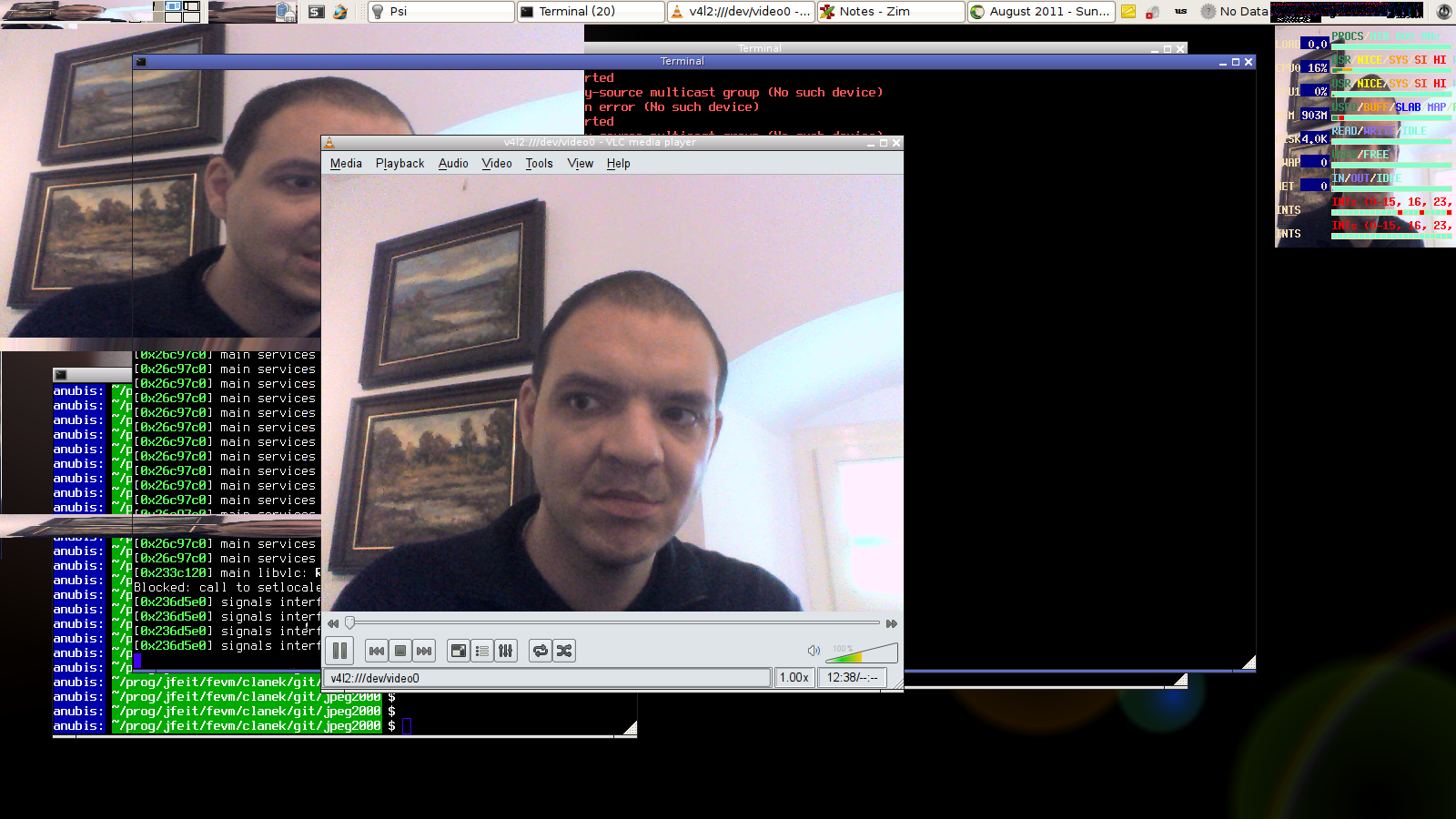
I gave a try to 3.0 kernel but problems were even worse. Playing video using XV gave me random framents of video accross whole desktop :(
Also, is it a bug that xrandr does not report eDP and DVI ports? (the first one is located on the NTB itself and dock, DVI is located on the dock only.) xrandr reports only VGA1 and LVDS1 ports. I have optimus variant but I switched to Intel only in BIOS.
Signature · 1 line
Lukáš Hejtmánek
Quoted 4 lines
Also, is it a bug that xrandr does not report eDP and DVI ports? (the first one is located on the NTB itself and dock, DVI is located on the dock only.) xrandr reports only VGA1 and LVDS1 ports. I have optimus variant but I switched to Intel only in BIOS.
Its most likely they aren't wired to the Intel chip at all, just the nvidia.
Dave.
Quoted 6 lines · On Wed, 3 Aug 2011 08:06:05 +0100 Dave Airlie <[email protected]> wrote:
Quoted 4 lines
Also, is it a bug that xrandr does not report eDP and DVI ports? (the first one is located on the NTB itself and dock, DVI is located on the dock only.) xrandr reports only VGA1 and LVDS1 ports. I have optimus variant but I switched to Intel only in BIOS.
Its most likely they aren't wired to the Intel chip at all, just the nvidia.
Yeah that's pretty common. On my Vaio, I can get DDC bits from the HDMI port with the Intel display controller, but can't actually light it up. I guess it's cheaper to do that than to wire up a full MUX for the port.
Signature · 1 line
Jesse Barnes, Intel Open Source Technology Center
Quoted 8 lines · Jesse Barnes
Quoted 5 lines · On Wed, 3 Aug 2011 08:06:05 +0100 Dave Airlie <[email protected]> wrote:
Quoted 4 lines
Also, is it a bug that xrandr does not report eDP and DVI ports? (the first one is located on the NTB itself and dock, DVI is located on the dock only.) xrandr reports only VGA1 and LVDS1 ports. I have optimus variant but I switched to Intel only in BIOS.
Quoted 6 lines
Quoted 1 line
Its most likely they aren't wired to the Intel chip at all, just the nvidia.
Yeah that's pretty common. On my Vaio, I can get DDC bits from the HDMI port with the Intel display controller, but can't actually light it up. I guess it's cheaper to do that than to wire up a full MUX for the port.
Yeah the combined nvidia/intel driver detects the DDC and switches to the nvidia driver.
Dave.
Quoted 17 lines · Lukas Hejtmanek
Quoted 9 lines · Chris Wilson
Quoted 7 lines · Nicolas Kalkhof
Hi Chris,
Applications:
Oxygen XML Editor 12.2 using latest jdk 1.6.0 (get the trial here: http://www.oxygenxml.com/)
Squirrel SQL Editor 3.2.1 (get it here: http://squirrel-sql.sourceforge.net/)
Desktop: XFCE 4.8 or Trinity 3.5.12
Got a ScreenRegion dumped with xwd, see attachment.Quoted 6 lines
Given that I have to wait for a trial key, you're going to have to convince me that it is not simply the application mishandling a NoExpose. What are the steps to reproduce within Oxygen XML Editor? Can it be reproduced within the help system, which is all I can access at the moment? Can it be reproduced in any other application using a different toolkit?
Quoted 6 lines
Chris, I'm getting similar render issues with XFCE and openbox. I use 2.6.39.3 kernel + git head driver (--enable-sna).
I got screen corruption accross all the apps (xfce-terminal, im psi, xfce4 panel, firefox). Not all are text related, e.g., xfce4 panel gets corrupted in pager (workspace switcher where no text is).
I know xfce4 has the choice of a compositor, do you have it enabled? Is it possible to capture the corruption in a screen shot?
Quoted 5 lines
My HW is Lenovo T420. 00:02.0 VGA compatible controller: Intel Corporation 2nd Generation Core Processor Family Integrated Graphics Controller (rev 09)
I gave a try to 3.0 kernel but problems were even worse. Playing video using XV gave me random framents of video accross whole desktop :(
This is to starting to sound quite serious. Is this just an excerbation of 2.6.39 behaviour or is it an entirely new failure mode? -Chris
Signature · 1 line
Chris Wilson, Intel Open Source Technology Centre
Quoted 5 lines · Chris Wilson
Quoted 2 lines
I gave a try to 3.0 kernel but problems were even worse. Playing video using XV gave me random framents of video accross whole desktop :(
This is to starting to sound quite serious. Is this just an excerbation of 2.6.39 behaviour or is it an entirely new failure mode?
Oh, I forgot to answer this one. XV is just fine with 2.6.39 and the same git head driver as tried with 3.0.0.
Signature · 1 line
Lukáš Hejtmánek
Quoted 9 lines · Lukas Hejtmanek
Quoted 5 lines · Chris Wilson
Quoted 2 lines
I gave a try to 3.0 kernel but problems were even worse. Playing video using XV gave me random framents of video accross whole desktop :(
This is to starting to sound quite serious. Is this just an excerbation of 2.6.39 behaviour or is it an entirely new failure mode?
Oh, I forgot to answer this one. XV is just fine with 2.6.39 and the same git head driver as tried with 3.0.0.
well, it is not :(
this is screenshot of XV corruption with 2.6.39 kernel.
http://www.fi.muni.cz/~xhejtman/snb-bug9.png
Signature · 1 line
Lukáš Hejtmánek
Chris,
Quoted 7 lines · Lukas Hejtmanek
Quoted 2 lines
Oh, I forgot to answer this one. XV is just fine with 2.6.39 and the same git head driver as tried with 3.0.0.
well, it is not :(
this is screenshot of XV corruption with 2.6.39 kernel.
http://www.fi.muni.cz/~xhejtman/snb-bug9.png
is there anything I can do in this issue? At least create bugzilla record? I'm capable of some debugging but not sure where should I start..
Signature · 1 line
Lukáš Hejtmánek
Quoted 6 lines · Chris Wilson
Quoted 3 lines
I got screen corruption accross all the apps (xfce-terminal, im psi, xfce4 panel, firefox). Not all are text related, e.g., xfce4 panel gets corrupted in pager (workspace switcher where no text is).
I know xfce4 has the choice of a compositor, do you have it enabled? Is it possible to capture the corruption in a screen shot?
I got another observation. Videos played in firefox from youtube do not get refresh. Playback is only visible if I move another window on top of the firefox and its subwindow with video content.
Signature · 1 line
Lukáš Hejtmánek