raidreconf / growing raid 5 doesn't seem to work anymore
Hello all -
This is more of a cautionary tale than anything, as I have not attempted to determine the root cause or anything, but I have been able to add a disk to a raid5 array using raidreconf in the past and my last attempt looked like it worked but still scrambled the filesystem.
So, if you're thinking of relying on raidreconf (instead of a backup/restore cycle) to grow your raid 5 array, I'd say its probably time to finally invest in enough backup space. Or you could dig in and test raidreconf until you know it will work.
I'll paste the commands and their output in below so you can see what happened - raidreconf appeared to work just fine, but the file-system is completely corrupted as far as I can tell. Maybe I just did something wrong though. I used a "make no changes" mke2fs command to generate the list of alternate superblock locations. They could be wrong, but the first one being "corrupt" is enough by itself to be a fail mark for raidreconf.
This isn't a huge deal in my opinion, as this actually is my backup array, but it would have been cool if it had worked. I'm not going to be able to do any testing on it past this point though as I'm going to rsync the main array onto this thing ASAP...
-Mike
-------------------------------------------
<marvin>/root # raidreconf -o /etc/raidtab -n /etc/raidtab.new -m /dev/md2 Working with device /dev/md2
Parsing /etc/raidtab
Parsing /etc/raidtab.new
Size of old array: 2441960010 blocks, Size of new array: 2930352012 blocks Old raid-disk 0 has 953890 chunks, 244195904 blocks
Old raid-disk 1 has 953890 chunks, 244195904 blocks
Old raid-disk 2 has 953890 chunks, 244195904 blocks
Old raid-disk 3 has 953890 chunks, 244195904 blocks
Old raid-disk 4 has 953890 chunks, 244195904 blocks
New raid-disk 0 has 953890 chunks, 244195904 blocks
New raid-disk 1 has 953890 chunks, 244195904 blocks
New raid-disk 2 has 953890 chunks, 244195904 blocks
New raid-disk 3 has 953890 chunks, 244195904 blocks
New raid-disk 4 has 953890 chunks, 244195904 blocks
New raid-disk 5 has 953890 chunks, 244195904 blocks
Using 256 Kbyte blocks to move from 256 Kbyte chunks to 256 Kbyte chunks. Detected 256024 KB of physical memory in system
A maximum of 292 outstanding requests is allowed
---------------------------------------------------
I will grow your old device /dev/md2 of 3815560 blocks
to a new device /dev/md2 of 4769450 blocks
using a block-size of 256 KB
Is this what you want? (yes/no): yes
Converting 3815560 block device to 4769450 block device Allocated free block map for 5 disks
6 unique disks detected.
Working (\) [03815560/03815560] [############################################]
Source drained, flushing sink.
Reconfiguration succeeded, will update superblocks...
Updating superblocks...
handling MD device /dev/md2
analyzing super-block
disk 0: /dev/hdc1, 244196001kB, raid superblock at 244195904kB disk 1: /dev/hde1, 244196001kB, raid superblock at 244195904kB disk 2: /dev/hdg1, 244196001kB, raid superblock at 244195904kB disk 3: /dev/hdi1, 244196001kB, raid superblock at 244195904kB disk 4: /dev/hdk1, 244196001kB, raid superblock at 244195904kB disk 5: /dev/hdj1, 244196001kB, raid superblock at 244195904kB Array is updated with kernel.
Disks re-inserted in array... Hold on while starting the array...
Maximum friend-freeing depth:         8
Total wishes hooked:            3815560
Maximum wishes hooked:              292
Total gifts hooked:             3815560
Maximum gifts hooked:               200
Congratulations, your array has been reconfigured, and no errors seem to have occured. <marvin>/root # cat /proc/mdstat Personalities : [raid1] [raid5]
md1 : active raid1 hda1[0] hdb1[1]
146944 blocks [2/2] [UU]
md3 : active raid1 hda2[0] hdb2[1]
440384 blocks [2/2] [UU]
md2 : active raid5 hdj1[5] hdk1[4] hdi1[3] hdg1[2] hde1[1] hdc1[0]
      1220979200 blocks level 5, 256k chunk, algorithm 0 [6/6] [UUUUUU]
      [=>...................]  resync =  7.7% (19008512/244195840)
finish=434.5min speed=8635K/sec
md0 : active raid1 hda3[0] hdb3[1]
      119467264 blocks [2/2] [UU]
unused devices: <none>
<marvin>/root # mount /backup
mount: wrong fs type, bad option, bad superblock on /dev/md2,
or too many mounted file systems
(aren't you trying to mount an extended partition, instead of some logical partition inside?)
<marvin>/root # fsck.ext3 -C 0 -v /dev/md2
e2fsck 1.35 (28-Feb-2004)
fsck.ext3: Filesystem revision too high while trying to open /dev/md2 The filesystem revision is apparently too high for this version of e2fsck. (Or the filesystem superblock is corrupt)
The superblock could not be read or does not describe a correct ext2 filesystem. If the device is valid and it really contains an ext2 filesystem (and not swap or ufs or something else), then the superblock is corrupt, and you might try running e2fsck with an alternate superblock:
e2fsck -b 8193 <device>
<marvin>/root # mke2fs -j -m 1 -n -v
Usage: mke2fs [-c|-t|-l filename] [-b block-size] [-f fragment-size]
[-i bytes-per-inode] [-j] [-J journal-options] [-N number-of-inodes] [-m reserved-blocks-percentage] [-o creator-os] [-g
blocks-per-group]
[-L volume-label] [-M last-mounted-directory] [-O feature[,...]] [-r fs-revision] [-R raid_opts] [-qvSV] device [blocks-count]
<marvin>/root # mke2fs -j -m 1 -n -v /dev/md2
mke2fs 1.35 (28-Feb-2004)
Filesystem label=
OS type: Linux
Block size=4096 (log=2)
Fragment size=4096 (log=2)
152633344 inodes, 305244800 blocks
3052448 blocks (1.00%) reserved for the super user
First data block=0
9316 block groups
32768 blocks per group, 32768 fragments per group
16384 inodes per group
Superblock backups stored on blocks:
        32768, 98304, 163840, 229376, 294912, 819200, 884736, 1605632,
2654208,
        4096000, 7962624, 11239424, 20480000, 23887872, 71663616, 78675968,
        102400000, 214990848
<marvin>/root # fsck.ext3 -C 0 -v -b 32768 /dev/md2
e2fsck 1.35 (28-Feb-2004)
fsck.ext3: Bad magic number in super-block while trying to open /dev/md2
The superblock could not be read or does not describe a correct ext2 filesystem. If the device is valid and it really contains an ext2 filesystem (and not swap or ufs or something else), then the superblock is corrupt, and you might try running e2fsck with an alternate superblock:
e2fsck -b 8193 <device>
<marvin>/root # fsck.ext3 -C 0 -v -b 163840 /dev/md2
e2fsck 1.35 (28-Feb-2004)
fsck.ext3: Bad magic number in super-block while trying to open /dev/md2
The superblock could not be read or does not describe a correct ext2 filesystem. If the device is valid and it really contains an ext2 filesystem (and not swap or ufs or something else), then the superblock is corrupt, and you might try running e2fsck with an alternate superblock:
e2fsck -b 8193 <device>
Just to re-iterate for the googlers...
EVMS has an alternative raid5 grow solution that is active, maintained and apparently works (ie someone who knows the code actually cares if it fails!!!)
It does require a migration to EVMS and it has limitations which prevented me from using it when I needed to do this (it won't extend a degraded array, though I don't know if rr will either...) FWIW I migrated to an EVMS setup and back to plain md/lvm2 without any issues.
AFAIK raidreconf is unmaintained.
I know which I'd steeer clear of...
David
Quoted 165 lines · Mike Hardy
Hello all -
This is more of a cautionary tale than anything, as I have not attempted to determine the root cause or anything, but I have been able to add a disk to a raid5 array using raidreconf in the past and my last attempt looked like it worked but still scrambled the filesystem.
So, if you're thinking of relying on raidreconf (instead of a backup/restore cycle) to grow your raid 5 array, I'd say its probably time to finally invest in enough backup space. Or you could dig in and test raidreconf until you know it will work.
I'll paste the commands and their output in below so you can see what happened - raidreconf appeared to work just fine, but the file-system is completely corrupted as far as I can tell. Maybe I just did something wrong though. I used a "make no changes" mke2fs command to generate the list of alternate superblock locations. They could be wrong, but the first one being "corrupt" is enough by itself to be a fail mark for raidreconf.
This isn't a huge deal in my opinion, as this actually is my backup array, but it would have been cool if it had worked. I'm not going to be able to do any testing on it past this point though as I'm going to rsync the main array onto this thing ASAP...
-Mike
-------------------------------------------
<marvin>/root # raidreconf -o/etc/raidtab-n/etc/raidtab.new-m/dev/md2Working with device/dev/md2
Parsing/etc/raidtab
Parsing/etc/raidtab.new
Size of old array: 2441960010 blocks, Size of new array: 2930352012 blocks Old raid-disk 0 has 953890 chunks, 244195904 blocks
Old raid-disk 1 has 953890 chunks, 244195904 blocks
Old raid-disk 2 has 953890 chunks, 244195904 blocks
Old raid-disk 3 has 953890 chunks, 244195904 blocks
Old raid-disk 4 has 953890 chunks, 244195904 blocks
New raid-disk 0 has 953890 chunks, 244195904 blocks
New raid-disk 1 has 953890 chunks, 244195904 blocks
New raid-disk 2 has 953890 chunks, 244195904 blocks
New raid-disk 3 has 953890 chunks, 244195904 blocks
New raid-disk 4 has 953890 chunks, 244195904 blocks
New raid-disk 5 has 953890 chunks, 244195904 blocks
Using 256 Kbyte blocks to move from 256 Kbyte chunks to 256 Kbyte chunks. Detected 256024 KB of physical memory in system
A maximum of 292 outstanding requests is allowed
---------------------------------------------------
I will grow your old device/dev/md2of 3815560 blocks
to a new device/dev/md2of 4769450 blocks
using a block-size of 256 KB
Is this what you want? (yes/no): yes
Converting 3815560 block device to 4769450 block device Allocated free block map for 5 disks
6 unique disks detected.
Working (\) [03815560/03815560] [############################################]
Source drained, flushing sink.
Reconfiguration succeeded, will update superblocks...
Updating superblocks...
handling MD device/dev/md2
analyzing super-block
disk 0:/dev/hdc1, 244196001kB, raid superblock at 244195904kB disk 1:/dev/hde1, 244196001kB, raid superblock at 244195904kB disk 2:/dev/hdg1, 244196001kB, raid superblock at 244195904kB disk 3:/dev/hdi1, 244196001kB, raid superblock at 244195904kB disk 4:/dev/hdk1, 244196001kB, raid superblock at 244195904kB disk 5:/dev/hdj1, 244196001kB, raid superblock at 244195904kB Array is updated with kernel.
Disks re-inserted in array... Hold on while starting the array...Maximum friend-freeing depth: 8 Total wishes hooked: 3815560 Maximum wishes hooked: 292 Total gifts hooked: 3815560 Maximum gifts hooked: 200Congratulations, your array has been reconfigured, and no errors seem to have occured. <marvin>/root # cat
/proc/mdstatPersonalities : [raid1] [raid5]
md1 : active raid1 hda1[0] hdb1[1]146944 blocks [2/2] [UU]md3 : active raid1 hda2[0] hdb2[1]
440384 blocks [2/2] [UU]md2 : active raid5 hdj1[5] hdk1[4] hdi1[3] hdg1[2] hde1[1] hdc1[0]
     1220979200 blocks level 5, 256k chunk, algorithm 0 [6/6] [UUUUUU]
     [=>...................]  resync =  7.7% (19008512/244195840)
finish=434.5min speed=8635K/sec
md0 : active raid1 hda3[0] hdb3[1]
     119467264 blocks [2/2] [UU]
unused devices: <none>
<marvin>/root # mount /backup
mount: wrong fs type, bad option, bad superblock on/dev/md2,
or too many mounted file systems
(aren't you trying to mount an extended partition, instead of some logical partition inside?)
<marvin>/root # fsck.ext3 -C 0 -v/dev/md2
e2fsck 1.35 (28-Feb-2004)
fsck.ext3: Filesystem revision too high while trying to open/dev/md2The filesystem revision is apparently too high for this version of e2fsck. (Or the filesystem superblock is corrupt)The superblock could not be read or does not describe a correct ext2 filesystem. If the device is valid and it really contains an ext2 filesystem (and not swap or ufs or something else), then the superblock is corrupt, and you might try running e2fsck with an alternate superblock:
e2fsck -b 8193 <device><marvin>/root # mke2fs -j -m 1 -n -v
Usage: mke2fs [-c|-t|-l filename] [-b block-size] [-f fragment-size]
[-i bytes-per-inode] [-j] [-J journal-options] [-N number-of-inodes] [-m reserved-blocks-percentage] [-o creator-os] [-g
blocks-per-group]
[-L volume-label] [-M last-mounted-directory] [-O feature[,...]] [-r fs-revision] [-Rraid_opts] [-qvSV] device [blocks-count]
<marvin>/root # mke2fs -j -m 1 -n -v/dev/md2
mke2fs 1.35 (28-Feb-2004)
Filesystem label=
OS type: Linux
Block size=4096 (log=2)
Fragment size=4096 (log=2)
152633344 inodes, 305244800 blocks
3052448 blocks (1.00%) reserved for the super user
First data block=0
9316 block groups
32768 blocks per group, 32768 fragments per group
16384 inodes per group
Superblock backups stored on blocks:32768, 98304, 163840, 229376, 294912, 819200, 884736, 1605632, 2654208, 4096000, 7962624, 11239424, 20480000, 23887872, 71663616, 78675968, 102400000, 214990848<marvin>/root # fsck.ext3 -C 0 -v -b 32768
/dev/md2
e2fsck 1.35 (28-Feb-2004)
fsck.ext3: Bad magic number in super-block while trying to open/dev/md2The superblock could not be read or does not describe a correct ext2 filesystem. If the device is valid and it really contains an ext2 filesystem (and not swap or ufs or something else), then the superblock is corrupt, and you might try running e2fsck with an alternate superblock:
e2fsck -b 8193 <device><marvin>/root # fsck.ext3 -C 0 -v -b 163840
/dev/md2
e2fsck 1.35 (28-Feb-2004)
fsck.ext3: Bad magic number in super-block while trying to open/dev/md2The superblock could not be read or does not describe a correct ext2 filesystem. If the device is valid and it really contains an ext2 filesystem (and not swap or ufs or something else), then the superblock is corrupt, and you might try running e2fsck with an alternate superblock:
e2fsck -b 8193 <device>-
To unsubscribe from this list: send the line "unsubscribe linux-raid" in the body of a message to [email protected]
More majordomo info at http://vger.kernel.org/majordomo-info.html
EVMS or md?
I am top posting since I am starting a new topic.
Don't get me wrong, I like and trust md, at least with kernel 2.4.
This is the first I knew about EVMS, the website makes it sound wonderfull!
http://evms.sourceforge.net/
Is EVMS "better" than md?
Is EVMS replacing md?
Any performance data comparing the 2?
One bad point for EVMS, no RAID6. :(
One good point for EVMS, bad Block Relocation (but only on writes). Not sure how EVMS handles read errors.
I am getting on the mailing list(s). I must know more about this!!!
Guy
Quoted 205 lines
-----Original Message-----
From: [email protected] [mailto:linux-raid- [email protected]] On Behalf Of David Greaves
Sent: Monday, April 04, 2005 1:49 AM
To: Mike Hardy
Cc: [email protected]
Subject: Re: raidreconf / growing raid 5 doesn't seem to work anymoreJust to re-iterate for the googlers...
EVMS has an alternative raid5 grow solution that is active, maintained and apparently works (ie someone who knows the code actually cares if it fails!!!)
It does require a migration to EVMS and it has limitations which prevented me from using it when I needed to do this (it won't extend a degraded array, though I don't know if rr will either...) FWIW I migrated to an EVMS setup and back to plain md/lvm2 without any issues.AFAIK raidreconf is unmaintained.
I know which I'd steeer clear of...
David
Quoted 25 lines · Mike Hardy
Hello all -
This is more of a cautionary tale than anything, as I have not attempted to determine the root cause or anything, but I have been able to add a disk to a raid5 array using raidreconf in the past and my last attempt looked like it worked but still scrambled the filesystem.
So, if you're thinking of relying on raidreconf (instead of a backup/restore cycle) to grow your raid 5 array, I'd say its probably time to finally invest in enough backup space. Or you could dig in and test raidreconf until you know it will work.
I'll paste the commands and their output in below so you can see what happened - raidreconf appeared to work just fine, but the file-system is completely corrupted as far as I can tell. Maybe I just did something wrong though. I used a "make no changes" mke2fs command to generate the list of alternate superblock locations. They could be wrong, but the first one being "corrupt" is enough by itself to be a fail mark for raidreconf.
This isn't a huge deal in my opinion, as this actually is my backup array, but it would have been cool if it had worked. I'm not going to be able to do any testing on it past this point though as I'm going to rsync the main array onto this thing ASAP...
Quoted 5 lines
-Mike
-------------------------------------------
<marvin>/root # raidreconf -o/etc/raidtab-n/etc/raidtab.new-m
/dev/md2Quoted 4 lines
Working with device
/dev/md2
Parsing/etc/raidtab
Parsing/etc/raidtab.new
Size of old array: 2441960010 blocks, Size of new array: 2930352012blocks
Quoted 59 lines
Old raid-disk 0 has 953890 chunks, 244195904 blocks
Old raid-disk 1 has 953890 chunks, 244195904 blocks
Old raid-disk 2 has 953890 chunks, 244195904 blocks
Old raid-disk 3 has 953890 chunks, 244195904 blocks
Old raid-disk 4 has 953890 chunks, 244195904 blocks
New raid-disk 0 has 953890 chunks, 244195904 blocks
New raid-disk 1 has 953890 chunks, 244195904 blocks
New raid-disk 2 has 953890 chunks, 244195904 blocks
New raid-disk 3 has 953890 chunks, 244195904 blocks
New raid-disk 4 has 953890 chunks, 244195904 blocks
New raid-disk 5 has 953890 chunks, 244195904 blocks
Using 256 Kbyte blocks to move from 256 Kbyte chunks to 256 Kbyte chunks. Detected 256024 KB of physical memory in system
A maximum of 292 outstanding requests is allowed
---------------------------------------------------
I will grow your old device/dev/md2of 3815560 blocks
to a new device/dev/md2of 4769450 blocks
using a block-size of 256 KB
Is this what you want? (yes/no): yes
Converting 3815560 block device to 4769450 block device Allocated free block map for 5 disks
6 unique disks detected.
Working (\) [03815560/03815560] [############################################]
Source drained, flushing sink.
Reconfiguration succeeded, will update superblocks... Updating superblocks...
handling MD device/dev/md2
analyzing super-block
disk 0:/dev/hdc1, 244196001kB, raid superblock at 244195904kB disk 1:/dev/hde1, 244196001kB, raid superblock at 244195904kB disk 2:/dev/hdg1, 244196001kB, raid superblock at 244195904kB disk 3:/dev/hdi1, 244196001kB, raid superblock at 244195904kB disk 4:/dev/hdk1, 244196001kB, raid superblock at 244195904kB disk 5:/dev/hdj1, 244196001kB, raid superblock at 244195904kB Array is updated with kernel.
Disks re-inserted in array... Hold on while starting the array...Maximum friend-freeing depth: 8 Total wishes hooked: 3815560 Maximum wishes hooked: 292 Total gifts hooked: 3815560 Maximum gifts hooked: 200Congratulations, your array has been reconfigured, and no errors seem to have occured. <marvin>/root # cat
/proc/mdstatPersonalities : [raid1] [raid5]
md1 : active raid1 hda1[0] hdb1[1]146944 blocks [2/2] [UU]md3 : active raid1 hda2[0] hdb2[1]
440384 blocks [2/2] [UU]md2 : active raid5 hdj1[5] hdk1[4] hdi1[3] hdg1[2] hde1[1] hdc1[0]
     1220979200 blocks level 5, 256k chunk, algorithm 0 [6/6] [UUUUUU]
     [=>...................]  resync =  7.7% (19008512/244195840)
finish=434.5min speed=8635K/sec
md0 : active raid1 hda3[0] hdb3[1]
     119467264 blocks [2/2] [UU]
Quoted 10 lines
unused devices: <none>
<marvin>/root # mount /backup
mount: wrong fs type, bad option, bad superblock on/dev/md2,
or too many mounted file systems
(aren't you trying to mount an extended partition, instead of some logical partition inside?)
<marvin>/root # fsck.ext3 -C 0 -v/dev/md2
e2fsck 1.35 (28-Feb-2004)
fsck.ext3: Filesystem revision too high while trying to open/dev/md2The filesystem revision is apparently too high for this version ofe2fsck.
Quoted 7 lines
(Or the filesystem superblock is corrupt)
The superblock could not be read or does not describe a correct ext2 filesystem. If the device is valid and it really contains an ext2 filesystem (and not swap or ufs or something else), then the superblock is corrupt, and you might try running e2fsck with an alternate
superblock:
Quoted 5 lines
e2fsck -b 8193 <device><marvin>/root # mke2fs -j -m 1 -n -v
Usage: mke2fs [-c|-t|-l filename] [-b block-size] [-f fragment-size][-i bytes-per-inode] [-j] [-J journal-options] [-N number-of-inodes]
Quoted 17 lines
[-m reserved-blocks-percentage] [-o creator-os] [-g
blocks-per-group]
[-L volume-label] [-M last-mounted-directory] [-O feature[,...]] [-r fs-revision] [-Rraid_opts] [-qvSV] device [blocks-count]
<marvin>/root # mke2fs -j -m 1 -n -v/dev/md2
mke2fs 1.35 (28-Feb-2004)
Filesystem label=
OS type: Linux
Block size=4096 (log=2)
Fragment size=4096 (log=2)
152633344 inodes, 305244800 blocks
3052448 blocks (1.00%) reserved for the super user
First data block=0
9316 block groups
32768 blocks per group, 32768 fragments per group
16384 inodes per group
Superblock backups stored on blocks:Quoted 3 lines
       32768, 98304, 163840, 229376, 294912, 819200, 884736, 1605632,
2654208,
       4096000, 7962624, 11239424, 20480000, 23887872, 71663616,
78675968,
Quoted 10 lines
102400000, 214990848<marvin>/root # fsck.ext3 -C 0 -v -b 32768
/dev/md2
e2fsck 1.35 (28-Feb-2004)
fsck.ext3: Bad magic number in super-block while trying to open/dev/md2The superblock could not be read or does not describe a correct ext2 filesystem. If the device is valid and it really contains an ext2 filesystem (and not swap or ufs or something else), then the superblock is corrupt, and you might try running e2fsck with an alternate
superblock:
Quoted 10 lines
e2fsck -b 8193 <device><marvin>/root # fsck.ext3 -C 0 -v -b 163840
/dev/md2
e2fsck 1.35 (28-Feb-2004)
fsck.ext3: Bad magic number in super-block while trying to open/dev/md2The superblock could not be read or does not describe a correct ext2 filesystem. If the device is valid and it really contains an ext2 filesystem (and not swap or ufs or something else), then the superblock is corrupt, and you might try running e2fsck with an alternate
superblock:
Quoted 10 lines
e2fsck -b 8193 <device>-
To unsubscribe from this list: send the line "unsubscribe linux-raid" in the body of a message to [email protected]
More majordomo info at http://vger.kernel.org/majordomo-info.html-
To unsubscribe from this list: send the line "unsubscribe linux-raid" in the body of a message to [email protected]
More majordomo info at http://vger.kernel.org/majordomo-info.html
Re: EVMS or md?
Quoted 3 lines · Guy
I am top posting since I am starting a new topic.
excuses not needed - I prefer it ;)
Quoted 8 lines
Don't get me wrong, I like and trust md, at least with kernel 2.4.
This is the first I knew about EVMS, the website makes it sound wonderfull!
http://evms.sourceforge.net/Is EVMS "better" than md?
It uses md
A more appropriate question is : Is EVMS "better" than _mdadm_?
Probably - if you're doing more than simple stuff - it doesn't (seem to) offer all the control that mdadm offers but the same gui manages everything from partitioning to bad block management (remember all the raid5 bad block discussions...) to logical volume management and snapshots etc to filesystem creation/expansion/reduction and more including boundary checking (which prevents you from saying "I know what I'm doing" - which is usually a good thing!!!)
So "does it do more than mdadm?" "Yes!"
It's closer (from memory) to Sun's or Veritas' volume management guis
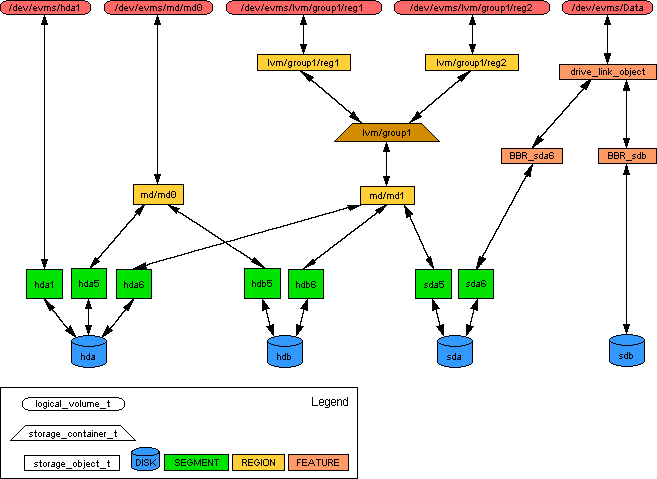
It also introduces a consistent (self-consistent!) set of terminology and a 'way of doing things'. Eg lvm layers over md layers over bbr layers over partitions
It's also quite intimidating at first sight.
see http://evms.sourceforge.net/architecture/evms-data-example.png
Quoted 3 lines
Is EVMS replacing md?
so no - although there are evms md-patches which appear to be in mainline now.
Quoted 3 lines
One bad point for EVMS, no RAID6. :(
I think, more correctly: no raid6 config support in the gui...
Quoted 3 lines
One good point for EVMS, bad Block Relocation (but only on writes).
again, this uses the dm bbr kernel feature.
Quoted 7 lines
Not sure how EVMS handles read errors.
I am getting on the mailing list(s). I must know more about this!!!
Guy
I don't understand why there is so little cross conversation... You sometimes need to dip into md stuff to fix/diagnose evms issues.
HTH
David
Re: EVMS or md?
In reply to GuyHi Guy,
Quoted 10 lines · Guy
I am top posting since I am starting a new topic.
Don't get me wrong, I like and trust md, at least with kernel 2.4.
This is the first I knew about EVMS, the website makes it sound wonderfull!
http://evms.sourceforge.net/Is EVMS "better" than md?
Is EVMS replacing md?
Any performance data comparing the 2?
EVMS uses MD and Device Mapper (DM). So, EVMS does not replace MD. For RAID-1 & RAID-5, EVMS ioctl md driver to start the array. For MD's RAID-0 and LINEAR arrays, EVMS uses DM stripe and linear targets to create device nodes.
You can say EVMS replaces mdadm (sorry, NeilB :))
Regarding performance issue (raid1 & raid5), I/O requests from MD will appear on DM's queue. So, it is probably slower. How much slower, we never run any benchmark to find out.
Quoted 2 lines
One bad point for EVMS, no RAID6. :(
We (EVMS team) intended to support RAID6 last year. But as we all remember RAID6 was not stable then. I may write a plugin to support RAID6 soon.
Quoted 2 lines
One good point for EVMS, bad Block Relocation (but only on writes). Not sure how EVMS handles read errors.
As I mentioned above, kernel MD driver handle I/O requests for raid1 and raid5.
Quoted 3 lines
I am getting on the mailing list(s). I must know more about this!!!
Welcome aboard :)
--
Regards,
Mike T.
Re: EVMS or md?
Mike Tran wrote on Monday 04 April 2005 12:28:
Quoted 3 lines
We (EVMS team) intended to support RAID6 last year. But as we all remember RAID6 was not stable then. I may write a plugin to support RAID6 soon.
Hi Mike,
In your view, is RAID6 now considered stable? How soon might you have an evms plugin for it? ;) I'd love to use evms on my new filserver if it supported RAID6.
David
Re: EVMS or md?
Followup to:  <[email protected]>
By author:    David Kewley <[email protected]>
In newsgroup: linux.dev.raid
Quoted 6 lines
Mike Tran wrote on Monday 04 April 2005 12:28:
Quoted 3 lines
We (EVMS team) intended to support RAID6 last year. But as we all remember RAID6 was not stable then. I may write a plugin to support RAID6 soon.
Quoted 6 lines
Hi Mike,
In your view, is RAID6 now considered stable? How soon might you have an evms plugin for it? ;) I'd love to use evms on my new filserver if it supported RAID6.
I can't speak for the EVMS people, but I got to stress-test my RAID6 test system some this weekend; after having run in 1-disk degraded mode for several months (thus showing that the big bad "degraded write" bug has been thoroughly fixed) I changed the motherboard, and the kernel didn't support one of the controllers. And now there were 2 missing drives. Due to some bootloader problems, I ended up yo-yoing between the two kernels a bit more than I intended to, and went through quite a few RAID disk losses and rebuilds as a result.
No hiccups, data losses, or missing functionality. At the end of the whole ordeal, the filesystem (1 TB, 50% full) was still quite prisine, and fsck confirmed this. I was quite pleased :)
Oh, and doing the N-2 -> N-1 rebuild is slow (obviously), but not outrageously so. It rebuilt the 1 TB array in a matter of single-digit hours. CPU utilitization was quite high, obviously, but it didn't cripple the system by any means.
-hpa
Re: EVMS or md?
Quoted 8 lines · H. Peter Anvin
I can't speak for the EVMS people, but I got to stress-test my RAID6 test system some this weekend; after having run in 1-disk degraded mode for several months (thus showing that the big bad "degraded write" bug has been thoroughly fixed) I changed the motherboard, and the kernel didn't support one of the controllers. And now there were 2 missing drives. Due to some bootloader problems, I ended up yo-yoing between the two kernels a bit more than I intended to, and went through quite a few RAID disk losses and rebuilds as a result.
I bit the bullet recently and moved a raft of servers over to 2.6.11 and RAID-6. Biggest single partition is 1.3TB over 8 drives. Oddest is probably 4 drives in a RAID-6 setup, but hey ... (All are running Debian Woody FWIW)
So-far so good. No crashes, no failures. Performance is adequate (Mix of Opteron and Hyperthreading Xeon processors, SCSI and SATA drives, Gb Ether) and I'm hoping they'll stay that way for the next 3 years until they are replaced.
6 years ago, I built mt first (Linux S/W) RAID-5 system... (and that server was only retired last year) Lets hope RAID-6 does just as good a job!
Gordon
Re: EVMS or md?
In reply to H. Peter AnvinQuoted 15 lines · H. Peter Anvin
Followup to:  <[email protected]>
By author:    David Kewley <[email protected]>
In newsgroup: linux.dev.raid
Quoted 12 lines
Mike Tran wrote on Monday 04 April 2005 12:28:
Quoted 3 lines
We (EVMS team) intended to support RAID6 last year. But as we all remember RAID6 was not stable then. I may write a plugin to support RAID6 soon.
Hi Mike,
In your view, is RAID6 now considered stable? How soon might you have an evms plugin for it? ;) I'd love to use evms on my new filserver if it supported RAID6.
I will do it, but I can't promise a time frame. I will announce on evms mailing list when it's available. This discussion should be on evms mailing list (sorry folks!)
Quoted 10 lines
I can't speak for the EVMS people, but I got to stress-test my RAID6 test system some this weekend; after having run in 1-disk degraded mode for several months (thus showing that the big bad "degraded write" bug has been thoroughly fixed) I changed the motherboard, and the kernel didn't support one of the controllers. And now there were 2 missing drives. Due to some bootloader problems, I ended up yo-yoing between the two kernels a bit more than I intended to, and went through quite a few RAID disk losses and rebuilds as a result.
Quoted 9 lines
No hiccups, data losses, or missing functionality. At the end of the whole ordeal, the filesystem (1 TB, 50% full) was still quite prisine, and fsck confirmed this. I was quite pleased :)
Oh, and doing the N-2 -> N-1 rebuild is slow (obviously), but not outrageously so. It rebuilt the 1 TB array in a matter of single-digit hours. CPU utilitization was quite high, obviously, but it didn't cripple the system by any means.
Glad to hear the good news :) mdadm or EVMS is just a user space tool. We depend on the kernel side to provide stability.
--
Mike T.
Re: EVMS or md?
In reply to H. Peter AnvinQuoted 3 lines · H. Peter n
No hiccups, data losses, or missing functionality. At the end of the whole ordeal, the filesystem (1 TB, 50% full) was still quite prisine, and fsck confirmed this. I was quite pleased :)
I second this. I endured numerous kernel crashes and other lockup/forced restart issues while setting up a 15 drive 3TB raid-6 (Crashes not really realted to the mb subsystem except for the oddity in the -mm kernel, and that was not raid-6 specific). I have popped out various drives and caused numerous failures/rebuilds with an ext3 system over 90% full while burn in testing and not experienced one glitch. It has been used in production now for over a month and is performing flawlessly. I have run it in full/1-disk and 2-disk degraded mode for testing. I certainly consider it stable.
Brad
Signature · 3 lines
"Human beings, who are almost unique in having the ability
to learn from the experience of others, are also remarkable
for their apparent disinclination to do so." -- Douglas Adams