Booting/installing WindowsNT
Apparently with current kvm stable (0.12.3) Windows NT 4.0 does not install anymore.
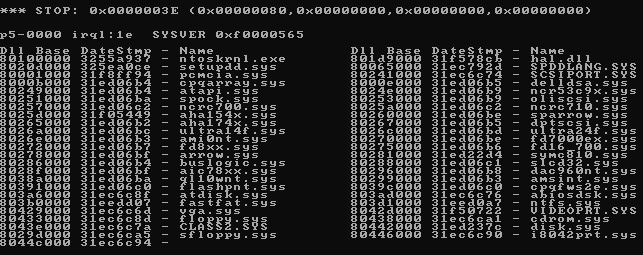
With default -cpu, it boots, displays the "Inspecting your hardware configuration" message and BSODs with "STOP: 0x0000003E" error as shown here:
http://www.corpit.ru/mjt/winnt4_1.gif
With -cpu pentium the situation is a
Quoted 1 line
bit< better, it displays:
Microsoft (R) Windows NT (TM) Version 4.0 (Build 1381). 1 System Processor [512 MB Memory] Multiprocessor Kernel
and stops there with 100% CPU usage, never going any further.
Kvm command line is trivial, with -hda and -cdrom and -vga std (with -vga cirrus it displays garbage here). The only parameters of interest are:
-no-acpi - this one has no visible effect
-cpu pentium - tried that with some change
but no success anyway.
Anyone know what's going on here?
Thanks!
/mjt
Quoted 24 lines · Michael Tokarev
Apparently with current kvm stable (0.12.3)
Windows NT 4.0 does not install anymore.With default -cpu, it boots, displays the
"Inspecting your hardware configuration"
message and BSODs with "STOP:0x0000003E"
error as shown here:
http://www.corpit.ru/mjt/winnt4_1.gif
With -cpu pentium the situation is aQuoted 1 line
bit< better, it displays:
Microsoft (R) Windows NT (TM) Version 4.0 (Build 1381). 1 System Processor [512 MB Memory] Multiprocessor Kernel
and stops there with 100% CPU usage, never
going any further.Kvm command line is trivial, with -hda
and -cdrom and -vga std (with -vga cirrus
it displays garbage here). The only parameters
of interest are:(quoted diff) +0
-2-no-acpi - this one has no visible effect -cpu pentium - tried that with some change
Quoted 1 line
but no success anyway.
I were able to boot and install it just fine
using -cpu host (without -no-acpi or any
other option).
Microsoft(R) Windows NT(R) version 4.0 (Build 1381: Service Pack 1)
(C) 1981-1996
where my host cpu is Athlon X2-64 4850e (2 cores).
I tried a few other -cpu values, but no luck - it either BSODs with 0x3E error, or stops after first kernel message.
Quoted 1 line
Anyone know what's going on here?
Thanks!
/mjt
Quoted 31 lines · Michael Tokarev
Quoted 24 lines · Michael Tokarev
Apparently with current kvm stable (0.12.3)
Windows NT 4.0 does not install anymore.With default -cpu, it boots, displays the
"Inspecting your hardware configuration"
message and BSODs with "STOP:0x0000003E"
error as shown here:
http://www.corpit.ru/mjt/winnt4_1.gif
With -cpu pentium the situation is aQuoted 1 line
bit< better, it displays:
Microsoft (R) Windows NT (TM) Version 4.0 (Build 1381). 1 System Processor [512 MB Memory] Multiprocessor Kernel
and stops there with 100% CPU usage, never
going any further.Kvm command line is trivial, with -hda
and -cdrom and -vga std (with -vga cirrus
it displays garbage here). The only parameters
of interest are:(quoted diff) +0
-2-no-acpi - this one has no visible effect -cpu pentium - tried that with some changeQuoted 1 line
but no success anyway.
I were able to boot and install it just fine
using -cpu host (without -no-acpi or any
other option).
Quoted 8 lines
Microsoft(R) Windows NT(R) version 4.0 (Build 1381: Service Pack 1)
(C) 1981-1996where my host cpu is Athlon X2-64 4850e (2 cores).
I tried a few other -cpu values, but no luck - it either BSODs with
0x3Eerror, or stops after first kernel message.
Interesting. Can you try -cpu host with the family/model/vendor etc used by -cpu qemu64?
Signature · 1 line
error compiling committee.c: too many arguments to function
Quoted 35 lines · Avi Kivity
Quoted 34 lines · Michael Tokarev
Quoted 24 lines · Michael Tokarev
Apparently with current kvm stable (0.12.3)
Windows NT 4.0 does not install anymore.With default -cpu, it boots, displays the
"Inspecting your hardware configuration"
message and BSODs with "STOP:0x0000003E"
error as shown here:
http://www.corpit.ru/mjt/winnt4_1.gif
With -cpu pentium the situation is aQuoted 1 line
bit< better, it displays:
Microsoft (R) Windows NT (TM) Version 4.0 (Build 1381). 1 System Processor [512 MB Memory] Multiprocessor Kernel
and stops there with 100% CPU usage, never
going any further.Kvm command line is trivial, with -hda
and -cdrom and -vga std (with -vga cirrus
it displays garbage here). The only parameters
of interest are:(quoted diff) +0
-2-no-acpi - this one has no visible effect -cpu pentium - tried that with some changeQuoted 1 line
but no success anyway.
I were able to boot and install it just fine
using -cpu host (without -no-acpi or any
other option).Microsoft(R) Windows NT(R) version 4.0 (Build 1381: Service Pack 1)
(C) 1981-1996
Quoted 8 lines
Quoted 5 lines
where my host cpu is Athlon X2-64 4850e (2 cores).
I tried a few other -cpu values, but no luck - it either BSODs with
0x3Eerror, or stops after first kernel message.Interesting. Can you try -cpu host with the family/model/vendor etc used by -cpu qemu64?
Here we go.
cpuinfo from kvm default cpu:
processor : 0vendor_id : AuthenticAMD
cpu family : 6
model : 2
model name : QEMU Virtual CPU version 0.12.3
stepping : 3
cpu MHz : 2500.000
cache size : 512 KB
fpu : yesfpu_exception : yes
cpuid level : 4
wp : yes
flags : fpu de pse tsc msr pae mce cx8 apic sep mtrr pge mca cmov pat pse36 clflush mmx fxsr sse sse2 syscall nx lm up pni cx16 hypervisor lahf_lm
bogomips : 5002.33
TLB size : 1024 4K pages
clflush size : 64cache_alignment : 64
address sizes : 40 bits physical, 48 bits virtual
power management:
cpuinfo from host:
processor : 0vendor_id : AuthenticAMD
cpu family : 15
model : 107
model name : AMD Athlon(tm) Dual Core Processor 4850e
stepping : 2
cpu MHz : 1000.000
cache size : 512 KB
physical id : 0
siblings : 2
core id : 0
cpu cores : 2
apicid : 0
initial apicid : 0
fpu : yesfpu_exception : yes
cpuid level : 1
wp : yes
flags : fpu vme de pse tsc msr pae mce cx8 apic sep mtrr pge mca cmov pat pse36 clflush mmx fxsr sse sse2 ht syscall nx mmxext fxsr_opt rdtscp lm 3dnowext 3dnow rep_good extd_apicid pni cx16 lahf_lm cmp_legacy svm extapic cr8_legacy 3dnowprefetch lbrv
bogomips : 1003.48
TLB size : 1024 4K pages
clflush size : 64cache_alignment : 64
address sizes : 40 bits physical, 48 bits virtual
power management: ts fid vid ttp tm stc 100mhzsteps
running with -cpu host,vendor=AuthenticAMD,model=2,family=6 :
processor : 0vendor_id : AuthenticAMD
cpu family : 6
model : 2
model name : AMD Athlon(tm) Dual Core Processor 4850e
stepping : 2
cpu MHz : 2500.000
cache size : 512 KB
fpu : yesfpu_exception : yes
cpuid level : 1
wp : yes
flags : fpu vme de pse tsc msr pae mce cx8 apic sep mtrr pge mca cmov pat pse36 clflush mmx fxsr sse sse2 syscall nx mmxext fxsr_opt lm up pni cx16 hypervisor lahf_lm cmp_legacy cr8_legacy 3dnowprefetch
bogomips : 4401.33
TLB size : 1024 4K pages
clflush size : 64cache_alignment : 64
address sizes : 40 bits physical, 48 bits virtual
power management:
WindowsNT works, just like with -cpu host.
There are a few more data points.
After installing, winNT does not boot without -cpu host, with exactly the same diagnostics as before (0x0000003E).
But: After installing service pack 6, it boots just fine with any -cpu, including the default qemu64.
With qemu-kvm-0.11.4 it all just works without any additional options.
I asked the other person with this issue (see debian bug,
http://bugs.debian.org/cgi-bin/bugreport.cgi?bug=575439 ) to try -cpu host, but for him it didn't help. I suspect (but don't know for sure) he's running it on Intel CPU.
Thanks!
/mjt
Quoted 7 lines · Michael Tokarev
After installing, winNT does not boot without -cpu host, with exactly the same diagnostics as before (
0x0000003E).
But: After installing service pack 6, it boots just fine with any -cpu, including the default qemu64.
Quoted 7 lines
With qemu-kvm-0.11.4 it all just works without any additional options.
I asked the other person with this issue (see debian bug,
http://bugs.debian.org/cgi-bin/bugreport.cgi?bug=575439 ) to try -cpu host, but for him it didn't help. I suspect (but don't know for sure) he's running it on Intel CPU.
Ok. Please try the following:
qemu-0.12 with 0.11's bios.
compare the cpuid flags from 0.11 and 0.12, mix and match until 0.12 works.
Signature · 2 lines
I have a truly marvellous patch that fixes the bug which this
signature is too narrow to contain.
Quoted 11 lines · Avi Kivity
Quoted 10 lines · Michael Tokarev
After installing, winNT does not boot without -cpu host, with exactly the same diagnostics as before (
0x0000003E).
But: After installing service pack 6, it boots just fine with any -cpu, including the default qemu64.With qemu-kvm-0.11.4 it all just works without any additional options.
Quoted 8 lines
Quoted 4 lines
I asked the other person with this issue (see debian bug,
http://bugs.debian.org/cgi-bin/bugreport.cgi?bug=575439 ) to try -cpu host, but for him it didn't help. I suspect (but don't know for sure) he's running it on Intel CPU.Ok. Please try the following:
qemu-0.12 with 0.11's bios.
I tried that as one of first options. I can't get it to boot at all, kvm displays the sdl window with black background and it stays black, no even bios messages are shown.
Thanks!
/mjt
Quoted 2 lines
compare the cpuid flags from 0.11 and 0.12, mix and match until 0.12 works.
Quoted 12 lines · Michael Tokarev
Quoted 11 lines · Avi Kivity
Quoted 10 lines · Michael Tokarev
Quoted 9 lines · Michael Tokarev
Apparently with current kvm stable (0.12.3)
Windows NT 4.0 does not install anymore.With default -cpu, it boots, displays the
"Inspecting your hardware configuration"
message and BSODs with "STOP:0x0000003E"
error as shown here:
http://www.corpit.ru/mjt/winnt4_1.gif
With -cpu pentium the situation is a
Quoted 4 lines
Quoted 4 lines
Quoted 4 lines
Quoted 4 lines
Quoted 1 line
bit< better, it displays:
Microsoft (R) Windows NT (TM) Version 4.0 (Build 1381). 1 System Processor [512 MB Memory] Multiprocessor Kernel
....
Michael,
can you try -cpu kvm64? This should be somewhat in between -cpu host and -cpu qemu64. Also look in dmesg for uncatched rd/wrmsrs. In case you find something there, please try:
# modprobe kvm ignore_msrs=1
(You have to unload the modules first)
Regards,
Andre.
Signature · 3 lines
Andre Przywara
AMD-OSRC (Dresden)
Tel: x29712
Quoted 5 lines · Andre Przywara
can you try -cpu kvm64? This should be somewhat in between -cpu host and -cpu qemu64. Also look in dmesg for uncatched rd/wrmsrs. In case you find something there, please try:
# modprobe kvm ignore_msrs=1
(You have to unload the modules first)
It's unlikely NT 4 will touch msrs, it's used to running on very old hardware (pre-msr, even). I expect it's a problem with the bios or vendor/model/blah.
(worth trying anyway)
Signature · 1 line
error compiling committee.c: too many arguments to function
Quoted 8 lines · Avi Kivity
Quoted 5 lines · Andre Przywara
can you try -cpu kvm64? This should be somewhat in between -cpu host and -cpu qemu64. Also look in dmesg for uncatched rd/wrmsrs. In case you find something there, please try:
# modprobe kvm ignore_msrs=1
(You have to unload the modules first)
It's unlikely NT 4 will touch msrs, it's used to running on very old hardware (pre-msr, even). I expect it's a problem with the bios or vendor/model/blah.
That is probably right, although I could be that it uses some MSRs if it finds the CPUID bit set. But I just wanted to make sure that not the issue.
I made a diff of the CPUID flags between qemu64 and Michael's host, the difference is:
only on qemu64: up hypervisor
up is a Linux pseudo flag for a SMP kernel running on an UP host, the hypervisor bit has been introduced much later than even SP6. I guess that is OK, but note that Linux supposedly recognizes the single VCPU guest with -cpu host as SMP. But I guess that is not an issue for NT4, since it does not know about multi-core CPUs and CPUID based topology detection.
only on host: vme ht mmxext fxsr_opt rdtscp 3dnowext 3dnow rep_good extd_apicid cmp_legacy svm extapic cr8_legacy 3dnowprefetch lbrv
Most of the features are far younger than NT4, only "vme" sticks out.
This is pretty old flag, but I am not sure if that matters. My documentation reads:
VME: virtual-mode enhancements. CR4.VME, CR4.PVI, software interrupt indirection, expansion of the TSS with the software, indirection bitmap, EFLAGS.VIF, EFLAGS.VIP.
Let's just rule that out:
Michael, can you try to use -cpu host,-vme and see if that makes a difference?
Thanks,
Andre.
Signature · 3 lines
Andre Przywara
AMD-Operating System Research Center (OSRC), Dresden, Germany
Tel: +49 351 448-3567-12
Quoted 36 lines · Andre Przywara
Quoted 9 lines · Avi Kivity
Quoted 7 lines · Andre Przywara
can you try -cpu kvm64? This should be somewhat in between -cpu host and -cpu qemu64.
Also look in dmesg for uncatched rd/wrmsrs. In case you find something there, please try:# modprobe kvm ignore_msrs=1 (You have to unload the modules first)Quoted 3 lines
It's unlikely NT 4 will touch msrs, it's used to running on very old hardware (pre-msr, even). I expect it's a problem with the bios or vendor/model/blah.
That is probably right, although I could be that it uses some MSRs if it finds the CPUID bit set. But I just wanted to make sure that not the issue.
I made a diff of the CPUID flags between qemu64 and Michael's host, the difference is:
only on qemu64: up hypervisor
up is a Linux pseudo flag for a SMP kernel running on an UP host, the hypervisor bit has been introduced much later than even SP6. I guess that is OK, but note that Linux supposedly recognizes the single VCPU guest with -cpu host as SMP. But I guess that is not an issue for NT4, since it does not know about multi-core CPUs and CPUID based topology detection.only on host: vme ht mmxext
fxsr_optrdtscp 3dnowext 3dnowrep_goodextd_apicidcmp_legacysvm extapiccr8_legacy3dnowprefetch lbrv
Most of the features are far younger than NT4, only "vme" sticks out. This is pretty old flag, but I am not sure if that matters. My documentation reads:
VME: virtual-mode enhancements. CR4.VME, CR4.PVI, software interrupt indirection, expansion of the TSS with the software, indirection bitmap, EFLAGS.VIF, EFLAGS.VIP.
Quoted 4 lines
Let's just rule that out:
Michael, can you try to use -cpu host,-vme and see if that makes a difference?
With -cpu host,-vme winNT boots just fine as with just -cpu host.
I also tried with -cpu qemu64 and kvm64, with +vme and -vme (4 combinations in total) - in all cases winNT crashes with the same 0x0000003E error. So it appears that vme makes no difference.
While trying some other combinations, I noticed that with -cpu pentium, while the install CD stops after loading kernel (no BSoD as with other cases, it just stalls), it stops... differently than in other cases. It sits there doing exactly nothing, all host CPUs are idle, there's no progress of any sort. In all other cases the guest cpu is working at full speed all the time.
Just.. random observation, yet another one... ;)
Thanks!
/mjt
Quoted 10 lines · Michael Tokarev
Quoted 2 lines
Michael, can you try to use -cpu host,-vme and see if that makes a difference?
With -cpu host,-vme winNT boots just fine as with just -cpu host.
I also tried with -cpu qemu64 and kvm64, with +vme and -vme (4 combinations in total) - in all cases winNT crashes with the same
0x0000003Eerror. So it appears that vme makes no difference.
Please try again the model/vendor/family. I suggest using x86info on both to see what the differences are, using -cpu host with overrides to make it equivalent to qemu64 (and verifying it fails), then removing the overrides one by one until it works.
Signature · 1 line
error compiling committee.c: too many arguments to function
Quoted 5 lines · Avi Kivity
Quoted 4 lines · Michael Tokarev
Quoted 2 lines
Michael, can you try to use -cpu host,-vme and see if that makes a difference?
Quoted 8 lines
Quoted 6 lines
With -cpu host,-vme winNT boots just fine as with just -cpu host.
I also tried with -cpu qemu64 and kvm64, with +vme and -vme (4 combinations in total) - in all cases winNT crashes with the same
0x0000003Eerror. So it appears that vme makes no difference.Please try again the model/vendor/family. I suggest using x86info on both to see what the differences are, using -cpu host with overrides to make it equivalent to qemu64 (and verifying it fails), then removing the overrides one by one until it works.
I managed to get a NT4 CD and can acknowledge the issues you see. I am about to debug this now.
With -cpu host (on a AMD K8, similar to Michael's) I get to the point Michael mentioned:
Microsoft (R) Windows NT (TM) Version 4.0 (Build 1381).
1 System Processor [512 MB Memory] Multiprocessor Kernel
Then it _seems_ to hang, checking for getting beyond a certain TSC value in a tight loop.
(rdtsc; cmp %edx, %edi; ja @rdtsc; jb bailout; cmp %eax, %ebx; ja @rdtsdc; bailout:)
But after some time (when I got back from the monitor, but also without going into) I could proceed with the installation. Michael, can you confirm this?
I will now try to get behind the STOP 3E error.
Regards,
Andre.
Signature · 3 lines
Andre Przywara
AMD-Operating System Research Center (OSRC), Dresden, Germany
Tel: +49 351 448-3567-12
Andre Przywara wrote:
[]
Quoted 5 lines
I managed to get a NT4 CD and can acknowledge the issues you see. I am about to debug this now.
With -cpu host (on a AMD K8, similar to Michael's) I get to the point Michael mentioned:
Microsoft (R) Windows NT (TM) Version 4.0 (Build 1381).
Quoted 8 lines
1 System Processor [512 MB Memory] Multiprocessor Kernel
Then it _seems_ to hang, checking for getting beyond a certain TSC value in a tight loop.
(rdtsc; cmp %edx, %edi; ja @rdtsc; jb bailout; cmp %eax, %ebx; ja @rdtsdc; bailout:)
But after some time (when I got back from the monitor, but also without going into) I could proceed with the installation.
Michael, can you confirm this?
I've seen 3 variants here so far:
1. normal installation. It stops for a while after that kernel message you mentioned. For several secodns, mabye even 20 seconds. And after a while it continues. During all this time the guest cpu usage is 100% like you describe (a tight loop). This is what I call "working" - I never bothered to think if that tight loop/pause is normal or not. This is what happens for me with -cpu host.
2. with -cpu pentium it also displays that kernel message but stops here without any cpu usage whatsoever. I waited for some 40 minutes at one point (I just forgot I started it but later on noticed there's a QEMU window floating around with that NT kernel message on it and nothing happening).
3. In all other cases so far it BSoDs with STOP 0x3E error right before displaying that kernel message.
So.. I'm not sure if it's confirmation or not :)
Thanks!
/mjt
Quoted 9 lines · Michael Tokarev
I've seen 3 variants here so far:
1. normal installation. It stops for a while after that kernel message you mentioned. For several secodns, mabye even 20 seconds. And after a while it continues. During all this time the guest cpu usage is 100% like you describe (a tight loop). This is what I call "working" - I never bothered to think if that tight loop/pause is normal or not. This is what happens for me with -cpu host.
OK, I see that, too.
Quoted 5 lines
2. with -cpu pentium it also displays that kernel message but stops here without any cpu usage whatsoever. I waited for some 40 minutes at one point (I just forgot I started it but later on noticed there's a QEMU window floating around with that NT kernel message on it and nothing happening).
Agreed. It stucks in a sti;hlt;ret, obviously waiting in vain for an interrupt. Interestingly it works with -smp 2. Will further investigate.
Quoted 2 lines
3. In all other cases so far it BSoDs with STOP
0x3Eerror right before displaying that kernel message.
MSDN talks about a mulitprocessor configuration error:
http://msdn.microsoft.com/en-us/library/ms819006.aspx
I suspected the offline CPUs in the mptable that confuse NT. But -smp 1,maxcpus=1 does not make a difference. I will try to dig deeper in this area.
Quoted 1 line
So.. I'm not sure if it's confirmation or not :)
I take this as one. Thanks for the clarification.
Regards,
Andre.
Signature · 3 lines
Andre Przywara
AMD-Operating System Research Center (OSRC), Dresden, Germany
Tel: +49 351 488-3567-12
Quoted 7 lines · Andre Przywara
Quoted 3 lines
3. In all other cases so far it BSoDs with STOP
0x3Eerror right before displaying that kernel message.MSDN talks about a mulitprocessor configuration error:
http://msdn.microsoft.com/en-us/library/ms819006.aspx
I suspected the offline CPUs in the mptable that confuse NT. But -smp 1,maxcpus=1 does not make a difference. I will try to dig deeper in this area.
What about disabling ACPI? smp should still work through the mptable.
Signature · 1 line
error compiling committee.c: too many arguments to function
Quoted 11 lines · Avi Kivity
Quoted 8 lines · Andre Przywara
Quoted 3 lines
3. In all other cases so far it BSoDs with STOP
0x3Eerror right before displaying that kernel message.MSDN talks about a mulitprocessor configuration error:
http://msdn.microsoft.com/en-us/library/ms819006.aspx
I suspected the offline CPUs in the mptable that confuse NT. But -smp 1,maxcpus=1 does not make a difference. I will try to dig deeper in this area.What about disabling ACPI? smp should still work through the mptable.
That was the first thing I tried in my initial testing. Apparently ACPI has nothing to do with the problem, -- -no-acpi has no visible effect, the behavour is still the same.
/mjt
Quoted 7 lines · Avi Kivity
Quoted 6 lines · Andre Przywara
Quoted 3 lines
3. In all other cases so far it BSoDs with STOP
0x3Eerror right before displaying that kernel message.MSDN talks about a mulitprocessor configuration error:
http://msdn.microsoft.com/en-us/library/ms819006.aspx
I suspected the offline CPUs in the mptable that confuse NT. But -smp 1,maxcpus=1 does not make a difference. I will try to dig deeper in this area.
OK, I tackled this down. It is the max CPUID level that differs.
In the AMD CPUID guide leafs 0000_0002 till 0000_0004 are reserved, the CPU that Michael and I used (K8RevF) actually have a max leaf of 1 here. Default qemu64 has a max leaf of 4.
So by saying -cpu qemu64,level=1 (or 2 or 3) it works for me.
Modern OS only read leaf 4 on Intel systems, it seems that NT4 is missing this.
I will now think about a proper fix for this.
Quoted 1 line
What about disabling ACPI? smp should still work through the mptable.
Didn't make a difference.
Regards,
Andre.
Signature · 3 lines
Andre Przywara
AMD-Operating System Research Center (OSRC), Dresden, Germany
Tel: +49 351 448-3567-12
Quoted 10 lines · Andre Przywara
Quoted 9 lines · Avi Kivity
Quoted 8 lines · Andre Przywara
Quoted 3 lines
3. In all other cases so far it BSoDs with STOP
0x3Eerror right before displaying that kernel message.MSDN talks about a mulitprocessor configuration error:
http://msdn.microsoft.com/en-us/library/ms819006.aspx
I suspected the offline CPUs in the mptable that confuse NT. But -smp 1,maxcpus=1 does not make a difference. I will try to dig deeper in this area.
Quoted 6 lines
OK, I tackled this down. It is the max CPUID level that differs.
In the AMD CPUID guide leafs 0000_0002 till 0000_0004 are reserved, the CPU that Michael and I used (K8RevF) actually have a max leaf of 1 here. Default qemu64 has a max leaf of 4.
So by saying -cpu qemu64,level=1 (or 2 or 3) it works for me.
Modern OS only read leaf 4 on Intel systems, it seems that NT4 is missing this.
I will now think about a proper fix for this.
I don't understand. Shouldn't the values for cpuid leaf 4 be the same for qemu64 whether the cpu is Intel or AMD? The real cpuid shouldn't matter.
Signature · 1 line
error compiling committee.c: too many arguments to function
Quoted 11 lines · Avi Kivity
Quoted 10 lines · Andre Przywara
Quoted 9 lines · Avi Kivity
Quoted 8 lines · Andre Przywara
Quoted 3 lines
3. In all other cases so far it BSoDs with STOP
0x3Eerror right before displaying that kernel message.MSDN talks about a mulitprocessor configuration error:
http://msdn.microsoft.com/en-us/library/ms819006.aspx
I suspected the offline CPUs in the mptable that confuse NT. But -smp 1,maxcpus=1 does not make a difference. I will try to dig deeper in this area.
Quoted 8 lines
Quoted 6 lines
OK, I tackled this down. It is the max CPUID level that differs.
In the AMD CPUID guide leafs 0000_0002 till 0000_0004 are reserved, the CPU that Michael and I used (K8RevF) actually have a max leaf of 1 here. Default qemu64 has a max leaf of 4.
So by saying -cpu qemu64,level=1 (or 2 or 3) it works for me.
Modern OS only read leaf 4 on Intel systems, it seems that NT4 is missing this.
I will now think about a proper fix for this.I don't understand. Shouldn't the values for cpuid leaf 4 be the same for qemu64 whether the cpu is Intel or AMD? The real cpuid shouldn't matter.
Yes, but if the max leaf value is smaller than 4, then the guest will not read it. It seems that NT does not like the entries returned by KVM for leaf 4. I am about to find out what exactly is causing that. I have the theory that the stop is intentional as NT4 workstation does not _want_ to support certain SMP configurations (more than 2 processors?) I have seen similar issue with WinXPPro and -smp 4 (which went away with -smp 4,cores=4).
Regards,
Andre.
Signature · 3 lines
Andre Przywara
AMD-Operating System Research Center (OSRC), Dresden, Germany
Tel: +49 351 448-3567-12
Quoted 10 lines · Andre Przywara
Quoted 9 lines · Avi Kivity
Quoted 8 lines · Andre Przywara
Quoted 3 lines
3. In all other cases so far it BSoDs with STOP
0x3Eerror right before displaying that kernel message.MSDN talks about a mulitprocessor configuration error:
http://msdn.microsoft.com/en-us/library/ms819006.aspx
I suspected the offline CPUs in the mptable that confuse NT. But -smp 1,maxcpus=1 does not make a difference. I will try to dig deeper in this area.
Quoted 7 lines
OK, I tackled this down. It is the max CPUID level that differs. In the AMD CPUID guide leafs 0000_0002 till 0000_0004 are reserved, the CPU that Michael and I used (K8RevF) actually have a max leaf of 1 here. Default qemu64 has a max leaf of 4.
So by saying -cpu qemu64,level=1 (or 2 or 3) it works for me. Modern OS only read leaf 4 on Intel systems, it seems that NT4 is missing this.
Confirmed, with -cpu qemu64,level=[123] it works for me as well.
Note again that after service pack 6 (I haven't tried other SPs), the problem goes away entirely -- winNT SP6 works with the default kvm cpu just fine.
Thanks!
/mjt
Quoted 6 lines · Michael Tokarev
Quoted 6 lines
In the AMD CPUID guide leafs 0000_0002 till 0000_0004 are reserved, the CPU that Michael and I used (K8RevF) actually have a max leaf of 1 here. Default qemu64 has a max leaf of 4.
So by saying -cpu qemu64,level=1 (or 2 or 3) it works for me. Modern OS only read leaf 4 on Intel systems, it seems that NT4 is missing this.
Quoted 7 lines
OK, I tackled this down. It is the max CPUID level that differs.
Confirmed, with -cpu qemu64,level=[123] it works for me as well.
Note again that after service pack 6 (I haven't tried other SPs), the problem goes away entirely -- winNT SP6 works with the default kvm cpu just fine.
Interesting, may be a guest bug that was fixed later.
Signature · 1 line
error compiling committee.c: too many arguments to function
Quoted 19 lines · Michael Tokarev
Quoted 10 lines · Andre Przywara
Quoted 9 lines · Avi Kivity
Quoted 8 lines · Andre Przywara
Quoted 3 lines
3. In all other cases so far it BSoDs with STOP
0x3Eerror right before displaying that kernel message.MSDN talks about a mulitprocessor configuration error:
http://msdn.microsoft.com/en-us/library/ms819006.aspx
I suspected the offline CPUs in the mptable that confuse NT. But -smp 1,maxcpus=1 does not make a difference. I will try to dig deeper in this area.Quoted 7 lines
OK, I tackled this down. It is the max CPUID level that differs. In the AMD CPUID guide leafs 0000_0002 till 0000_0004 are reserved, the CPU that Michael and I used (K8RevF) actually have a max leaf of 1 here. Default qemu64 has a max leaf of 4.
So by saying -cpu qemu64,level=1 (or 2 or 3) it works for me. Modern OS only read leaf 4 on Intel systems, it seems that NT4 is missing this.
Quoted 1 line
Confirmed, with -cpu qemu64,level=[123] it works for me as well.
The strange thing is that NT4 never reads leaf 4:
kvm-2341  [003]   228.527874: kvm_cpuid: func 40000000 rax 0 rbx 4b4d564b rcx 564b4d56 rdx 4d
kvm-2341  [003]   228.530033: kvm_cpuid: func 1 rax 623 rbx 800 rcx 80002001 rdx 78bfbfd
kvm-2341  [003]   228.530081: kvm_cpuid: func 80000000 rax 8000000a rbx 68747541 rcx 444d4163 rdx 69746e65
kvm-2341  [003]   228.530084: kvm_cpuid: func 80000008 rax 3028 rbx 0 rcx 0 rdx 0
kvm-2341  [003]   228.530147: kvm_cpuid: func 1 rax 623 rbx 800 rcx 80002001 rdx 78bfbfd
kvm-2341  [002]   228.538254: kvm_cpuid: func 1 rax 623 rbx 800 rcx 80002001 rdx 78bfbfd
kvm-2341  [002]   228.539902: kvm_cpuid: func 1 rax 623 rbx 800 rcx 80002001 rdx 78bfbfd
kvm-2341  [002]   236.273370: kvm_cpuid: func 1 rax 623 rbx 800 rcx 80002001 rdx 78bfbfd
kvm-2341  [002]   236.273381: kvm_cpuid: func 0 rax 4 rbx 68747541 rcx 444d4163 rdx 69746e65
With level=4 it BSODs afterwards, with level=1 it beyond that:
kvm-2472  [002]   871.379192: kvm_cpuid: func 1 rax 623 rbx 800 rcx 80002001 rdx 78bfbfd
kvm-2472  [002]   871.379235: kvm_cpuid: func 0 rax 1 rbx 68747541 rcx 444d4163 rdx 69746e65
kvm-2472  [002]   871.379238: kvm_cpuid: func 1 rax 623 rbx 800 rcx 80002001 rdx 78bfbfd
....
Interestingly it also accesses leaf 8000_0008, I thought that that leaf wasn't around in 1996.
Quoted 4 lines
Note again that after service pack 6 (I haven't tried other SPs), the problem goes away entirely -- winNT SP6 works with the default kvm cpu just fine.
I agree with Avi that it looks like a bug to me. I will see if I can learn more about it.
Regards,
Andre.
Signature · 3 lines
Andre Przywara
AMD-Operating System Research Center (OSRC), Dresden, Germany
Tel: +49 351 448-3567-12
Quoted 22 lines · Andre Przywara
Quoted 19 lines · Michael Tokarev
Quoted 10 lines · Andre Przywara
Quoted 9 lines · Avi Kivity
Quoted 8 lines · Andre Przywara
Quoted 3 lines
3. In all other cases so far it BSoDs with STOP
0x3Eerror right before displaying that kernel message.MSDN talks about a mulitprocessor configuration error:
http://msdn.microsoft.com/en-us/library/ms819006.aspx
I suspected the offline CPUs in the mptable that confuse NT. But -smp 1,maxcpus=1 does not make a difference. I will try to dig deeper in this area.Quoted 7 lines
OK, I tackled this down. It is the max CPUID level that differs. In the AMD CPUID guide leafs 0000_0002 till 0000_0004 are reserved, the CPU that Michael and I used (K8RevF) actually have a max leaf of 1 here. Default qemu64 has a max leaf of 4.
So by saying -cpu qemu64,level=1 (or 2 or 3) it works for me. Modern OS only read leaf 4 on Intel systems, it seems that NT4 is missing this.Quoted 1 line
Confirmed, with -cpu qemu64,level=[123] it works for me as well.
The strange thing is that NT4 never reads leaf 4:
Quoted 9 lines
kvm-2341  [003]   228.527874: kvm_cpuid: func 40000000 rax 0 rbx 4b4d564b rcx 564b4d56 rdx 4d
kvm-2341  [003]   228.530033: kvm_cpuid: func 1 rax 623 rbx 800 rcx 80002001 rdx 78bfbfd
kvm-2341  [003]   228.530081: kvm_cpuid: func 80000000 rax 8000000a rbx 68747541 rcx 444d4163 rdx 69746e65
kvm-2341  [003]   228.530084: kvm_cpuid: func 80000008 rax 3028 rbx 0 rcx 0 rdx 0
kvm-2341  [003]   228.530147: kvm_cpuid: func 1 rax 623 rbx 800 rcx 80002001 rdx 78bfbfd
kvm-2341  [002]   228.538254: kvm_cpuid: func 1 rax 623 rbx 800 rcx 80002001 rdx 78bfbfd
kvm-2341  [002]   228.539902: kvm_cpuid: func 1 rax 623 rbx 800 rcx 80002001 rdx 78bfbfd
kvm-2341  [002]   236.273370: kvm_cpuid: func 1 rax 623 rbx 800 rcx 80002001 rdx 78bfbfd
kvm-2341  [002]   236.273381: kvm_cpuid: func 0 rax 4 rbx 68747541 rcx 444d4163 rdx 69746e65
So maybe it's just a simple guest bug that was never encountered in real life because no processors had that leaf.
Quoted 8 lines
With level=4 it BSODs afterwards, with level=1 it beyond that:
kvm-2472  [002]   871.379192: kvm_cpuid: func 1 rax 623 rbx 800 rcx 80002001 rdx 78bfbfd
kvm-2472  [002]   871.379235: kvm_cpuid: func 0 rax 1 rbx 68747541 rcx 444d4163 rdx 69746e65
kvm-2472  [002]   871.379238: kvm_cpuid: func 1 rax 623 rbx 800 rcx 80002001 rdx 78bfbfd
....
Interestingly it also accesses leaf 8000_0008, I thought that that leaf wasn't around in 1996.
It's the bios:src/mtrr.c: cpuid(0x80000008u, &eax, &ebx, &ecx, &edx);
Signature · 1 line
error compiling committee.c: too many arguments to function
Quoted 15 lines · Andre Przywara
Quoted 14 lines · Michael Tokarev
Quoted 13 lines · Avi Kivity
Quoted 12 lines · Michael Tokarev
Quoted 11 lines · Michael Tokarev
Apparently with current kvm stable (0.12.3)
Windows NT 4.0 does not install anymore.With default -cpu, it boots, displays the
"Inspecting your hardware configuration"
message and BSODs with "STOP:0x0000003E"
error as shown here:
http://www.corpit.ru/mjt/winnt4_1.gif
With -cpu pentium the situation is aQuoted 1 line
bit< better, it displays:
Quoted 8 lines
Quoted 2 lines
Quoted 2 lines
Quoted 2 lines
Quoted 2 lines
Microsoft (R) Windows NT (TM) Version 4.0 (Build 1381). 1 System Processor [512 MB Memory] Multiprocessor Kernel
....
Michael,
can you try -cpu kvm64? This should be somewhat in between -cpu host and -cpu qemu64.
It stops during boot with the same "STOP 0x0000003E" message.
Quoted 2 lines
Also look in dmesg for uncatched rd/wrmsrs. In case you find something there, please try:
Nothing in host dmesg, nothing at all.
Thanks!
/mjt