em28xx: success report for KWORLD DVD Maker USB 2.0 (VS-USB2800) [eb1a:2860]
I recently purchased ($20 special deal from newegg; the price has gone back up) the following USB stick that captures composite video and S-video (no TV tuner):
KWORLD DVD Maker USB 2.0 (VS-USB2800)
It seemed likely to be supported by the em28xx driver, and I'm pleased to report that, in fact, it is!
I actually thought for a while that it might not be supported, because it wasn't obvious that I needed to set the appropriate V4L settings, which weren't defaulted to the ones I need (NTSC, composite video input), or even which program I should start testing with. So it looks like I should make sure that the documentation on linuxtv.org gets improved.
My first successful test occurred with MPlayer:
mplayer tv:// -tv device=/dev/video1:input=1:normid=0
(my webcam is /dev/video0, so the USB stick gets /dev/video1)
I'm wondering about firmware, though, because I notice that the Windows drivers include a firmware file (merlinFW.rom, 16382 bytes, md5sum 647d818c6fc82f385ebfbbd4fb2def6d), and the video looks slightly cleaner in Windows-- this might be accomplished with a software filter, but I thought it might be possible that it's being done by firmware.
Does the em28xx driver load a firmware?
Also, any firmware that gets loaded only persists until the device is unplugged, right? And so my prior successful test on Windows has nothing to do with my later success on Linux... just want to be sure about that. I also tried testing with Windows in Virtualbox, but had no luck-- does anyone know if this should be possible? (I can provide more info about my virtualbox testing if anyone's interested.)
Finally, lsusb output:
Bus 002 Device 004: ID eb1a:2860 eMPIA Technology, Inc. (let me know if you want the verbose output)
And dmesg output:
usb 2-1.2: new high speed USB device using ehci_hcd and address 4
usb 2-1.2: configuration #1 chosen from 1 choice
em28xx: New device @ 480 Mbps (eb1a:2860, interface 0, class 0)
em28xx #0: chip ID is em2860
em28xx #0: board has no eeprom
em28xx #0: Identified as Unknown EM2750/28xx video grabber (card=1)
em28xx #0: found i2c device @ 0x4a [saa7113h]
em28xx #0: Your board has no unique USB ID.
em28xx #0: A hint were successfully done, based on i2c devicelist hash.
em28xx #0: This method is not 100% failproof.
em28xx #0: If the board were missdetected, please email this log to:
em28xx #0: V4L Mailing List <[email protected]>
em28xx #0: Board detected as EM2860/SAA711X Reference Design
em28xx #0: Registering snapshot button...
input: em28xx snapshot button as /devices/pci0000:00/0000:00:1d.0/usb2/2-1/2-1.2/input/input10 saa7115 8-0025: saa7113 found (1f7113d0e100000) @ 0x4a (em28xx #0)
em28xx #0: Config register raw data: 0x00
em28xx #0: v4l2 driver version 0.1.2
em28xx #0: V4L2 video device registered as /dev/video1
em28xx #0: V4L2 VBI device registered as /dev/vbi0
usbcore: registered new interface driver em28xx
em28xx driver loaded
I guess the part about the snapshot button means that I can use the push button on the USB stick to trigger stuff if I want (yay!), but I have no idea how to make that actually happen.
I'll be happy to provide more info if needed. I really appreciate the great work that's been done on the V4L drivers!
Ivan
Quoted 8 lines · Ivan
I recently purchased ($20 special deal from newegg; the price has gone back up) the following USB stick that captures composite video and S-video (no TV tuner):
KWORLD DVD Maker USB 2.0 (VS-USB2800)
It seemed likely to be supported by the em28xx driver, and I'm pleased to report that, in fact, it is!
Yup, it's supported.
Quoted 1 line
Does the em28xx driver load a firmware?
No firmware is involved at all for this device. The Merlin ROM you are seeing is for other devices that use the same underlying driver.
Quoted 6 lines
Also, any firmware that gets loaded only persists until the device is unplugged, right? And so my prior successful test on Windows has nothing to do with my later success on Linux... just want to be sure about that. I also tried testing with Windows in Virtualbox, but had no luck-- does anyone know if this should be possible? (I can provide more info about my virtualbox testing if anyone's interested.)
Again, no firmware involved, and there is no transient state from Windows to Linux. Do a cold boot into Linux and you will see the device works fine.
VirtualBox performs poorly with devices of this nature because the USB emulation isn't really designed for high-speed realtime delivery of video (and an uncompressed analog stream is about 20MB/sec).
Quoted 3 lines
I guess the part about the snapshot button means that I can use the push button on the USB stick to trigger stuff if I want (yay!), but I have no idea how to make that actually happen.
If your device actually has a physical button on it then yes it will work. The driver will generate a "KEY_CAMERA" input event via inputdev (similar to a keyboard event). Read up on inputdev to see how to write a userland application which can see it.
Cheers,
Devin
Signature · 2 lines
Devin J. Heitmueller - Kernel Labs
http://www.kernellabs.com
Quoted 1 line
KWORLD DVD Maker USB 2.0 (VS-USB2800)
Minor correction, for people who might be searching on the exact model number:
KWORLD DVD Maker USB 2.0 (VS-USB2800D)
Quoted 4 lines
Quoted 2 lines
It seemed likely to be supported by the em28xx driver, and I'm pleased to report that, in fact, it is!
Yup, it's supported.
Ok, I just wanted to submit a detailed report because I didn't see my exact hardware in any of (what I suppose are) the official lists:
http://www.mjmwired.net/kernel/Documentation/video4linux/CARDLIST.em28xx
http://www.linuxtv.org/wiki/index.php/Em28xx_devices#Validated_boards
It's also kinda nice to see that my previous email is already in the top ten google results for *linux kworld dvd maker*.
Quoted 2 lines
No firmware is involved at all for this device. The Merlin ROM you are seeing is for other devices that use the same underlying driver.
Ah, that makes sense.
Quoted 4 lines
If your device actually has a physical button on it then yes it will work. The driver will generate a "
KEY_CAMERA" input event via inputdev (similar to a keyboard event). Read up on inputdev to see how to write a userland application which can see it.
Thanks for those pointers.
Now, regarding the difference in image quality between the Linux and Windows drivers, I took some snapshots. Linux is first, then Windows:
http://www3.picturepush.com/photo/a/3762966/img/3762966.png
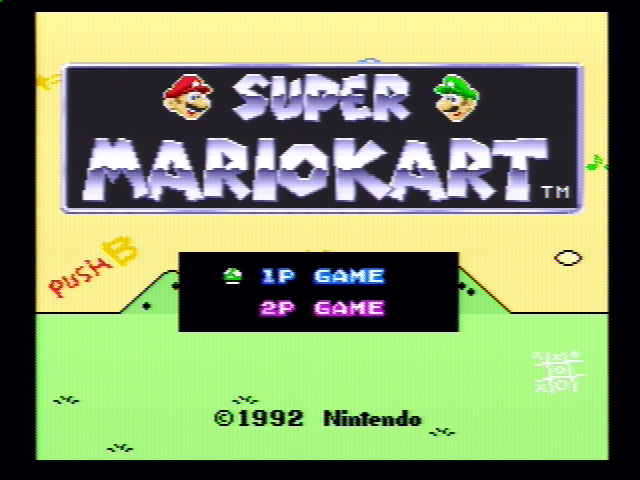
http://www4.picturepush.com/photo/a/3762977/img/3762977.png
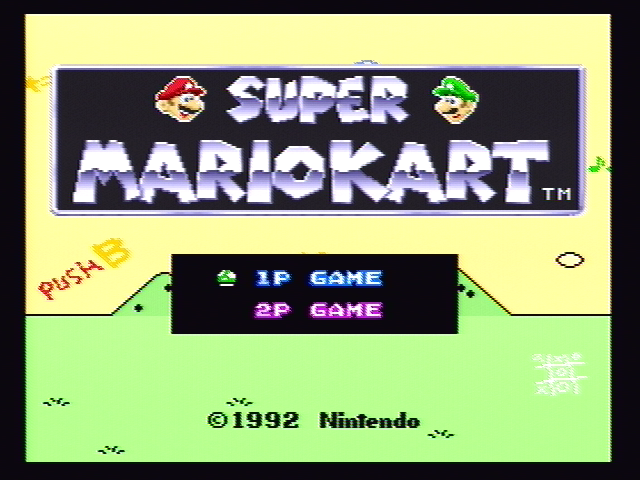
I would have thought that the digitized video coming from the card would be essentially the same in both cases, but the vertical stripes and the difference in width don't seem to be merely a matter of postprocessing. Does the driver have a greater level of control than I suspected over the digitization process in the card? (The difference in sharpness, on the other hand, I would guess to be postprocessing.)
So I'm mainly wondering whether the vertical stripes can be eliminated by controlling the card differently, or if we have no control over that and have to deal with it by postprocessing.
Ivan
Quoted 14 lines · Ivan
Now, regarding the difference in image quality between the Linux and Windows drivers, I took some snapshots. Linux is first, then Windows:
http://www3.picturepush.com/photo/a/3762966/img/3762966.png
http://www4.picturepush.com/photo/a/3762977/img/3762977.png
I would have thought that the digitized video coming from the card would be essentially the same in both cases, but the vertical stripes and the difference in width don't seem to be merely a matter of postprocessing. Does the driver have a greater level of control than I suspected over the digitization process in the card? (The difference in sharpness, on the other hand, I would guess to be postprocessing.)
Quoted 3 lines
So I'm mainly wondering whether the vertical stripes can be eliminated by controlling the card differently, or if we have no control over that and have to deal with it by postprocessing.
The vertical stripes were a problem with the anti-alias filter configuration, which I fixed a few months ago (and probably just hasn't made it into your distribution). Just install the current v4l-dvb code and it should go away:
Devin
Signature · 2 lines
Devin J. Heitmueller - Kernel Labs
http://www.kernellabs.com
Quoted 6 lines · Devin Heitmueller
The vertical stripes were a problem with the anti-alias filter configuration, which I fixed a few months ago (and probably just hasn't made it into your distribution). Just install the current v4l-dvb code and it should go away:
Yep, that gets rid of the vertical stripes but adds in a lovely horizontal shift:
http://www3.picturepush.com/photo/a/3763906/img/3763906.png
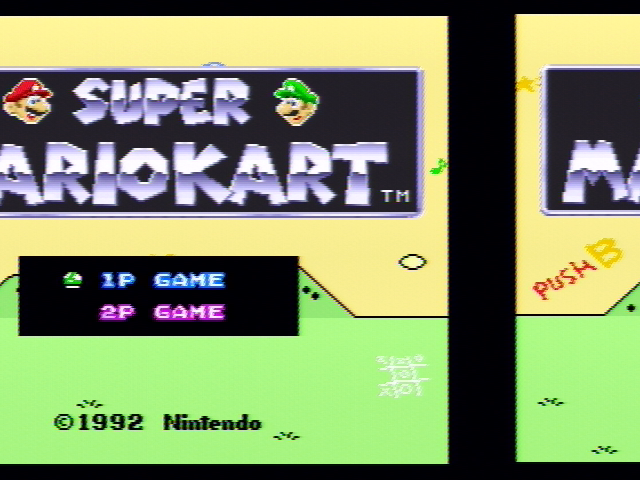
Also, vertical lines look slightly more ragged than they did before, to my eye at least.
I'm also encountering this old compilation problem:
http://www.mail-archive.com/[email protected]/msg06865.html
I worked around it by disabling firedtv in v4l/.config. (I'm running 2.6.32-23-generic on Ubuntu Lucid.)
Ivan
Quoted 17 lines · Ivan
Quoted 7 lines · Devin Heitmueller
The vertical stripes were a problem with the anti-alias filter configuration, which I fixed a few months ago (and probably just hasn't made it into your distribution). Just install the current v4l-dvb code and it should go away:
Yep, that gets rid of the vertical stripes but adds in a lovely horizontal shift:
http://www3.picturepush.com/photo/a/3763906/img/3763906.png
Also, vertical lines look slightly more ragged than they did before, to my eye at least.
Quoted 9 lines
I'm also encountering this old compilation problem:
http://www.mail-archive.com/[email protected]/msg06865.html
I worked around it by disabling firedtv in v4l/.config. (I'm running 2.6.32-23-generic on Ubuntu Lucid.)
Ivan
The "jagged vertical lines" is probably this issue, which was fixed in git but the fix hasn't hit the hg repository yet:
http://git.linuxtv.org/v4l-dvb.git?a=commitdiff;h=9db74cf24c038292d353d746cec11f6da368ef4c
The "horizontal shift" issue is interesting. Does that happen every time? And did you unplug/replug the device? Try to reboot?
Regarding the compilation issue, yeah it's annoying. Perhaps someday the Ubuntu people will fix their kernel packaging process.
Devin
Signature · 2 lines
Devin J. Heitmueller - Kernel Labs
http://www.kernellabs.com
Quoted 8 lines · Devin Heitmueller
Quoted 4 lines · Ivan
Yep, that gets rid of the vertical stripes but adds in a lovely horizontal shift:
The "horizontal shift" issue is interesting. Does that happen every time? And did you unplug/replug the device? Try to reboot?
Reboot? What is this, Windoze? :^D
But yeah, it's consistent across unplugs/replugs/reboots.
Ivan
Quoted 6 lines · Ivan
Quoted 5 lines · Devin Heitmueller
Quoted 4 lines · Ivan
Yep, that gets rid of the vertical stripes but adds in a lovely horizontal
shift:
Quoted 8 lines
Quoted 4 lines
The "horizontal shift" issue is interesting. Does that happen every time? And did you unplug/replug the device? Try to reboot?
Reboot? What is this, Windoze? :^D
But yeah, it's consistent across unplugs/replugs/reboots.
Ok, the horizontal shift disappears if I switch to 720x480 instead of 640x480.
Does the card always output 720x480 (in NTSC mode anyway), then, and any scaling is done by V4L?
I also have a question about dropped frames. After running mplayer or mencoder, I see a line like:
v4l2: 1199 frames successfully processed, -3 frames dropped.
I can only guess that the negative number means that V4L received frames at a slightly faster rate than the expected 30000/1001 fps. In my case, it would seem that my SNES is producing something more like 30.05 fps, and so V4L reports a "negative" dropped frame every 12.5 seconds or so.
It would also seem that V4L doesn't actually discard any frames, but still passes them on to mplayer/mencoder, because mencoder shows an encoding fps of 30.04 (and it will skip a frame every 12.5 seconds or so unless you pass it -noskip).
Am I right about all this?
Ivan
Quoted 5 lines · Ivan
Ok, the horizontal shift disappears if I switch to 720x480 instead of 640x480.
Does the card always output 720x480 (in NTSC mode anyway), then, and any scaling is done by V4L?
That card does have an onboard scaler, although it's not clear to me why it isn't working. Exactly what command line did you use?
Quoted 9 lines
I also have a question about dropped frames. After running mplayer or mencoder, I see a line like:
v4l2: 1199 frames successfully processed, -3 frames dropped.
I can only guess that the negative number means that V4L received frames at a slightly faster rate than the expected 30000/1001 fps. In my case, it would seem that my SNES is producing something more like 30.05 fps, and so V4L reports a "negative" dropped frame every 12.5 seconds or so.
Yeah, I don't know. You would have to ask the mplayer/mencoder people.
Quoted 6 lines
It would also seem that V4L doesn't actually discard any frames, but still passes them on to mplayer/mencoder, because mencoder shows an encoding fps of 30.04 (and it will skip a frame every 12.5 seconds or so unless you pass it -noskip).
Am I right about all this?
Again, this would be an mplayer/mencoder thing.
Devin
Signature · 2 lines
Devin J. Heitmueller - Kernel Labs
http://www.kernellabs.com
Quoted 2 lines · Devin Heitmueller
That card does have an onboard scaler, although it's not clear to me why it isn't working. Exactly what command line did you use?
At first, I was always using
mplayer tv:// -tv device=/dev/video1:input=1:norm=NTSC
which defaults to a resolution of 640x480. This output looked correct (except for vertical stripes) in kernel 2.6.32-23-generic, but was horizontally shifted after I updated to the current mercurial sources.
Then I noticed that
mplayer tv:// -tv device=/dev/video1:input=1:norm=NTSC:width=720
gives a correct picture with current hg source.
Quoted 4 lines
Quoted 2 lines
v4l2: 1199 frames successfully processed, -3 frames dropped.
...Yeah, I don't know. You would have to ask the mplayer/mencoder people.
Ah, so those statistics are generated by mplayer, then, not by v4l.
Quoted 4 lines
Quoted 2 lines
It would also seem that V4L doesn't actually discard any frames... ...blah blah blah about mencoder...
Again, this would be an mplayer/mencoder thing.
I guess I'm just trying to confirm that v4l doesn't try to enforce a strict NTSC framerate, but just passes all frames on even if they appear at a slightly different framerate.
Ivan
Em 08-07-2010 19:10, Ivan escreveu:
Quoted 9 lines · Devin Heitmueller
Quoted 2 lines
That card does have an onboard scaler, although it's not clear to me why it isn't working. Exactly what command line did you use?
At first, I was always using
mplayer tv:// -tv device=/dev/video1:input=1:norm=NTSC
which defaults to a resolution of 640x480. This output looked correct (except for vertical stripes) in kernel 2.6.32-23-generic, but was horizontally shifted after I updated to the current mercurial sources.
I never saw the em28xx scaler generating such vertical stripes. This could be a mplayer or a video adapter driver problem. Are you using a proprietary video driver? You may try to use ffmeg or mencoder to generate a mpeg file at 640x480 and then try to play it on another player (preferably on another machine), to see if this problem disappears.
Quoted 8 lines
Then I noticed that
mplayer tv:// -tv device=/dev/video1:input=1:norm=NTSC:width=720
gives a correct picture with current hg source.
Quoted 1 line
Quoted 1 line
v4l2: 1199 frames successfully processed, -3 frames dropped.
This is not a V4L issue.
A negative number of dropping frames makes no sense. It is probably a mplayer bug. I would try to get a newer version of mplayer and double check.
If your video adapter is not fast enough, or if some post-processing logic at mplayer are enabled and you don't have enough processing speed at both CPU and GPU, mplayer may complain about frames dropped. It may also be related to audio driver, if you're enabling alsa at .mplayer/config.
When you have frames dropped, it may help to replace the video and audio output (-vo and -ao) to use one of the several different mplayer output drivers. On my own tests, I generally use sdl, gl or gl2 drivers for output, instead of x11, as they provide a better performance with the video adapters I have here.
To get a list of available drivers, you may use:
$ mplayer -vo help
Quoted 4 lines
Quoted 3 lines
Quoted 1 line
...
Yeah, I don't know. You would have to ask the mplayer/mencoder people.
Quoted 8 lines
Ah, so those statistics are generated by mplayer, then, not by v4l.
Quoted 4 lines
Quoted 2 lines
It would also seem that V4L doesn't actually discard any frames... ...blah blah blah about mencoder...
Again, this would be an mplayer/mencoder thing.
I guess I'm just trying to confirm that v4l doesn't try to enforce a strict NTSC framerate, but just passes all frames on even if they appear at a slightly different framerate.
V4L doesn't enforce a framerate. It will just send frames to userspace as they're being available by the hardware and provided that the application is fast enough to get frames at the hardware speed.
em28xx hardware outputs NTSC frames at about 30 fps.
Quoted 6 lines
Ivan
Signature · 3 lines
To unsubscribe from this list: send the line "unsubscribe linux-media" in
the body of a message to [email protected]
More majordomo info at  http://vger.kernel.org/majordomo-info.html
Quoted 6 lines · Mauro Carvalho Chehab
I never saw the em28xx scaler generating such vertical stripes. This could be a mplayer or a video adapter driver problem. Are you using a proprietary video driver? You may try to use ffmeg or mencoder to generate a mpeg file at 640x480 and then try to play it on another player (preferably on another machine), to see if this problem disappears.
Huh? Does there even *exist* a proprietary linux driver for my card? And because you never saw stripes with em28xx, they must not exist? :^P
You might want to reread the thread-- we already figured the stripes out.
Quoted 3 lines
Quoted 1 line
Quoted 1 line
Quoted 1 line
v4l2: 1199 frames successfully processed, -3 frames dropped.
This is not a V4L issue.
I'm aware of that by now.
Quoted 3 lines
A negative number of dropping frames makes no sense. It is probably a mplayer bug. I would try to get a newer version of mplayer and double check.
Newer than latest svn? :^D
If you look at the mplayer code that calculates the supposed number of frames dropped (it's in stream/tvi_v4l2.c), it would seem that it's just an indicator of how close the stream came to the nominal framerate (30000/1001 in my case).
In other words, if mplayer sees an actual framerate of less than 29.97 coming from v4l, it assumes (perhaps incorrectly) that this is because some frames were dropped. If you do the same calculation when the actual framerate is greater than 29.97, you get a negative number of dropped frames. It looks weird, but it makes a kind of sense if you know what it really means.
Em 09-07-2010 14:19, Ivan escreveu:
Quoted 9 lines · Mauro Carvalho Chehab
Quoted 6 lines
I never saw the em28xx scaler generating such vertical stripes. This could be a mplayer or a video adapter driver problem. Are you using a proprietary video driver? You may try to use ffmeg or mencoder to generate a mpeg file at 640x480 and then try to play it on another player (preferably on another machine), to see if this problem disappears.
Huh? Does there even *exist* a proprietary linux driver for my card? And because you never saw stripes with em28xx, they must not exist? :^P
Well, it depends. What are your video adapter card? ATI? Nvidia?
Quoted 6 lines
You might want to reread the thread-- we already figured the stripes out.
Quoted 3 lines
Quoted 1 line
Quoted 1 line
Quoted 1 line
v4l2: 1199 frames successfully processed, -3 frames dropped.
This is not a V4L issue.
Quoted 7 lines
I'm aware of that by now.
Quoted 3 lines
A negative number of dropping frames makes no sense. It is probably a mplayer bug. I would try to get a newer version of mplayer and double check.
Newer than latest svn? :^D
Well, then try a stable version ;)
Quoted 3 lines
If you look at the mplayer code that calculates the supposed number of frames dropped (it's in
stream/tvi_v4l2.c), it would seem that it's just an indicator of how close the stream came to the nominal framerate (30000/1001 in my case).In other words, if mplayer sees an actual framerate of less than 29.97 coming from v4l, it assumes (perhaps incorrectly) that this is because some frames were dropped. If you do the same calculation when the actual framerate is greater than 29.97, you get a negative number of dropped frames. It looks weird, but it makes a kind of sense if you know what it really means.
Such logic is broken. In the case of webcams, the framerate is generally less than 29.97 fps. For example, em2750 webcams, supported by em28xx driver, have a framerate of about 5 fps, due to sensor limits.
Quoted 4 lines
Signature · 3 lines
To unsubscribe from this list: send the line "unsubscribe linux-media" in
the body of a message to [email protected]
More majordomo info at  http://vger.kernel.org/majordomo-info.html
Quoted 9 lines · Mauro Carvalho Chehab
Em 09-07-2010 14:19, Ivan escreveu:
Quoted 8 lines · Mauro Carvalho Chehab
Quoted 6 lines
I never saw the em28xx scaler generating such vertical stripes. This could be a mplayer or a video adapter driver problem. Are you using a proprietary video driver? You may try to use ffmeg or mencoder to generate a mpeg file at 640x480 and then try to play it on another player (preferably on another machine), to see if this problem disappears.
Quoted 3 lines
Quoted 1 line
Huh? Does there even *exist* a proprietary linux driver for my card? And because you never saw stripes with em28xx, they must not exist? :^P
Well, it depends. What are your video adapter card? ATI? Nvidia?
Mauro,
His issue with the "vertical stripes" has been fixed when he updated to the latest v4l-dvb code. It's the issue I fixed a couple of months ago with the saa7113 chroma gain behavior when there is an overdriven signal. The problem he's having now with the latest is the picture appears to be shifted. I have to wonder if perhaps I screwed something up when I did the VBI support, in that it may not work properly when the scaler is in use.
I will have to do some testing.
Devin
Signature · 2 lines
Devin J. Heitmueller - Kernel Labs
http://www.kernellabs.com
Quoted 2 lines · Devin Heitmueller
Quoted 1 line · Mauro Carvalho Chehab
Well, it depends. What are your video adapter card? ATI? Nvidia?
Sorry Mauro, I misread your earlier comment. I thought you were talking about the capture device, not my graphics card. My video driver is indeed proprietary (Nvidia) and has terrible tearing issues, but at least it doesn't do anything as bad as introduce vertical stripes with periodicity 4.3. :^D
Quoted 6 lines
The problem he's having now with the latest is the picture appears to be shifted. I have to wonder if perhaps I screwed something up when I did the VBI support, in that it may not work properly when the scaler is in use.
I will have to do some testing.
By the way, if you can't find other hardware that exhibits the same problem, let me know what I can do to help.
I tried other picture resolutions and found that the shifting only happens when the picture height is the full 480. If you fix the height at 480 and let the width vary, the picture is shifted over by 1/4 of the width (or 3/4, depending how you look at it), except when the width is very close to 720. At width 718 the shift is more like 1/3, and then at width 720 the picture isn't shifted at all. Here are some tarred up snapshots if you want to take a look:
http://ifile.it/hpui0j4/em28xx-height480.tar
Ivan
Em 09-07-2010 15:12, Devin Heitmueller escreveu:
Quoted 25 lines
Quoted 9 lines · Mauro Carvalho Chehab
Em 09-07-2010 14:19, Ivan escreveu:
Quoted 8 lines · Mauro Carvalho Chehab
Quoted 6 lines
I never saw the em28xx scaler generating such vertical stripes. This could be a mplayer or a video adapter driver problem. Are you using a proprietary video driver? You may try to use ffmeg or mencoder to generate a mpeg file at 640x480 and then try to play it on another player (preferably on another machine), to see if this problem disappears.
Quoted 3 lines
Quoted 1 line
Huh? Does there even *exist* a proprietary linux driver for my card? And because you never saw stripes with em28xx, they must not exist? :^P
Well, it depends. What are your video adapter card? ATI? Nvidia?
Mauro,
His issue with the "vertical stripes" has been fixed when he updated to the latest v4l-dvb code. It's the issue I fixed a couple of months ago with the saa7113 chroma gain behavior when there is an overdriven signal. The problem he's having now with the latest is the picture appears to be shifted. I have to wonder if perhaps I screwed something up when I did the VBI support, in that it may not work properly when the scaler is in use.
Quoted 1 line
I will have to do some testing.
I meant that vertical risk that appeared when scaling is on. I never saw em28xx scaler doing something like that. It maybe some bug at mplayer or at the nvidia proprietary driver. We know that this driver has serious issues with their Xv support, and that it do some evil things when allocating kernel memory.
Cheers,
Mauro.
Quoted 4 lines · Mauro Carvalho Chehab
I meant that vertical risk that appeared when scaling is on. I never saw em28xx scaler doing something like that. It maybe some bug at mplayer or at the nvidia proprietary driver. We know that this driver has serious issues with their Xv support, and that it do some evil things when allocating kernel memory.
Sorry, what? You still want to argue that your vague suggestions trump the direct experiences of Devin and myself? That particular bug has already been identified and squashed (and I don't think it had much to do with scaling, but Devin could tell you for sure).